
Do you know that when your laptop starts acting slow and takes you longer time than normal to perform a simple and straight forward task, then you automatically need to upgrade its random access memory (RAM). Here’s How to increase laptop RAM in Nigeria.

How to increase laptop RAM in Nigeria
The truth is that the RAM is the memory of your laptop that allow the working of software. Your laptop saves temporary data within the memory cells and link to the information as applications is running. Note that If the information cannot be found in your laptop’s RAM because it’s a temporary storage, the laptop will redirect to it’s hard drive because the hard drive is a more permanent storage.
Your laptop may not perform very fast, if the RAM is small to handle many applications or even wider programs.
How to Check Your RAM Usage

Without disputing facts, ability to check your RAM usage on your laptop will allow you to know the size of memory you are utilising at a specific time. It is very easy for you to have an understanding of your laptop’s memory usage in Windows Task Manager.
Follow these steps
Right click the Task bar
Choose Task Manager in Windows 7 or tap the Windows key
Type “task manager” in the search column.
Then, in Task Manager’s performance section, check how much memory you have consume out of the total available. Note that you’ll also see the percentage of physical memory slots being use and the ones for upgrade.
Understanding the various sizes of RAM
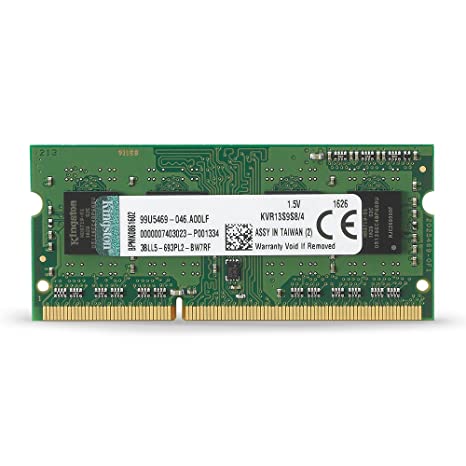
No doubt, RAMs are package in different sizes and so considering on what you do with your PC, it is important to go for more RAM at all times. Upgrading from a 4 GB to 8 GB of RAM can make a noticeable change. Stepping from 8 GB to 16 GB still depict some appreciable level of performance.
Tips to consider before upgrading to a higher RAM
Find out how many memory slots your laptop possess.
Find out the number of RAM modules installed already.
The two vital informations above will assist you in upgrading your Laptop RAM for excellent delivery.
Discover How to Upgrade Your RAM in Nigeria

Turn off your laptop
Kindly note that turning off your laptop and unplug the power adapter is the first step.
Open panel on the bottom of your laptop
The next step is to open the panel on the bottom of your laptop that provide shelter to the memory banks. Although it depend on your system, you may need to unscrew the whole back of the laptop to check the memory and other parts. Note that the step is entirely different if you are making use of desktop.
Check if all your memory slots are filled already.
If yes, try to pull the already existing RAM out, for you to change them. But if it is not, just put in the new memory module into the vacant spot. Set apart the clips holding it in place, to remove the memory . The memory module will come up, then hold by its side without affecting the gold connectors at the down side and pull it out.
Insert the new RAM modules into the empty slots.
Finally, as the edges is facing downward. Try and use style at the upper parts of the modules to set them into place. Don’t worry, you might hear a click, it shows that everything has fallen in place. Gently shift the module back until it is fix flat and level. Using the clips guiding it, on your laptop and check the System Information window or Task Manager to confirm the addition of the new memory, whether it has been added perfectly.
In case you want our tech experts to handle your laptop RAM upgrade. You’re on the right track. Kindly contact www.psero.com for more information or visit us at 09 Nigeria Army Shopping arena Bolade Oshodi Lagos Nigeria.