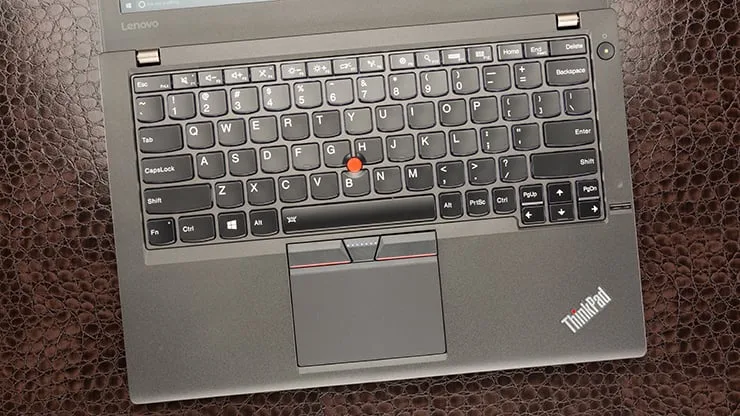
The Lenovo ThinkPad X260 remains one of the most popular UK used laptops for students, remote workers, and everyday productivity in Nigeria. It’s well-known for its long battery life, comfortable keyboard, solid performance, and durable build — traits that matter most for long lecture days, online classes, and multitasking.
In this review, we’ll explain what you can realistically expect from the X260 in terms of battery performance, speed, usability, and overall value.
Explore tested X260 units ready for delivery across Lagos and Nigeria:
https://psero.com
Overview: What the ThinkPad X260 Is
The Lenovo ThinkPad X260 is part of Lenovo’s X series — a lineup focused on portability, professional productivity, and long battery life. Unlike newer gaming or creative laptops, the X260 is designed for practical day-to-day work.
Key reasons students choose it:
Comfortable typing for assignments
Long battery life for classes
Solid business-class build
Reliable performance for everyday tasks
Battery: One of the Best for Students
Battery life is one of the biggest strengths of the ThinkPad X260 — especially for UK used units.
Real-World Battery Performance
Most X260 models come with two battery options:
Internal battery
Optional external/extended battery (Slice battery)
This gives you dual power sources, which means much longer endurance.
You can expect:
Light use (typing, browsing): 6–10 hours
Mixed use (online classes + documents): 4–7 hours
Heavy use (multiple apps + streaming): 3–5 hours
This makes the X260 one of the best choices for students who:
Attend long lecture sessions
Do online classes without constant charging
Study in libraries or cafes with limited power
In many cases, the ThinkPad X260 outlasts many newer laptops under classroom conditions.

Performance: Everyday Tasks Without Lag
The ThinkPad X260 generally comes with:
Intel Core i5 (6th gen) processors
8GB RAM (common configuration)
SSD storage (128GB or 256GB SSD is ideal)
This spec combo delivers a responsive user experience for student tasks such as:
Multiple browser tabs
Online class tools (Zoom, Google Meet, Teams)
Notes, essays, and presentations
PDFs and research work
Basic spreadsheet and data tasks
Thanks to SSD storage, boot times are fast and applications launch quickly, even if the CPU is a generation or two older.
This makes the X260 feel snappy enough for most student workloads.
Build Quality and Usability
Lenovo ThinkPads are designed for business use, and that durability carries over to student life.
What Students Notice
Strong hinge and lid — less wear from everyday handling
Comfortable keyboard — excellent for typing long assignments
TrackPoint in the middle — precise navigation without a mouse
Lightweight and portable — easy to carry between classes
This practical design appeals especially to students who spend long hours typing and commuting with their laptops.
Keyboard and Typing Comfort
One of the main reasons students love ThinkPads is the keyboard.
On the X260:
Key travel is satisfying
The layout is comfortable for long sessions
Typing feels responsive
Whether you’re composing essays, typing notes, or prepping reports, the keyboard remains one of the laptop’s strongest points.
Display and Daily Viewing
The X260 typically features a 12.5-inch Full HD (1080p) display.
For students, this means:
Clear text for reading and typing
Accurate visuals for notes and online lessons
Comfortable viewing for extended use
While not the largest screen, it’s compact and ideal for students who need mobility and productivity.
Pros and Cons for Students
Pros
Excellent battery life with extended battery options
Comfortable keyboard for typing
SSD storage speeds up everyday tasks
Durable business build quality
Portable and practical
Cons
Older generation CPU compared to modern laptops
Moderate graphics (not for heavy gaming)
Smaller screen than larger laptops
How It Compares With Typical Student Laptops
| Feature | Lenovo ThinkPad X260 | Typical Budget Laptop |
|---|---|---|
| Battery Life | Very strong (6–10 hrs+) | Often average (3–5 hrs) |
| Build Quality | Durable business class | Varies, often weaker |
| Keyboard | Excellent | Often average |
| Performance | Smooth for everyday tasks | Varies |
| Portability | Compact and light | Depends |
In many everyday use scenarios, the ThinkPad X260 feels more reliable and productive than many new laptops in its price range.
Buying Tips for Lagos Students
When choosing a UK used ThinkPad X260:
Prefer models with SSD storage
SSD makes the whole system feel faster compared with HDD.Ask about battery health and cycle count.
A battery that still holds strong is one of the X260’s best features.Verify port functionality — HDMI, USB, audio jack, etc.
These matter for presentations and connectivity.
With the right checks, the ThinkPad X260 offers excellent long-term value for students.
Explore tested X260 inventory here:
https://psero.com
Final Thoughts
The Lenovo ThinkPad X260 UK used laptop is one of the best choices for students who want:
Long daily battery life
Reliable everyday performance
Comfortable typing experience
Portable and durable design
It may not be the newest model, but its balance of battery performance and productivity makes it a very practical choice for student life — especially when purchased with verified specs and battery condition.