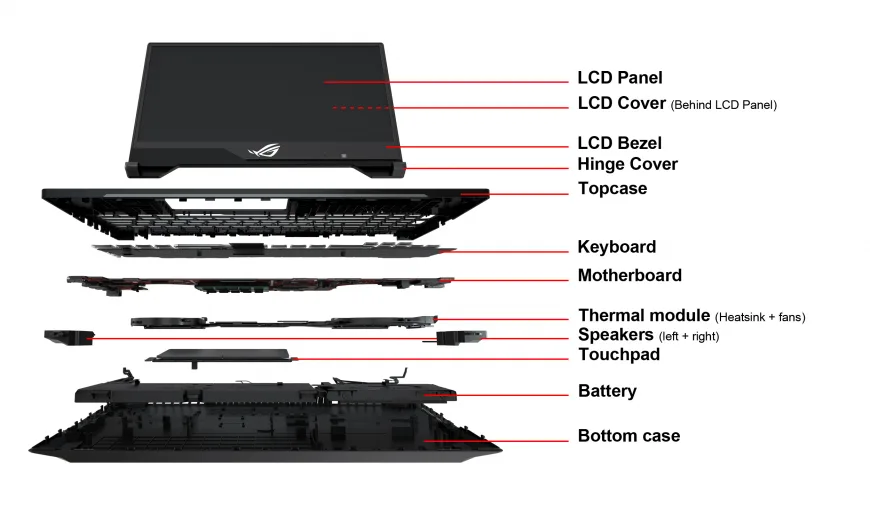
The difference often comes down to construction materials.
Laptop manufacturers use materials such as plastic, aluminium, magnesium alloys and carbon fibre. Each option affects weight, rigidity, appearance, cost and sometimes heat management.
For buyers in Nigeria, especially those considering UK-used business laptops, understanding these materials can help you judge build quality more accurately.
Does a Metal Laptop Automatically Mean Better Quality?

Not necessarily.
Metal can give a laptop a premium appearance and strong feel, but material alone does not determine build quality.
Chassis design, internal reinforcement, hinge construction, panel thickness and manufacturing quality all matter.
A well-designed plastic business laptop can survive years of normal use, while a poorly constructed metal machine can still develop cracks, dents or hinge problems.
That is why physically inspecting a used laptop is more useful than judging it from photographs.
Plastic Laptop Chassis
Plastic remains one of the most common materials used in laptops.
Its biggest advantage is cost. Plastic allows manufacturers to produce affordable machines without making them excessively heavy.
Modern engineering can also make plastic chassis surprisingly rigid. Different plastics have different properties, so the word “plastic” does not automatically mean weak.
Advantages of plastic
- Usually cheaper to manufacture
- Can keep laptop prices lower
- Often lighter than some metal designs
- Can be easier and cheaper to replace or repair
- Does not show every small scratch as prominently as some metal finishes
Possible disadvantages
- Some designs flex more than metal chassis
- Cheap plastic can feel less rigid
- Surface finishes may wear with heavy use
- Some plastics can crack after significant impact
For a budget laptop, good plastic construction can therefore be perfectly acceptable.
Aluminium Laptop Chassis
Aluminium is common in premium and business-class laptops.
It can provide a rigid feel while also giving the computer a clean, premium appearance. Aluminium is also a useful thermal conductor, although the chassis material itself does not determine how well a laptop is cooled.
Manufacturers can shape aluminium into thin panels while maintaining useful structural strength.
Advantages of aluminium
- Premium appearance
- Good rigidity in well-designed chassis
- Useful thermal conductivity
- Resistant to some forms of everyday wear
Possible disadvantages
- Can add manufacturing cost
- Can show dents clearly after impacts
- Metal surfaces may become uncomfortable when very hot or cold
- Repairing cosmetic damage can be expensive
A metal exterior should therefore be viewed as one part of the design rather than proof of overall durability.
Magnesium Alloy
Magnesium alloys are popular when manufacturers want to balance strength and low weight.
The material is particularly attractive for business laptops and ultraportable computers where carrying weight matters.
Some magnesium designs can feel different from aluminium. They may have a slightly softer or more textured surface depending on the coating and manufacturing process.
Why manufacturers use magnesium
- Low density
- Useful strength-to-weight characteristics
- Suitable for thin laptop designs
- Can help reduce overall weight
The exact result still depends on how the manufacturer uses the alloy. A thin magnesium panel is not automatically stronger than a thicker, well-engineered plastic or aluminium structure.
Carbon Fibre
Carbon fibre is another material associated with lightweight laptops, particularly some business and premium models.
Its appeal comes from its combination of low weight and structural performance.
However, “carbon fibre” can mean different things depending on the construction. Some laptops use carbon-fibre-reinforced materials as part of a larger composite design rather than making the entire chassis from carbon fibre.
The result can be a laptop that feels exceptionally light without feeling flimsy.
Plastic vs Aluminium vs Magnesium vs Carbon Fibre
| Material | Typical strength | Weight potential | Cost | Common use |
|---|---|---|---|---|
| Plastic | Varies widely | Low to moderate | Low to moderate | Budget and mainstream laptops |
| Aluminium | Good | Moderate | Moderate to high | Premium and business laptops |
| Magnesium alloy | Good | Low | Moderate to high | Business and lightweight laptops |
| Carbon-fibre composite | Good to excellent depending on design | Very low potential | High | Premium and business ultraportables |
These categories are broad. Actual durability depends heavily on the individual laptop’s engineering.
Why Chassis Flex Matters
Place your hands on opposite sides of the keyboard area and apply gentle pressure.
Some movement is normal. Excessive flex, however, can indicate that the structure is not particularly rigid.
Repeated flexing may also place additional stress on internal components, mounting points and connectors over time.
Do not perform an aggressive bend test. A laptop is not designed to be deliberately flexed by force.
How to Test Build Quality on a Used Laptop
Physical inspection is particularly important when buying a used machine.
Check the lid
Open and close the display slowly. Watch for excessive movement, cracking sounds or uneven resistance.
Inspect the palm rest
Look for cracks around the keyboard, touchpad and screw locations.
Check the base
Look underneath the laptop for cracks, missing screws or signs that the bottom cover has been repeatedly removed.
Inspect the corners
Corners often reveal previous impacts. Dents or broken plastic clips can indicate that the laptop has been dropped.
Examine the hinges
The display should move smoothly without excessive looseness. Our guide to laptop hinge problems explains what to look for during an inspection.
Why Business Laptops Often Feel Different
Business laptops are frequently designed around long-term office use, portability and serviceability.
That does not mean every business laptop is indestructible. It does explain why certain models can feel more substantial than similarly priced consumer machines.
When shopping for a UK-used laptop, build quality can therefore be one reason to consider business-class models.
Our UK-used laptop inspection checklist provides a wider set of checks to perform before buying.
Does Metal Help With Cooling?
Metal can conduct heat efficiently, but that does not mean every metal laptop runs cooler.
Cooling depends on the complete thermal design. Fans, heat pipes, vapour chambers, heatsinks, ventilation and processor power limits all contribute to the final result.
A plastic laptop with a well-designed cooling system can therefore run cooler than a poorly designed aluminium laptop.
Do not buy a laptop solely because the exterior feels cold or metallic.
Which Material Is Best for Students?
Students should think about how the laptop will be transported and used.
A lightweight chassis is useful when the computer travels between home, school and other locations. Durability also matters because frequent movement increases the chance of accidental knocks.
For a student carrying a laptop every day, a well-built lightweight business machine can make more sense than a heavier premium laptop simply because it has an aluminium exterior.
Budget-conscious buyers can also compare practical options in our UK-used student laptop guide.
Which Material Is Best for Freelancers?
Freelancers often move between workspaces, homes and client locations.
Weight, rigidity and portability can therefore matter more than the visual appearance of the chassis.
Someone who spends most of the day at a desk may prefer a sturdier machine. A freelancer who travels frequently may value a lighter construction instead.
What Should You Look for When Buying a Used Laptop?
Do not stop at “metal body” or “plastic body” when evaluating a used laptop.
Look at the complete physical condition.
- Check for cracks.
- Inspect the corners.
- Test the hinges.
- Look for excessive chassis flex.
- Check the keyboard deck.
- Inspect the bottom cover.
- Look for missing screws.
- Check for signs of liquid or impact damage.
- Make sure the display opens evenly.
Cosmetic marks are not automatically a reason to reject a used laptop. Structural damage deserves much more attention.
Does a Heavy Laptop Mean It Is Better Built?
Weight is not a reliable measure of durability.
A heavy laptop can contain a thick plastic chassis, a large cooling system or other components that add mass without necessarily improving structural strength.
Meanwhile, modern composite and magnesium designs can provide useful rigidity at considerably lower weight.
Focus on construction quality rather than trying to identify the “best” weight.
Build Quality vs Specifications
A laptop with a powerful processor and large SSD can still be a poor purchase if the physical structure is damaged.
For used machines especially, condition should be evaluated alongside specifications.
A slightly older laptop with a strong chassis, healthy ports and clean physical condition may be more practical than a newer computer with cracks, damaged hinges or a badly worn keyboard.
Bottom Line
Plastic, aluminium, magnesium and carbon-fibre composites can all be used successfully in laptop construction.
No single material guarantees the best laptop. Engineering, chassis design and physical condition matter just as much.
When buying a UK-used laptop, inspect the actual machine instead of judging it from the material listed in the specifications.
Check the hinges, corners, keyboard deck, display frame and base. Look for cracks and excessive flex. Most importantly, separate normal cosmetic wear from structural damage.
A well-built laptop does not need to feel luxurious. It needs to remain solid, practical and suitable for the way you intend to use it.