Two laptops can have the same processor and 16GB of RAM but deliver different performance in demanding applications. The reason is that memory capacity is only one part of a laptop’s memory system. Memory generation, channel configuration, frequency, timings, ranks and processor compatibility also influence how quickly data moves between the RAM and CPU.
Modern laptop memory architecture has become more advanced as applications demand faster access to larger amounts of information. Software development, video editing, virtual machines, gaming and professional workloads can all benefit from an efficient memory configuration.
For Nigerian laptop buyers, understanding these differences is useful when comparing UK-used and brand-new computers. A laptop advertised with 16GB RAM may look attractive, but its memory configuration could limit performance or prevent future upgrades.
This guide explains how laptop memory works, how DDR4 and DDR5 differ, why memory channels matter, and how to identify configurations that offer better performance.
1. What Is Laptop Memory Architecture?
Laptop memory architecture describes how the system stores and transfers temporary data between the processor and RAM.
When you open an application, edit a document or run a browser, the processor needs quick access to information. Instead of retrieving every instruction directly from the SSD, the computer loads active data into RAM.
RAM provides much faster access than ordinary storage. However, it is volatile memory, meaning its contents are normally lost when the computer loses power.
A laptop’s memory architecture involves several important elements:
- Memory modules or soldered memory chips.
- Memory channels.
- Memory controllers.
- DDR generation.
- Memory frequency and transfer rate.
- Memory timings and latency.
- Memory ranks and organisation.
- Processor and motherboard compatibility.
These components work together to determine how efficiently the system accesses temporary data.
2. Understanding the Memory Controller
The memory controller manages communication between the processor and system RAM.
It coordinates memory requests, manages data transfers and controls important operating parameters. These include supported memory speeds, timings, channel configurations and memory capacity.
In many modern laptop platforms, the memory controller is integrated into the processor.
This arrangement reduces communication delays compared with older computer architectures that placed memory controllers in a separate chipset.
Why the memory controller matters
The processor determines which memory technologies and configurations the laptop can support.
For example, a motherboard may physically provide a particular memory socket, but the installed processor still determines the supported memory generation and operating limits.
Some processors support DDR4, while others support DDR5 or LPDDR memory. Certain processors support multiple memory configurations, depending on the motherboard design.
Therefore, buying a faster RAM module does not guarantee that the laptop will operate at its advertised speed.
For a related explanation of processor capabilities, read our guide to laptop CPU architecture, cores, threads and cache.
3. DDR Memory Explained: DDR3, DDR4 and DDR5
DDR stands for Double Data Rate. It describes a type of synchronous dynamic random-access memory that transfers data twice per clock cycle.
Over the years, DDR technology has improved transfer rates, efficiency and memory capacity.
DDR3
DDR3 appeared in many older laptops and desktop computers.
Although it can still handle basic computing tasks, it has lower transfer rates and generally lower efficiency than newer memory generations.
Older business laptops may contain DDR3 or DDR3L memory. The low-voltage DDR3L variation was designed to operate at a lower voltage than standard DDR3.
DDR4
DDR4 became widely used in laptops during the previous generation of mobile computing platforms.
It introduced improvements in transfer rates, power efficiency and supported memory capacities compared with DDR3.
Many popular business laptops from the Intel Core sixth-generation through eleventh-generation era use DDR4, although exact support varies by processor and model.
DDR4 remains suitable for office applications, programming, browsing, accounting software and many professional workloads.

DDR5
DDR5 is a newer memory generation designed to provide higher data transfer rates and improved memory organisation.
It introduces changes to memory architecture, including two independent 32-bit subchannels per standard DDR5 DIMM.
DDR5 also includes on-module power management through a power management integrated circuit in standard modules.
These changes help improve memory efficiency and support higher bandwidth as compatible platforms evolve.
DDR4 versus DDR5
| Feature | DDR4 | DDR5 |
|---|---|---|
| Generation | Older mainstream standard | Newer mainstream standard |
| Typical starting data rate | 2133 MT/s | 4800 MT/s |
| Module architecture | One 64-bit data bus per standard DIMM | Two independent 32-bit subchannels per standard DIMM |
| Power management | Generally motherboard-managed | On-module power management |
| Compatibility | DDR4-compatible platforms | DDR5-compatible platforms |
DDR5 is not automatically better for every application. Processor architecture, memory latency, workload and overall system configuration influence actual performance.
For more information about choosing suitable memory capacity, see our guide to laptop RAM, DDR4, DDR5 and upgradeable memory.
4. Memory Channels: Single-Channel, Dual-Channel and More
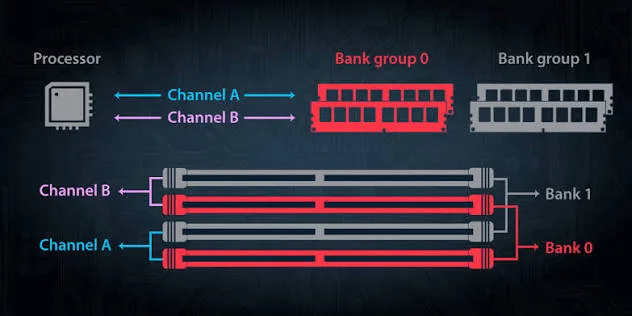
Memory channels are communication pathways between the processor’s memory controller and system RAM.
A channel provides a route for transferring data. Using multiple channels can increase the total available memory bandwidth when the platform and configuration support it.
Single-channel memory
A single-channel configuration uses one memory channel.
For example, a laptop with one compatible 16GB DDR4 memory module may operate in single-channel mode.
This configuration can provide sufficient performance for everyday tasks. However, applications that depend heavily on memory bandwidth may perform better with additional channel capacity.
Dual-channel memory
Dual-channel memory allows the processor to access memory through two channels.
A common example is a laptop with two compatible 8GB memory modules installed in the correct slots.
When configured properly, this arrangement can provide greater memory bandwidth than a comparable single-channel configuration.
The benefit can be particularly noticeable when the processor uses integrated graphics because the graphics hardware shares system memory.
Does two memory sticks always mean dual-channel?
Not necessarily. The motherboard, processor and module arrangement determine the available memory configuration.
Some laptops use soldered memory combined with one removable module. Others have two removable slots or fully soldered memory.
Before purchasing additional RAM, confirm the laptop’s memory topology and supported configuration.
5. Memory Bandwidth and Why It Matters
Memory bandwidth describes how much data can move between RAM and the processor within a given period.
It is commonly expressed in gigabytes per second (GB/s).
Higher memory bandwidth can help workloads that frequently transfer large amounts of data.
Calculating theoretical memory bandwidth
A simplified calculation for a standard memory channel is:
Memory bandwidth = Data transfer rate × Bus width ÷ 8
For a 64-bit memory channel operating at 3200 MT/s:
3200 million transfers per second × 8 bytes = approximately 25.6 GB/s.
A compatible dual-channel configuration can theoretically double that figure to approximately 51.2 GB/s.
Actual application performance will be lower or different depending on memory timings, controller behaviour and workload characteristics.
Applications that benefit from memory bandwidth
- Integrated graphics workloads.
- Video editing and rendering.
- Scientific computing.
- Large spreadsheet operations.
- Data processing.
- Some gaming workloads.
For ordinary browsing and document editing, memory capacity may matter more than achieving the highest possible bandwidth.
6. Memory Frequency, MT/s and Clock Speed
Memory specifications often include numbers such as DDR4-3200 or DDR5-5600.
These numbers describe the memory’s data transfer rate in megatransfers per second, commonly abbreviated as MT/s.
They are not exactly the same as the physical memory clock frequency.
Because DDR transfers data twice per clock cycle, a DDR4-3200 module has a nominal memory clock of 1600 MHz while delivering 3200 MT/s.
Similarly, DDR5-5600 has a nominal clock of 2800 MHz and a transfer rate of 5600 MT/s.
Why higher transfer rates matter
A higher transfer rate can increase theoretical memory bandwidth.
However, the processor and motherboard must support the required speed. If a laptop supports a lower maximum memory rate, faster modules may operate at a reduced speed.
Mixing modules with different specifications can also cause the system to select a common supported operating configuration.
7. Understanding RAM Timings and Latency
Memory latency describes the delay between a memory request and the availability of the requested data.
RAM specifications often include timings such as CL, tRCD, tRP and tRAS.
These values represent different delays involved in memory operations.
CAS latency
CAS latency, commonly written as CL, measures the delay between a column access command and the moment the requested data becomes available.
A lower CL value can indicate a shorter delay, but the transfer rate must also be considered.
For example, DDR4-3200 CL16 and DDR4-3200 CL22 operate at the same nominal transfer rate but have different CAS latency specifications.
Why latency should not be judged alone
A newer memory generation may have higher numerical timings but also provide much greater bandwidth.
Therefore, comparing RAM based only on the CL number can produce misleading conclusions.
Real-world performance depends on the complete memory configuration, processor architecture and application workload.
8. Memory Ranks: Single-Rank and Dual-Rank RAM
Memory ranks describe how memory chips are organised into groups that work together to provide a data width to the memory controller.
A rank is not the same thing as a memory channel or a physical RAM module.
A single memory module can contain one rank or multiple ranks.
Single-rank memory
A single-rank module contains one group of memory chips that the controller accesses as a unit.
These modules are common in laptop configurations and can provide excellent performance when properly matched to the platform.
Dual-rank memory
A dual-rank module contains two independently selectable groups of memory chips.
Depending on the memory controller and workload, multiple ranks can help improve efficiency through rank interleaving.
This allows the controller to work with another rank while one rank is busy with an operation.
Does dual-rank RAM always perform better?
No. The result depends on the processor, memory controller, module design and workload.
Some configurations may benefit from additional ranks, while others may experience little difference.
Compatibility and total memory capacity should remain the main priorities when upgrading a laptop.
9. SO-DIMM, Soldered RAM and LPDDR Memory
Not every laptop uses the same physical memory arrangement.
Some models use removable SO-DIMM modules, while others have memory chips soldered directly onto the motherboard.
SO-DIMM memory
SO-DIMM stands for Small Outline Dual Inline Memory Module.
It is a compact memory module format designed for smaller computer systems, including many laptops.
A removable SO-DIMM module can make memory upgrades easier when the laptop provides accessible memory slots.
Soldered memory
Some laptops have RAM chips permanently attached to the motherboard.
This arrangement can help manufacturers produce thinner devices and optimise motherboard space.
However, soldered memory usually cannot be upgraded through ordinary module replacement.
LPDDR memory
LPDDR stands for Low Power Double Data Rate.
It is designed to reduce power consumption in mobile devices and is widely used in thin laptops, tablets and other portable systems.
LPDDR memory can provide strong performance with efficient power usage, but it is commonly soldered directly onto the motherboard.
Some modern platforms also support LPDDR configurations with different physical arrangements and channel designs. Compatibility depends on the processor and motherboard.
10. Integrated Graphics and Shared System Memory
Integrated graphics processors use system RAM instead of relying entirely on dedicated graphics memory.
This means the available memory capacity and bandwidth can influence graphics performance.
A laptop with integrated graphics may benefit from a dual-channel memory configuration because it provides more bandwidth for the graphics processor.
For example, a system with two compatible memory channels may handle certain graphics workloads better than an otherwise similar single-channel configuration.
However, the exact improvement depends on the integrated graphics architecture, memory speed and application.
Dedicated graphics processors generally have their own VRAM, although some systems may also use shared system memory for specific purposes.
Read our guide to laptop GPU architecture, VRAM and graphics performance for a deeper explanation.
11. How to Check Your Laptop’s RAM Configuration in Windows
Windows provides several ways to identify installed memory capacity, speed and module usage.
Method 1: Use Task Manager
- Press Ctrl + Shift + Esc.
- Open the Performance tab.
- Select Memory.
- Check the installed memory capacity.
- Review the reported speed and available slot information.
Task Manager may also display the memory form factor and hardware-reserved capacity, depending on the system.
Method 2: Use System Information
Press Windows + R and enter:
msinfo32The System Information window displays the installed physical memory and other system details.
Method 3: Use Command Prompt
Open Command Prompt and enter:
wmic memorychip get capacity,speed,manufacturer,partnumberThis command works on many Windows installations, although WMIC is deprecated and may not be available in newer Windows configurations.
An alternative is PowerShell:
Get-CimInstance Win32_PhysicalMemory | Select-Object Manufacturer, Capacity, Speed, PartNumberThe result can help identify installed modules and their reported specifications.
Method 4: Use the manufacturer’s specifications
Windows tools may not reveal the complete memory architecture.
For details such as maximum supported capacity, soldered memory, available slots and supported configurations, check the manufacturer’s documentation for the exact laptop model.
Our guide to verifying laptop specifications before paying explains why checking the actual configuration matters.
12. Common Laptop RAM Problems and Their Causes
Memory problems can cause crashes, freezing, failed startup attempts and unexpected application errors.
Laptop fails to boot after a RAM upgrade
The new memory may be incompatible, improperly installed or faulty.
Some laptops also require a particular memory type or supported module configuration.
Windows detects less RAM than installed
Possible causes include hardware-reserved memory, integrated graphics allocation, an installation problem or a faulty memory module.
Check the BIOS or UEFI information and Windows system details before replacing components.
Random blue screen errors
Unstable or defective RAM can contribute to blue screen errors. However, drivers, storage problems and other hardware faults can produce similar symptoms.
Windows Memory Diagnostic can help identify certain memory faults.
Applications crash during heavy workloads
Insufficient memory, unstable modules and software problems can all contribute to application crashes.
Check Task Manager to determine whether the system regularly approaches its available memory limit.
One RAM slot does not work
A faulty module, damaged slot, motherboard issue or processor memory-controller problem may prevent a slot from operating correctly.
Professional diagnosis may be necessary when basic module testing does not resolve the problem.
13. Choosing the Right Memory Configuration for Different Users
The ideal memory configuration depends on the applications and workloads a laptop needs to handle.
Students
Students using browsers, word processors, online learning platforms and basic productivity software should prioritise sufficient capacity and system reliability.
For many everyday tasks, 8GB may be workable, while 16GB offers more room for multitasking and demanding applications.
Explore our guide to UK-used laptops for students in Lagos.
Software developers
Developers working with virtual machines, containers, development environments and several browser tabs may benefit from 16GB or more.
Memory capacity becomes especially important when running multiple environments simultaneously.
Our article on laptop virtualisation and hardware requirements explains how memory affects virtual machines.
Video editors
Video editing applications can consume significant amounts of RAM, particularly when handling high-resolution footage and complex timelines.
For heavier projects, 32GB or more may provide a more comfortable working environment, depending on the editing software and footage.
Business users
Accountants, administrators, virtual assistants and business owners often run spreadsheets, browsers, email clients and business applications simultaneously.
For these workloads, sufficient memory capacity helps maintain responsiveness during multitasking.
Read our guide to business and freelancing laptops in Nigeria.
14. Mistakes to Avoid When Upgrading Laptop Memory
Memory upgrades can improve laptop performance, but choosing an incompatible module may waste money or create stability problems.
Buying the wrong DDR generation
DDR4 and DDR5 modules are not interchangeable. Their physical designs and electrical requirements differ.
Always check the laptop’s supported memory generation.
Ignoring maximum memory capacity
Some laptops support a limited amount of RAM. Installing modules beyond the supported configuration may result in an unsuccessful upgrade or unused capacity.
Mixing incompatible modules
Different capacities, speeds and timings may work together on some systems, but the memory controller must support the resulting configuration.
Matching compatible modules is generally a sensible approach when dual-channel performance is important.
Assuming soldered RAM can be replaced
Memory chips soldered onto the motherboard cannot normally be upgraded like SO-DIMM modules.
Buyers should confirm the installed capacity before purchasing a laptop with soldered memory.
Ignoring static electricity precautions
Electronic components can be damaged by electrostatic discharge. Anyone installing removable memory should follow the manufacturer’s service instructions and use appropriate ESD precautions.
15. Final Thoughts: Memory Architecture Is More Than RAM Capacity
Laptop memory performance depends on several factors working together. Capacity determines how much information the system can keep readily available, while bandwidth and latency influence how efficiently that information moves between RAM and the processor.
DDR4 and DDR5 provide different levels of performance and compatibility. Memory channels affect available bandwidth, while ranks and timings influence how the memory controller accesses data.
Physical memory design matters too. A laptop with removable SO-DIMM modules may offer upgrade flexibility, while a thin device with soldered LPDDR memory may prioritise efficiency and compact construction.
For Nigerian buyers, checking the complete memory configuration is more useful than relying on a single specification such as 8GB or 16GB RAM.
At PSERO LAPTOP, we encourage customers to consider memory capacity, upgrade options and processor compatibility before choosing a computer.
Explore available laptops at PSERO LAPTOP. We serve customers across Nigeria, with our office in Ikeja, Lagos.
Frequently Asked Questions
1. What is laptop memory architecture?
Laptop memory architecture describes how RAM communicates with the processor, including memory channels, controllers, transfer rates, timings and physical memory organisation.
2. Is DDR5 always faster than DDR4?
DDR5 generally provides higher transfer rates and bandwidth, but actual application performance depends on the processor, timings, memory configuration and workload.
3. What is dual-channel RAM?
Dual-channel RAM uses two memory channels to increase the available data transfer bandwidth when supported by the processor and motherboard.
4. Does dual-channel RAM improve gaming?
It can improve performance, particularly with integrated graphics that share system memory. The result depends on the game, processor and memory configuration.
5. What does DDR4-3200 mean?
DDR4-3200 describes DDR4 memory with a data transfer rate of 3200 megatransfers per second.
6. Can I upgrade soldered laptop RAM?
Ordinary users cannot upgrade soldered memory through standard module replacement. The chips are attached directly to the motherboard.
7. What is the difference between SO-DIMM and LPDDR?
SO-DIMM is a removable memory module format commonly used in laptops. LPDDR is a low-power memory technology frequently used in thin laptops and mobile devices.
8. How much RAM does a laptop need in 2026?
Eight gigabytes may handle basic tasks, while 16GB offers greater flexibility for everyday multitasking. More demanding workloads, including video editing and virtual machines, may benefit from 32GB or more.