When people compare laptops, they often look at how much RAM a computer has. You will commonly see specifications such as 8GB, 16GB, 32GB or 64GB. However, capacity is only one part of the memory specification.
RAM also has a speed or data-transfer rate, and this can influence how quickly the processor and integrated graphics can access information. Modern laptops may use DDR4, DDR5, LPDDR5 or LPDDR5X memory, depending on the processor and design.
So, does faster RAM actually make a laptop faster? The answer is yes, but the difference depends heavily on the processor, workload, memory configuration and whether the laptop uses integrated graphics.
What Is Laptop RAM?
RAM stands for Random Access Memory. It is the temporary working memory used by your laptop while programs are running.
When you open a browser, edit a document, launch a game or work with a large application, the computer uses RAM to keep data readily available to the processor.
RAM is different from SSD storage. Your SSD keeps files when the laptop is switched off, while RAM is temporary working memory.
If you are unsure about the difference, our guide on RAM vs storage in a laptop explains why having a large SSD does not replace having enough RAM.
What Does RAM Speed Mean?
RAM speed refers broadly to how quickly memory can transfer data.
You may see memory described using figures such as DDR4-3200, DDR5-4800, DDR5-5600 or LPDDR5X-7500. These numbers indicate the memory’s rated data-transfer rate rather than simply the clock frequency.
Higher-rated memory can provide greater memory bandwidth, allowing more data to move between the processor and RAM in a given amount of time.
Is RAM Speed the Same as RAM Capacity?
No.
Capacity tells you how much memory is available. Speed tells you how quickly data can be transferred.
For example, a laptop with 16GB of RAM may have faster memory than another laptop with 16GB, while a 32GB laptop may have slower memory.
Therefore, 32GB does not automatically mean the RAM is faster.
Why Is RAM Speed Important?
The processor constantly reads data from and writes data to memory.
Faster memory can increase the amount of data that can be transferred between the CPU and RAM, potentially improving performance in workloads that are sensitive to memory bandwidth.
However, most everyday applications are affected by many components at once. The processor architecture, CPU cores, storage, cooling system and software can all have a larger impact than a relatively small difference in RAM speed.
DDR4 vs DDR5 Laptop RAM
DDR5 is the newer generation of mainstream DDR memory and provides higher data-transfer rates and other architectural improvements compared with DDR4.
For compatible systems, DDR5 can provide considerably greater memory bandwidth than older DDR4 configurations.
However, DDR5 is not simply a drop-in replacement for DDR4. The memory controller and laptop motherboard must support the appropriate memory technology.
What Is LPDDR?
LPDDR stands for Low Power Double Data Rate.
It is a family of memory technologies designed with power efficiency in mind and is commonly used in thin laptops, tablets and other mobile devices.
Modern laptops may use LPDDR5 or LPDDR5X memory to provide high bandwidth while keeping power consumption suitable for portable computers.
What Is LPDDR5X?
LPDDR5X is a newer generation of low-power memory designed to provide higher data-transfer rates than earlier LPDDR generations.
It is commonly found in newer premium laptops and systems using modern mobile processors.
The higher memory bandwidth can be particularly useful when the processor contains a powerful integrated GPU because integrated graphics often use system memory rather than dedicated graphics memory.
Does Faster RAM Make a Laptop Faster?
Sometimes significantly, but not always.
If a workload is limited by memory bandwidth, faster RAM can improve performance. On the other hand, if the processor or SSD is the main bottleneck, increasing RAM speed may produce only a small difference.
For normal web browsing, word processing and email, the difference between two reasonably fast memory configurations may be difficult to notice.
Does Faster RAM Help Gaming?
It can.
Gaming performance can sometimes benefit from faster memory, particularly on laptops using integrated graphics.
An integrated GPU typically shares system memory with the CPU. Consequently, memory bandwidth can have a greater influence on graphics performance than it would on a laptop with a dedicated GPU and its own VRAM.
However, the graphics processor itself remains one of the most important factors determining gaming performance.
If you are comparing gaming machines, our gaming laptop buying guide can help you evaluate the GPU, processor, cooling and other specifications together.
Does Faster RAM Help Integrated Graphics?
Yes, this is one of the situations where memory speed can matter more.
An integrated GPU does not usually have a separate pool of high-speed VRAM like a dedicated graphics card. Instead, it uses part of the system’s memory.
More memory bandwidth can therefore give the integrated GPU greater access to data.
This does not mean every laptop with faster RAM will suddenly become a gaming powerhouse. It simply means memory bandwidth can be a more important performance factor when the graphics processor shares system memory.
Does Faster RAM Improve Multitasking?
Capacity generally matters more than speed for heavy multitasking.
If you regularly keep dozens of browser tabs, Microsoft Office applications, communication tools and other programs open simultaneously, having enough RAM prevents the system from constantly moving data between RAM and storage.
In such situations, upgrading from 8GB to 16GB may make a much larger difference than moving from one fast 16GB memory configuration to a slightly faster 16GB configuration.
Is 8GB RAM Enough in 2026?
8GB can still work for basic tasks, but it is becoming less attractive for people who want a laptop that will remain comfortable to use for several years.
For web browsing, light office work and basic school tasks, 8GB may be adequate. However, heavier multitasking, modern applications and demanding workloads can benefit from more memory.
If your budget allows, 16GB is generally a more comfortable target for a new general-purpose laptop.
For students trying to balance cost and performance, our UK-used laptop guide for students in Lagos provides additional advice on choosing a practical specification.
Is 16GB RAM Enough?
For many users, yes.
16GB is a strong middle ground for general productivity, schoolwork, programming, browsing, office applications and many creative workloads.
Gamers and professionals may require more depending on their software and workflow, but 16GB remains a sensible target for many laptop buyers.
Who Needs 32GB RAM?
32GB becomes useful for people with demanding workloads.
- Video editing
- 3D modelling
- Large software development projects
- Virtual machines
- Professional photo editing
- Large datasets
- Heavy multitasking
- High-end gaming with demanding background applications
If your everyday workload does not approach these levels, paying significantly more for 32GB may not provide much practical benefit.
Does Dual-Channel RAM Matter?
Yes.
Memory configuration can be just as important as the advertised RAM speed.
A compatible dual-channel configuration can provide greater memory bandwidth than a single-channel configuration, depending on the platform.
This can be particularly important for integrated graphics because the GPU depends on system memory bandwidth.
Is 2 x 8GB Better Than 1 x 16GB?
On systems that support conventional dual-channel memory, two 8GB modules can provide more memory bandwidth than a single 16GB module.
However, laptop designs vary significantly.
Some modern laptops use soldered memory, while others provide one or two upgradeable memory slots. Some systems can also operate in different memory modes depending on how much memory is installed.
Therefore, check the exact laptop design before assuming that adding another module will produce a particular result.
Can You Upgrade Laptop RAM?
It depends on the laptop.
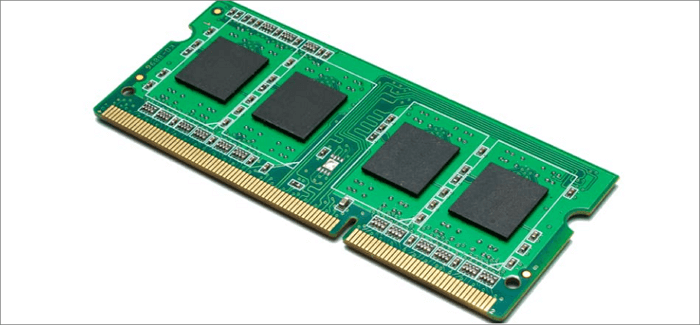
Traditional business and gaming laptops often provide accessible SO-DIMM slots, although this is not universal.
Many thin-and-light laptops use soldered LPDDR memory that cannot be upgraded after purchase.
This is why checking RAM upgradeability before buying is particularly important if you plan to keep the laptop for several years.
What Is Soldered RAM?
Soldered RAM is memory that is permanently attached to the laptop’s motherboard rather than installed in a removable memory slot.
The advantage is that manufacturers can create thinner and more power-efficient designs.
The disadvantage is that you generally cannot replace or upgrade the memory later.
Consequently, if a laptop has soldered 8GB RAM, you should think carefully before buying it if you expect your memory requirements to increase in the future.
Does RAM Speed Matter More on AMD or Intel Laptops?
There is no simple rule saying that RAM speed always matters more for one brand.
Memory performance depends on the specific processor architecture, integrated graphics, memory controller and laptop configuration.
For example, two processors with similar specifications may respond differently to changes in memory bandwidth.
Therefore, real-world benchmarks for the exact laptop are more useful than assuming that faster RAM automatically benefits every processor equally.
Does RAM Speed Matter on Apple Silicon Laptops?
Apple Silicon systems use a different memory architecture from traditional Windows laptops, including unified memory shared between the CPU and GPU.
Because the memory architecture is different, you should not directly compare an Apple Silicon laptop’s memory specification with a conventional DDR5 Windows laptop purely by looking at the advertised RAM speed.
The overall architecture and memory bandwidth should be considered together.
Can Faster RAM Reduce Battery Life?
Memory technology involves a balance between performance and power consumption.
Modern low-power memory such as LPDDR5 and LPDDR5X is specifically designed to deliver high bandwidth while supporting efficient mobile operation.
Still, overall battery life depends on far more than RAM. The processor, display brightness, battery capacity, software and workload all have significant effects.
Does More RAM Use More Battery?
Having more installed RAM does not automatically mean that your laptop will dramatically consume more battery.
Modern operating systems and memory technologies are designed to manage power efficiently.
In practice, the display and processor can often have a much larger influence on battery consumption than a modest difference in RAM capacity.
Can RAM Speed Affect SSD Performance?
RAM and SSD storage are separate components, but system memory can influence overall system behaviour.
For example, the operating system uses RAM for caching and managing active applications. If there is not enough RAM, the system may rely more heavily on storage for virtual memory, which is much slower than accessing physical RAM.
However, faster RAM does not turn an ordinary SSD into a faster SSD.
How Do You Check Your Laptop RAM Speed?
Windows provides several ways to check memory information.
You can open Task Manager, select Performance and then choose Memory. Depending on your system, Windows can show the installed memory, speed, slots used and other information.
You can also use system-information tools or the laptop manufacturer’s specifications for more detailed information.
Should You Buy a Laptop Based on RAM Speed?
RAM speed should be part of your buying decision, but it should not be the first specification you consider.
Start with the processor and the amount of RAM you need. Then consider the SSD, display, battery, graphics performance and upgradeability.
Once those fundamentals are suitable, RAM speed can help you choose between otherwise similar machines.
What Matters More: RAM Capacity or RAM Speed?
For most laptop buyers, capacity matters first.
A laptop with insufficient RAM can struggle when running several applications, regardless of how fast that RAM is.
For example, 16GB of reasonably fast RAM will generally be more useful for a multitasking user than 8GB of extremely fast memory.
Once you have enough capacity, however, higher memory bandwidth can provide additional performance in workloads that benefit from it.
What Should You Check When Comparing Laptop RAM?
- RAM capacity
- Memory type
- Memory speed
- Single-channel or dual-channel configuration
- Upgradeable or soldered memory
- Maximum supported RAM
- Number of available memory slots
- Processor memory support
- Integrated graphics requirements
If you are buying a used laptop, also check whether the advertised RAM matches what is physically installed. Our used laptop inspection checklist can help you verify the hardware before completing the purchase.
What Is the Best RAM Specification for a Laptop in 2026?
| User type | Suggested RAM | Priority |
|---|---|---|
| Basic user | 8GB–16GB | Capacity and value |
| Student | 16GB | Capacity, battery and value |
| Office professional | 16GB | Multitasking and reliability |
| Programmer | 16GB–32GB | Capacity and processor performance |
| Content creator | 32GB or more | Capacity and bandwidth |
| Heavy workstation user | 32GB–64GB+ | Capacity, bandwidth and CPU |
Should You Buy DDR4 or DDR5 in 2026?
If you are buying a new laptop and the rest of the specifications are similar, DDR5 or newer supported memory technologies can be attractive because they provide a newer memory platform and higher potential bandwidth.
Nevertheless, DDR4 laptops can still offer excellent value, particularly in the used-laptop market.
A well-maintained laptop with a strong processor, 16GB DDR4 and a fast SSD can be a much better purchase than a newer laptop with 8GB of faster memory if your priority is practical performance per naira.
Does Faster RAM Matter When Buying a Used Laptop?
It can matter, but price and the overall condition of the machine are usually more important.
If you are choosing between two used laptops, compare their processors, RAM capacity, SSD, battery health, display and physical condition before focusing on a relatively small difference in memory speed.
A complete laptop inspection is especially important when buying used because a machine with fast RAM is not a good deal if the battery, display or storage is already failing.
For Nigerian buyers, our guide to buying genuine laptops in Lagos also covers important precautions for avoiding problematic purchases.
Final Verdict
Faster laptop RAM can improve performance, but it is not a magic upgrade.
For most users, having enough RAM is more important than having the absolute fastest memory available. Moving from 8GB to 16GB can provide a much more noticeable improvement in multitasking than moving from one fast 16GB configuration to another slightly faster one.
On the other hand, memory bandwidth becomes increasingly relevant for demanding applications and laptops that rely heavily on integrated graphics. In those situations, faster DDR5 or LPDDR5X memory can contribute to better performance.
Ultimately, the best laptop is not the one with the biggest RAM speed number. It is the machine with the right combination of RAM capacity, memory bandwidth, processor performance, storage, graphics, battery life and price.