When people shop for a laptop, they often look at the processor, RAM and SSD first. The screen is sometimes treated as an afterthought.
That can be a mistake.
You may spend several hours every day looking at your laptop display, whether you are working, studying, browsing, watching films, editing photos or running business applications.
Two laptops can have similar specifications but completely different screen experiences.
One may have a bright IPS display with good viewing angles, while another may have a basic panel that looks washed out when viewed from the side.
This guide explains the major laptop display technologies and the practical things you should look for before buying a laptop in Nigeria.
What Is a Laptop Display Panel?
The display panel is the actual screen technology responsible for producing the image you see.
Common laptop display technologies include:
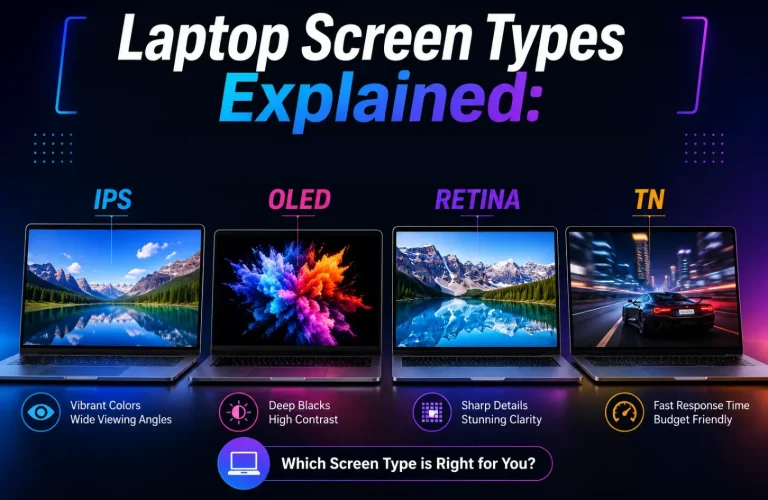
- TN
- IPS
- OLED
- Mini-LED
These technologies have different strengths and weaknesses.
What Is a TN Laptop Display?
TN means Twisted Nematic.
TN panels have been used in many laptops because they can be relatively affordable and can offer fast response times.
However, basic TN displays are generally known for weaker viewing angles and colour reproduction compared with better IPS and OLED displays.
If you are buying an older or inexpensive used laptop, you may encounter a TN panel.
What Is an IPS Laptop Display?
IPS means In-Plane Switching.
IPS displays are popular because they generally provide good viewing angles and more consistent colours across the screen.
This makes IPS a very practical choice for everyday computing.
Students, office workers, programmers, freelancers and general users can all benefit from a good IPS panel.
Why Are IPS Displays Popular?
A major advantage is viewing consistency.
When you move away from the centre of the screen, the image usually remains more usable than on many basic TN panels.
This matters when two people are looking at the laptop together or when you are working from different positions.
What Is an OLED Laptop Display?
OLED stands for Organic Light-Emitting Diode.
Unlike conventional LCD-based displays, OLED pixels can produce their own light.
This allows an OLED display to produce extremely deep blacks because individual pixels can be switched off.
OLED displays can therefore provide excellent contrast and vivid images.
Why Do OLED Screens Look So Good?
The ability to produce very deep blacks gives OLED displays strong contrast.
This can make films, photographs and other visual content look impressive.
OLED can be particularly attractive for:
- Content creators
- Photographers
- Video editors
- Film lovers
- Users who simply want a premium display
Does OLED Have Disadvantages?
Yes.
OLED displays can consume different amounts of power depending on what is being displayed, and some OLED panels can be susceptible to image retention or burn-in under certain long-term usage conditions.
Modern OLED laptop displays include technologies designed to reduce these risks, but buyers should still understand that OLED is not automatically the perfect display for every person.
What Is Mini-LED?
Mini-LED is an advanced backlighting technology used with LCD displays.
It uses a large number of very small LEDs to provide more precise control of the backlight.
This can improve contrast and HDR performance compared with conventional LCD backlighting.
Mini-LED is mainly found on higher-end laptops.
IPS vs OLED: Which Is Better?
There is no single answer.
OLED generally offers superior black levels and excellent contrast, while a good IPS display can provide excellent colour accuracy and can be a very practical choice for everyday work.
If your main priority is productivity and value, a good IPS panel can be more than enough.
If you care strongly about image quality, films, photography or premium visual experiences, OLED may be worth considering.
What Does Screen Resolution Mean?
Resolution describes the number of pixels used to create the image.
Common laptop resolutions include:
- 1366 × 768
- 1920 × 1080
- 1920 × 1200
- 2560 × 1600
- 2880 × 1800
- 3840 × 2160
Higher resolution can provide a sharper image, although the benefit depends on screen size, viewing distance and how Windows scales the interface.
Is 1366 × 768 Still Good for a Laptop?
It can work for basic tasks, but it is no longer the resolution most buyers should actively seek if better options are available within budget.
A Full HD 1920 × 1080 display generally provides a more comfortable workspace and sharper image on many laptop sizes.
For productivity, resolution is especially noticeable because more pixels can provide more usable workspace.
What Is a 16:9 Laptop Screen?
16:9 is a widescreen aspect ratio.
It has been extremely common in laptops and remains widely used.
However, many newer laptops use taller aspect ratios such as 16:10.
Why Are 16:10 Laptop Displays Becoming Popular?
A 16:10 display is slightly taller than a traditional 16:9 screen.
The extra vertical space can be useful when reading documents, browsing websites, programming or working with long spreadsheets.
For productivity users, that additional vertical space can make the laptop feel more spacious without dramatically increasing its width.
What Is Laptop Screen Brightness?
Brightness is normally measured in nits.
A brighter display can be easier to see in environments with strong ambient light.
This is particularly useful if you work near windows, outdoors or in brightly lit offices.
A display that looks excellent in a dark room may feel inadequate when used in bright Nigerian daylight.
How Bright Should a Laptop Screen Be?
For ordinary indoor use, a reasonably bright display can be perfectly adequate.
If you frequently work in very bright environments, however, a brighter panel is preferable.
Do not judge brightness solely from marketing claims. When buying a used laptop, physically inspect the screen under the conditions in which you expect to use it.
What Is a Matte Laptop Screen?
A matte display has a surface designed to reduce reflections.
This can make it easier to work under bright lights or near windows.
Matte screens are particularly popular on business laptops because they are practical for office environments.
What Is a Glossy Laptop Screen?
A glossy display has a smoother surface that can make colours and images appear more vibrant.
The disadvantage is that it can reflect surrounding light.
If a window or bright bulb is behind you, those reflections can become distracting.
Matte vs Glossy: Which Should You Choose?
For office work, school and general productivity, many people will appreciate a matte display.
For watching films and enjoying highly vibrant images, a glossy display can look excellent.
Your environment should influence the decision.
What Is a Touchscreen Laptop?
A touchscreen laptop allows you to interact with the computer by touching the display.
Touchscreens can be useful for:
- Scrolling
- Drawing
- Taking handwritten notes
- Presentations
- Creative work
- Using tablet-style laptop designs
However, not everyone needs a touchscreen.
Does a Touchscreen Make a Laptop Better?
Not necessarily.
A touchscreen adds functionality, but it can also add cost and may not be useful if you spend most of your time using the keyboard and touchpad.
If you are buying a laptop mainly for typing, programming, accounting or office work, you may prefer to spend your budget on a better display panel, keyboard, storage or build quality instead.
What Is a Laptop Refresh Rate?
Refresh rate describes how many times the display can update the image per second.
It is measured in hertz, or Hz.
A 60Hz display refreshes the image up to 60 times per second.
Higher-refresh-rate displays such as 90Hz, 120Hz, 144Hz and above can make scrolling and movement appear smoother.
Do You Need a 120Hz Laptop Display?
Not everyone does.
For office work, browsing, studying and ordinary productivity, 60Hz can still be perfectly usable.
Higher refresh rates become more attractive for gaming and users who value very smooth scrolling and animations.
What Is HDR on a Laptop?
HDR stands for High Dynamic Range.
It is designed to provide a wider range between dark and bright areas while supporting richer visual information.
However, simply seeing the word “HDR” in a specification does not guarantee an excellent HDR experience.
Panel brightness, contrast, colour capability and implementation all matter.
Why Does My Laptop Screen Look Washed Out?
Several things can cause a washed-out image.
- The display panel may have poor contrast.
- Brightness may be set incorrectly.
- Colour settings may be wrong.
- The graphics driver may have an issue.
- The screen may be damaged or ageing.
- The laptop may use an inexpensive panel.
When buying a used laptop, compare the screen with another known-good display if possible.
How to Check a Used Laptop Screen Before Buying
Do not simply turn the laptop on and confirm that the screen lights up.
Perform a proper inspection.
Check for:
- Dead pixels
- Bright or stuck pixels
- Dark spots
- Uneven brightness
- Screen flickering
- Lines across the display
- Cracks
- Pressure marks
- Display discolouration
- Loose display connection symptoms
Open a plain white image and a dark image to make defects easier to notice.
Why Are Dead Pixels Important?
A dead pixel is a pixel that does not display correctly.
One tiny defective pixel may not bother everyone, but multiple defects can affect your viewing experience.
Always inspect a used laptop carefully before purchase because display replacement can be expensive relative to the value of an older machine.

Should You Buy a Laptop With a Cracked Screen?
Generally, only do so if you fully understand the repair cost and have negotiated the price accordingly.
A cracked panel can become worse and may affect the usability of the laptop.
If the laptop is being purchased for immediate work or school use, choosing a machine with a clean, working display is usually the safer option.
Why Display Quality Matters for Students
Students may spend hours reading PDFs, browsing websites, attending online classes and writing assignments.
A comfortable display can reduce the frustration associated with long periods of computer use.
If you are comparing affordable machines, our guide to UK-used laptops under ₦200,000 for students in Lagos can help you consider the overall laptop rather than focusing on one specification.
Why Display Quality Matters for Freelancers
Freelancers working with graphics, websites, documents or video may spend most of their working day staring at the display.
A poor screen can make colour-sensitive work difficult and can make ordinary productivity less comfortable.
If your work involves visual content, pay particular attention to panel type, resolution, brightness and colour reproduction.
What Display Should You Choose for Business Work?
For most business users, a good Full HD IPS display with sensible brightness and a matte finish is an excellent combination.
You do not necessarily need OLED or an extremely high resolution.
A reliable, comfortable display can be more useful than an expensive feature that you rarely use.
This is one reason business-class UK-used laptops remain attractive to people looking for practical machines.
What Display Should You Choose for Gaming?
Gamers should pay particular attention to refresh rate, response time, resolution and graphics capability.
A 120Hz or 144Hz panel can provide a smoother experience than a standard 60Hz display when the laptop’s hardware can produce enough frames.
However, a high-refresh display alone does not make a laptop a gaming machine.
What Display Should You Choose for Photo or Video Editing?
Creators should look beyond resolution.
Colour accuracy, colour gamut, contrast and consistency can be more important depending on the type of work.
A high-resolution screen with poor colour reproduction may be less useful for professional visual work than a lower-resolution display with accurate colours.
Can You Replace a Laptop Screen With a Better One?
Sometimes.
Replacement possibilities depend on the laptop model, connector, physical dimensions, mounting system and display specifications.
Not every laptop supports every replacement panel.
Before buying a replacement screen, the exact model and compatible panel specifications should be confirmed.
What Should You Prioritise When Buying a Laptop in Nigeria?
A sensible display checklist is:
- Choose IPS or better when possible.
- Consider Full HD as a practical minimum for many modern laptops.
- Choose a brighter screen if you work in bright environments.
- Consider matte if reflections bother you.
- Consider OLED if premium image quality is important.
- Choose a higher refresh rate if smooth motion or gaming matters.
- Do not pay extra for touchscreen functionality you will never use.
And when buying used, always inspect the actual display instead of trusting the specification alone.
Final Verdict
The display is one of the most important parts of a laptop because it is the component you interact with constantly.
For most users, a good IPS display remains an excellent balance between quality and practicality. OLED offers outstanding contrast and visual quality, while Mini-LED can provide impressive HDR performance on premium machines.
Resolution, brightness, refresh rate, aspect ratio and surface finish also influence how comfortable the laptop is to use.
If you are buying a used laptop from the UK market, remember that the exact screen configuration can vary even between different versions of the same laptop model. That is why a proper physical inspection is important.
Before paying, check the display from different angles, test brightness, look for dead pixels and inspect for cracks or pressure marks. For a broader inspection, you can also use our UK-used laptop buying checklist.
The best laptop screen is not necessarily the most expensive one. It is the one that gives you the right combination of clarity, comfort, brightness and features for the way you actually use your computer.