Most people expect a laptop to connect to Wi-Fi without thinking much about the technology inside it.
You connect to your home router, office network, school network or mobile hotspot and start browsing.
But not all laptop Wi-Fi hardware is the same.
Older laptops may support older Wi-Fi standards, while newer machines can support technologies designed to provide better performance, improved efficiency and better handling of busy wireless networks.
This matters when you are browsing, attending online classes, downloading large files, streaming videos, working remotely or connecting to several wireless devices at the same time.
In this guide, we explain laptop Wi-Fi in simple terms and show you what actually matters when buying a laptop in Nigeria.

What Is Wi-Fi in a Laptop?
Wi-Fi is the wireless networking technology that allows your laptop to connect to a compatible wireless network without using an Ethernet cable.
The laptop contains a wireless network adapter that communicates with a router, access point or hotspot.
This allows you to access the internet and other devices on the network.
Does Every Laptop Have Wi-Fi?
Almost every modern laptop comes with built-in Wi-Fi.
However, very old laptops may use older wireless technology, and the capabilities of the Wi-Fi adapter can vary considerably from one model to another.
This is one reason why checking the exact specifications of a used laptop is important.
What Is a Wi-Fi Standard?
A Wi-Fi standard defines technologies and capabilities used for wireless communication.
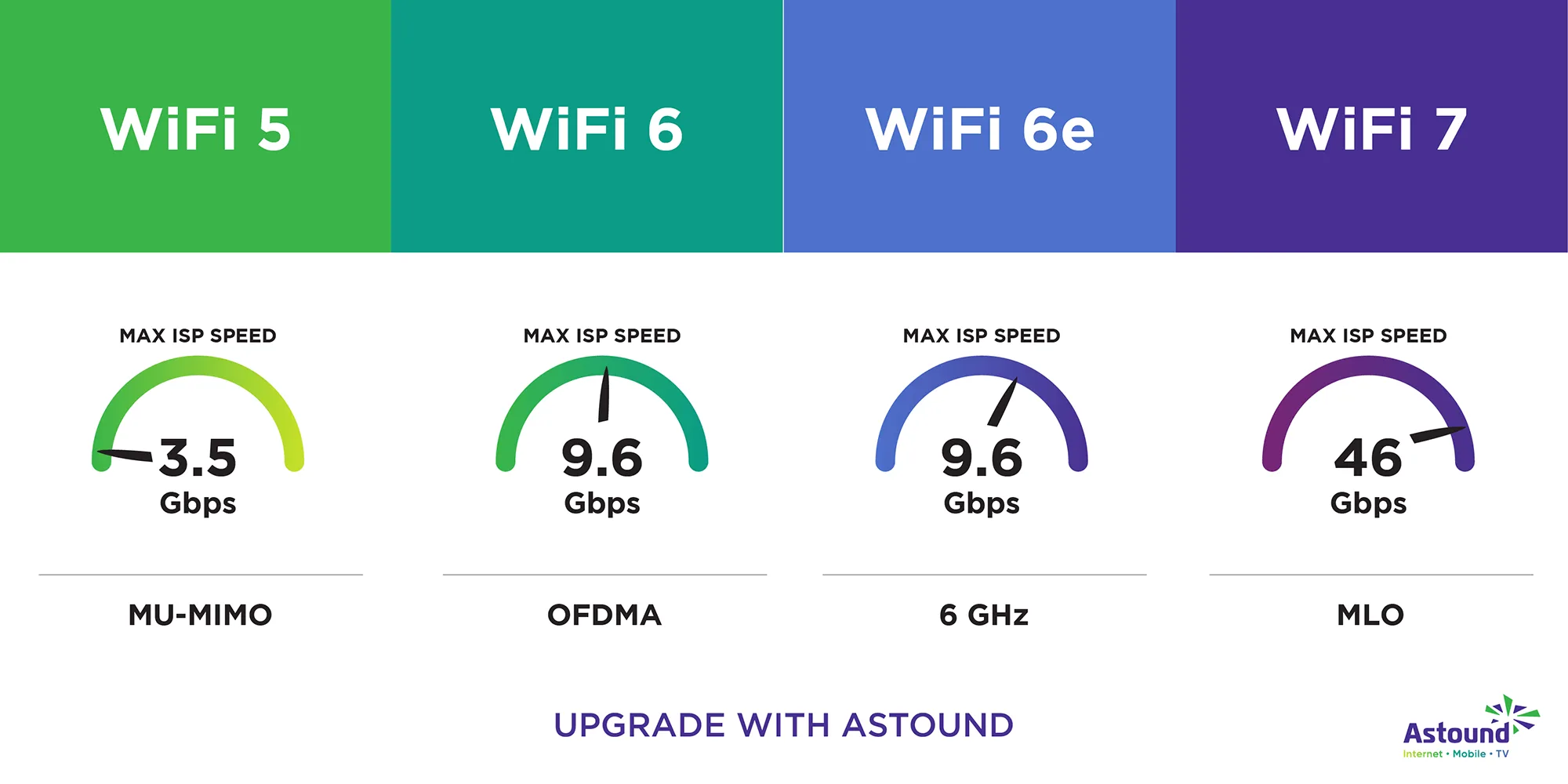
You may see names such as Wi-Fi 4, Wi-Fi 5, Wi-Fi 6, Wi-Fi 6E and Wi-Fi 7.
The names are easier for ordinary users to understand than the older technical IEEE naming system.
What Is Wi-Fi 5?
Wi-Fi 5 is the consumer-friendly name for the 802.11ac generation of Wi-Fi.
It became widely used in laptops, phones and routers and remains perfectly usable for many everyday internet activities.
A laptop with Wi-Fi 5 can handle normal browsing, video streaming, online meetings and many other tasks without a problem when connected to a good network.
What Is Wi-Fi 6?
Wi-Fi 6 is based on the 802.11ax standard.
It was designed not simply to chase higher theoretical speeds, but also to improve efficiency when many devices are sharing a wireless network.
This can be useful in homes, offices, schools and other environments where numerous phones, laptops, smart devices and other equipment are connected simultaneously.
Why Is Wi-Fi 6 Useful?
One of the biggest advantages of Wi-Fi 6 is improved network efficiency.
Modern homes can have many connected devices at once.
You might have:
- Several smartphones
- Laptops
- Smart TVs
- Security cameras
- Game consoles
- Printers
- Smart speakers
- Other connected devices
Wi-Fi 6 includes technologies designed to manage busy networks more efficiently.
What Is Wi-Fi 6E?
Wi-Fi 6E extends Wi-Fi 6 into the 6 GHz band where supported.
The additional spectrum can provide access to less congested wireless channels in compatible environments.
However, having a Wi-Fi 6E laptop does not automatically mean you will use the 6 GHz band.
Your router or access point must also support the appropriate technology and your local regulatory environment must permit its use.
What Is Wi-Fi 7?
Wi-Fi 7 is a newer generation of Wi-Fi technology based on IEEE 802.11be.
It introduces capabilities designed to improve throughput, latency and reliability, including Multi-Link Operation on supported equipment.
Wi-Fi 7 is primarily relevant to people using newer compatible networking equipment and devices.
Is Wi-Fi 7 Automatically Faster Than Wi-Fi 6?
The technology is designed to support higher performance, but your actual internet experience depends on much more than the Wi-Fi standard.
Your internet subscription, router, distance from the router, walls, interference, network congestion and the capabilities of the other device all matter.
Buying a Wi-Fi 7 laptop while using an old router will not magically turn the old router into a Wi-Fi 7 system.
Does Wi-Fi Version Determine Internet Speed?
No.
This is one of the most important things to understand.
Suppose your internet subscription provides 50 Mbps. Upgrading from an older Wi-Fi adapter to a much newer one does not automatically turn that internet connection into 500 Mbps.
Wi-Fi is the wireless connection between your laptop and network equipment. Your internet connection is a separate part of the system.
Why Is My Laptop Wi-Fi Slow?
Slow Wi-Fi can have many causes.
- Weak signal
- Distance from the router
- Walls and physical obstructions
- Wireless interference
- Too many connected devices
- Router limitations
- Internet service limitations
- Old Wi-Fi hardware
- Driver problems
- Background downloads
Therefore, do not immediately assume that the laptop’s Wi-Fi adapter is defective.
Why Does Wi-Fi Work Better Near the Router?
Wireless signals become weaker as distance increases and can also be affected by walls and other obstacles.
This means a laptop sitting beside a router may achieve a much better connection than the same laptop being used several rooms away.
If your laptop performs well near the router but poorly in another room, the problem may be your wireless environment rather than the laptop.
Can Walls Affect Laptop Wi-Fi?
Yes.
Walls, floors, furniture and other physical objects can affect wireless signal strength.
The material and thickness of the obstruction can make a difference.
This is why router placement matters in larger homes and offices.
What Is 2.4 GHz Wi-Fi?
2.4 GHz is one of the common frequency bands used for Wi-Fi.
It generally offers better range and can penetrate obstacles more effectively than higher-frequency bands, although it is also more vulnerable to congestion because many devices use this spectrum.
What Is 5 GHz Wi-Fi?
5 GHz Wi-Fi can provide higher performance and access to more channels in many situations, but its range through obstacles may be shorter than 2.4 GHz.
Modern routers commonly support both bands.
What Is 6 GHz Wi-Fi?
The 6 GHz band provides additional spectrum for compatible Wi-Fi equipment.
It is particularly associated with Wi-Fi 6E and newer Wi-Fi technologies.
Its availability and permitted channels depend on regulations in the country where the equipment is being used.
Should a Nigerian Laptop Buyer Care About 6 GHz?
It can be useful, but it should not be the first thing most buyers consider.
If your current router does not support the 6 GHz band, buying a laptop specifically because it supports 6 GHz may provide little immediate benefit.
For many buyers, reliable Wi-Fi 5 or Wi-Fi 6 connectivity is already sufficient for normal work, school and entertainment.
What Is MU-MIMO?
MU-MIMO stands for Multi-User Multiple Input, Multiple Output.
It is a wireless technology designed to help an access point communicate with multiple devices more efficiently.
This becomes more useful as the number of devices sharing a network increases.
What Is OFDMA?
OFDMA stands for Orthogonal Frequency Division Multiple Access.
It is one of the technologies used by Wi-Fi 6 to improve the efficient use of wireless channels, particularly when multiple devices are communicating.
You do not need to understand the mathematics behind it to benefit from the technology.
What Is Wi-Fi Latency?
Latency is the delay involved in transmitting information across a network.
Lower latency can be particularly useful for activities that require quick responses.
Examples include:
- Online gaming
- Video calls
- Remote desktop sessions
- Interactive cloud applications
However, internet routing and your service provider can also have a major effect on latency.
Why Does My Video Call Freeze Even Though Wi-Fi Is Connected?
Being connected to Wi-Fi does not guarantee a perfect internet connection.
Your wireless signal may be weak, your internet connection may be congested, or the video-call service may be experiencing problems.
Background downloads can also consume bandwidth.
So “Wi-Fi connected” and “internet working perfectly” are not always the same thing.
Can an Old Laptop Have Good Wi-Fi?
Yes.
An older laptop can still provide a perfectly usable wireless connection if its Wi-Fi adapter is in good condition and your network is reliable.
For ordinary browsing and office work, you do not necessarily need the newest Wi-Fi standard.
Can You Upgrade Laptop Wi-Fi?
Sometimes.
Some laptops use replaceable internal wireless cards, while others have Wi-Fi hardware soldered to the motherboard or integrated in a way that makes upgrading impractical.
Compatibility also depends on the laptop’s physical design, operating system, drivers and manufacturer restrictions.
Before purchasing a replacement Wi-Fi card, verify compatibility with the exact laptop model.
Can You Use a USB Wi-Fi Adapter?
Yes.
A USB Wi-Fi adapter can add or replace wireless networking functionality on compatible computers.
This can be useful if the internal wireless adapter has failed or if you need a different wireless capability.
However, a USB adapter will occupy a USB port, so consider your connectivity requirements before choosing one.
How to Check Wi-Fi on a Used Laptop
Testing Wi-Fi should be part of your inspection when buying a used laptop.
Connect the laptop to a known working wireless network and check whether the connection is stable.
Try ordinary browsing and, if possible, stream a short video.
Also check whether the laptop can see available wireless networks.
What If a Used Laptop Cannot Detect Wi-Fi Networks?
Possible causes include:
- Disabled Wi-Fi
- Missing drivers
- Faulty wireless hardware
- Windows configuration problems
- Hardware switch or keyboard control issues on some older laptops
Do not assume that the Wi-Fi adapter is dead until the software and settings have been checked.
Should You Buy a Laptop With Wi-Fi 5 in 2026?
Yes, if the laptop otherwise meets your needs and the price is right.
Wi-Fi 5 is still capable of handling many normal computing tasks.
For someone buying an affordable UK-used laptop for school, office work or basic freelancing, there is no reason to reject a good machine solely because it does not have Wi-Fi 6 or Wi-Fi 7.
Should You Prefer Wi-Fi 6?
If two laptops are similar in price and condition, Wi-Fi 6 can be a useful advantage.
It gives you access to newer wireless capabilities and can be particularly beneficial when using a compatible modern router in a busy network.
But do not sacrifice a significantly better laptop simply to obtain a newer Wi-Fi standard.
What About Business Users?
Business users should care more about stable connectivity than marketing numbers.
If you regularly work from home, attend online meetings, transfer files or connect to company resources, a reliable wireless adapter is important.
This is another reason why inspecting the complete condition of a used business laptop is more important than focusing on one specification.
If you are considering a UK-used machine for work, our guide to laptops for business and freelancing in Nigeria can help you compare the bigger picture.
What About Students?
Students often depend heavily on wireless connectivity for research, online classes, assignments and communication.
A reliable Wi-Fi connection can therefore be more important than having the newest wireless standard.
If you are shopping specifically for school use, you can also compare suitable machines in our UK-used laptop guide for students in Lagos.
Does Bluetooth Come With Laptop Wi-Fi?
Many laptop wireless cards combine Wi-Fi and Bluetooth functionality.
This allows the same general wireless hardware system to support devices such as wireless headphones, mice, keyboards and other Bluetooth accessories.
However, Wi-Fi and Bluetooth are different wireless technologies, so always check the specifications if a particular Bluetooth version or feature matters to you.
How to Check Your Laptop’s Wi-Fi Standard
In Windows, you can inspect the installed wireless adapter and its properties to identify the hardware model.
You can then check the manufacturer’s documentation for the exact Wi-Fi capabilities of that adapter.
This is more reliable than guessing from the laptop’s processor generation or release year.
What Should You Actually Look for When Buying a Laptop?
For most Nigerian buyers, use this practical approach:
- Wi-Fi 5 is still acceptable for many everyday users.
- Wi-Fi 6 is a useful modern feature.
- Wi-Fi 6E is valuable if you have compatible equipment and can use the 6 GHz band.
- Wi-Fi 7 is mainly attractive to buyers with newer compatible networking equipment.
- Check the actual wireless adapter rather than assuming from the laptop’s name.
- Test Wi-Fi when buying used.
- Consider router quality, signal strength and internet speed as well.
Final Verdict
Laptop Wi-Fi technology has evolved considerably, but newer does not automatically mean that you need it.
Wi-Fi 5 remains useful for many everyday tasks, Wi-Fi 6 brings improvements in efficiency and performance on busy networks, Wi-Fi 6E adds access to the 6 GHz band where supported, and Wi-Fi 7 represents a newer generation designed for even greater wireless capability.
For most laptop buyers, the most important thing is not chasing the highest Wi-Fi number.
Instead, choose a laptop with a reliable wireless adapter that matches your actual network.
When buying a used laptop, test the Wi-Fi before paying. Make sure it detects networks, connects reliably and remains connected during ordinary use.
And remember that a laptop’s wireless performance is only one part of the complete machine. If you are buying a UK-used laptop, use a proper inspection process such as the PSERO UK-used laptop buying checklist rather than judging the computer from its specifications alone.
The best Wi-Fi technology is the one that gives you a reliable connection without making you spend money on features you do not actually need.