When buying a laptop, many people focus on the processor, RAM, storage and screen. But there is another part of the laptop that can significantly affect everyday use: the speakers.
Whether you are watching movies, attending online meetings, listening to music, taking online classes or simply watching videos on YouTube, poor speakers can make the experience frustrating.
Some laptops have surprisingly good built-in audio, while others sound quiet, thin or distorted even when the volume is high.
This guide explains how laptop speakers work, the meaning of stereo speakers, Dolby Audio and other audio technologies, speaker placement and how to test laptop sound before buying a used laptop.
How Do Laptop Speakers Work?
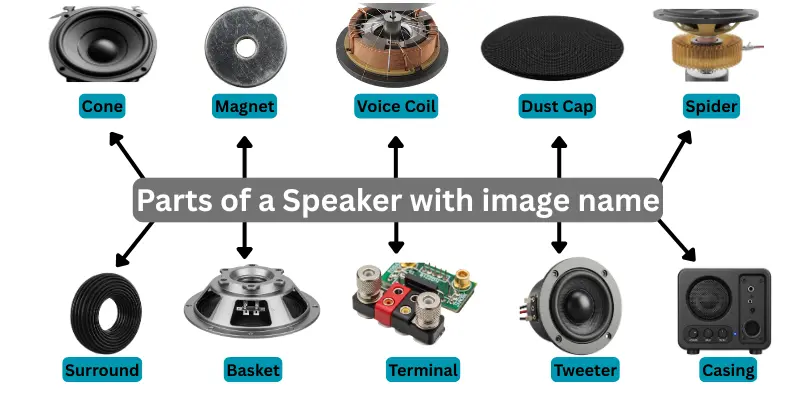
Laptop speakers convert electrical audio signals into sound.
Because laptops have limited internal space, their speakers are usually much smaller than traditional desktop speakers.
This means laptop manufacturers must work within physical limitations when designing the audio system.
As a result, even two laptops with similar specifications can have very different sound quality.
What Are Stereo Speakers?
Stereo speakers use two separate audio channels: left and right.
This can create a wider sound experience than a single speaker.
Many modern laptops use stereo speaker systems, although the quality and positioning of the speakers can vary considerably.
Does Having Two Speakers Automatically Mean Better Sound?
Not necessarily.
The quality of the speaker drivers, amplifier, laptop design, software tuning and speaker placement can all affect the final sound.
A laptop with two poorly designed speakers may still sound worse than another machine with a better engineered audio system.
What Is Speaker Placement?
Speaker placement refers to where the speakers are located on the laptop.
Common locations include:
- Above the keyboard
- Beside the keyboard
- Underneath the laptop
- Near the front edge
- Inside the display or hinge area on some designs
Speaker placement can make a major difference to how sound reaches the user.
Why Do Some Laptop Speakers Sound Muffled?
Speakers positioned underneath the laptop can sometimes sound different depending on the surface where the laptop is placed.
A soft bed, pillow or cushion can block or absorb some of the sound.
Using the same laptop on a hard desk may produce a noticeably different result.
What Is Dolby Audio?
Dolby Audio is a collection of audio technologies and processing designed to improve the listening experience on compatible devices.
Depending on the laptop and implementation, it may provide audio profiles or processing intended for activities such as watching movies, listening to music or improving voice clarity.
However, a Dolby logo does not automatically guarantee excellent speakers. The physical quality of the laptop’s audio hardware still matters.
You can learn more about Dolby technologies through [Dolby’s official website](https://www.dolby.com/?utm_source=chatgpt.com).
What Is DTS Audio?
DTS is another company associated with audio technologies used in some laptops and other electronic devices.
Depending on the specific implementation, DTS software can provide sound processing and different listening profiles.
As with other audio technologies, the overall experience depends on both the software and the laptop’s physical speakers.
What Does “Tuned by” Mean on a Laptop?
Some laptops display branding that says the speakers or audio system were “tuned by” a particular audio company.
This generally refers to audio engineering, processing or tuning associated with that brand.
It does not necessarily mean that the company physically manufactured every speaker inside the laptop.
Why Are Laptop Speakers Usually Weak Compared With External Speakers?
The main reason is space.
A laptop is designed to be portable and compact.
Large speaker drivers require more physical space, and producing strong low-frequency sound also requires careful acoustic design.
External speakers can use larger drivers and larger enclosures, which is why they can often produce louder and fuller sound.
Why Do Laptop Speakers Have Weak Bass?
Small speakers generally have limitations when reproducing very low frequencies.
This is why many thin laptops can sound clear for voices and videos but may lack deep bass when playing music.
Software processing can improve the perceived sound, but it cannot completely overcome the physical limitations of very small speaker hardware.
What Is an Audio Jack?
The audio jack is a physical port that allows compatible headphones, headsets or speakers to connect to the laptop.
Many laptops use a 3.5 mm combination audio jack for headphones and microphones.
However, some newer laptops may use USB-C or wireless Bluetooth audio instead of including a traditional headphone jack.
Should You Avoid a Laptop Without a Headphone Jack?
Not necessarily.
If you mainly use Bluetooth headphones or USB-C audio devices, the absence of a traditional audio jack may not matter.
However, if you regularly use wired 3.5 mm headphones, check the available ports before buying.
You can also learn more about laptop connectivity in our guide to laptop wireless connectivity and Wi-Fi technology.
Can You Connect External Speakers to a Laptop?
Yes.
You can connect external speakers using methods supported by your laptop and speaker system, including:
- 3.5 mm audio connections
- USB
- USB-C on compatible devices
- Bluetooth
The best option depends on the laptop and the speakers you are using.
What Is Bluetooth Audio?
Bluetooth allows compatible wireless headphones, earbuds and speakers to connect to a laptop without an audio cable.
This can be convenient for people who want a cleaner workspace or prefer wireless accessories.
However, audio quality, latency and connection stability can depend on the Bluetooth hardware and the connected device.
Can Laptop Speakers Be Replaced?
In many laptops, the internal speakers can be replaced.
However, the difficulty of replacement varies between models.
Some speaker modules are easy to access, while others require significant disassembly.
Before attempting a repair, check the service information for the exact laptop model.
Why Is One Laptop Speaker Louder Than the Other?
If one side sounds significantly quieter, possible causes include:
- Dust or obstruction around the speaker opening
- Audio balance settings
- Software or driver problems
- A damaged speaker
- Loose internal connections
Check the Windows audio balance settings before assuming that the speaker itself has failed.
Why Do Laptop Speakers Crackle?
Crackling or distorted sound can be caused by several problems.
Possible causes include damaged speaker hardware, excessive volume, audio driver issues or software problems.
Testing the laptop with headphones can help determine whether the problem affects the entire audio system or only the internal speakers.
How to Test Laptop Speakers Before Buying a Used Laptop
Do not simply play a sound for one second and assume everything is fine.
Play music, a video or another clear audio source at low, medium and reasonably high volume.
Listen for:
- Crackling
- Distortion
- Unusually low volume
- One speaker being much quieter
- Sound cutting in and out
- Rattling noises
Also test the headphone or audio connection if the laptop has one.
When buying a used laptop, audio testing should be part of the same inspection process you use for the screen, keyboard, battery, Wi-Fi and other components.
Our complete UK-used laptop inspection checklist can help you examine the machine as a whole before paying.
Are Business Laptops Known for Good Speakers?
Business laptops are usually designed primarily around durability, portability, productivity and professional use.
Some have excellent speakers, but audio quality is not always their highest design priority.
A multimedia or premium consumer laptop may sometimes provide a stronger entertainment experience.
However, the exact model matters more than the general laptop category.
Should Students Care About Laptop Speaker Quality?
Yes, particularly if they attend online classes, watch educational videos or frequently use the laptop for entertainment.
However, speaker quality should be considered alongside more important factors such as battery condition, keyboard comfort, screen quality and overall performance.
Students comparing affordable options can also check our UK-used laptop guide for students in Lagos.
Should You Buy External Speakers?
If you regularly watch movies, listen to music or need louder audio for presentations, external speakers can provide a significant improvement over many built-in laptop speaker systems.
However, for ordinary video calls, online classes and casual videos, a good laptop speaker system may be enough.
How to Keep Laptop Speakers Working Properly
Avoid spilling liquids near the keyboard or speaker openings.
Keep dust and debris away from the laptop.
Do not continuously operate damaged or distorted speakers at extremely high volume.
Keep audio drivers and Windows reasonably updated when appropriate.
Final Verdict
Laptop speakers are easy to ignore until they stop working or produce poor sound.
Speaker quality depends on much more than whether a laptop has two speakers or carries an audio brand logo.
The physical design, speaker placement, hardware quality and audio processing all contribute to the final experience.
When buying a used laptop, test the speakers properly before making payment. Listen at different volume levels and check both sides of the audio system.
A laptop does not need cinema-quality sound to be useful, but clear and reliable speakers can make everyday work, online meetings, movies and music much more enjoyable.