Not every laptop is designed to fit the same lifestyle.
Some machines are built mainly for typing and office work. Others can fold into tablet mode, detach from their keyboards or remain light enough to carry around Lagos all day.
Interestingly, two laptops can have similar processors, RAM and storage while feeling completely different in everyday use. The reason often comes down to their form factor.
Before spending money on a new or UK-used laptop, therefore, it makes sense to ask a simple question:

How do I actually plan to use this computer?
What Does Laptop Form Factor Mean?
A laptop’s form factor refers to its physical design and the way the machine is intended to be used.
Common designs include:
- Traditional clamshell laptops
- Convertible 2-in-1 laptops
- Detachable 2-in-1 devices
- Ultraportable laptops
- Large performance laptops and mobile workstations
None of these designs is automatically better than the others. Your work, travel habits, preferred screen size and need for flexibility should determine which one makes the most sense.
1. Traditional Clamshell Laptops
This is the familiar laptop design used by millions of people.
The display opens from the keyboard and normally remains attached to it. Unlike a convertible, the screen does not usually fold completely backwards.
For many buyers, that simplicity is actually an advantage.
- Comfortable for long typing sessions
- Available across many price ranges
- Often easier to maintain
- Common among business-class laptops
- Suitable for school, office and general computing
If your daily routine involves Microsoft Word, spreadsheets, browsing, programming or business applications, a traditional clamshell may give you everything you need.
Why Buy Something More Complicated?
A touchscreen or 360-degree hinge can look attractive in a product advertisement. However, those features only become valuable when they solve a real problem for you.
Someone who spends eight hours typing documents may gain little from a laptop that turns into a tablet.
On the other hand, an artist, presenter or student who takes handwritten notes could find that flexibility extremely useful.
2. Convertible 2-in-1 Laptops
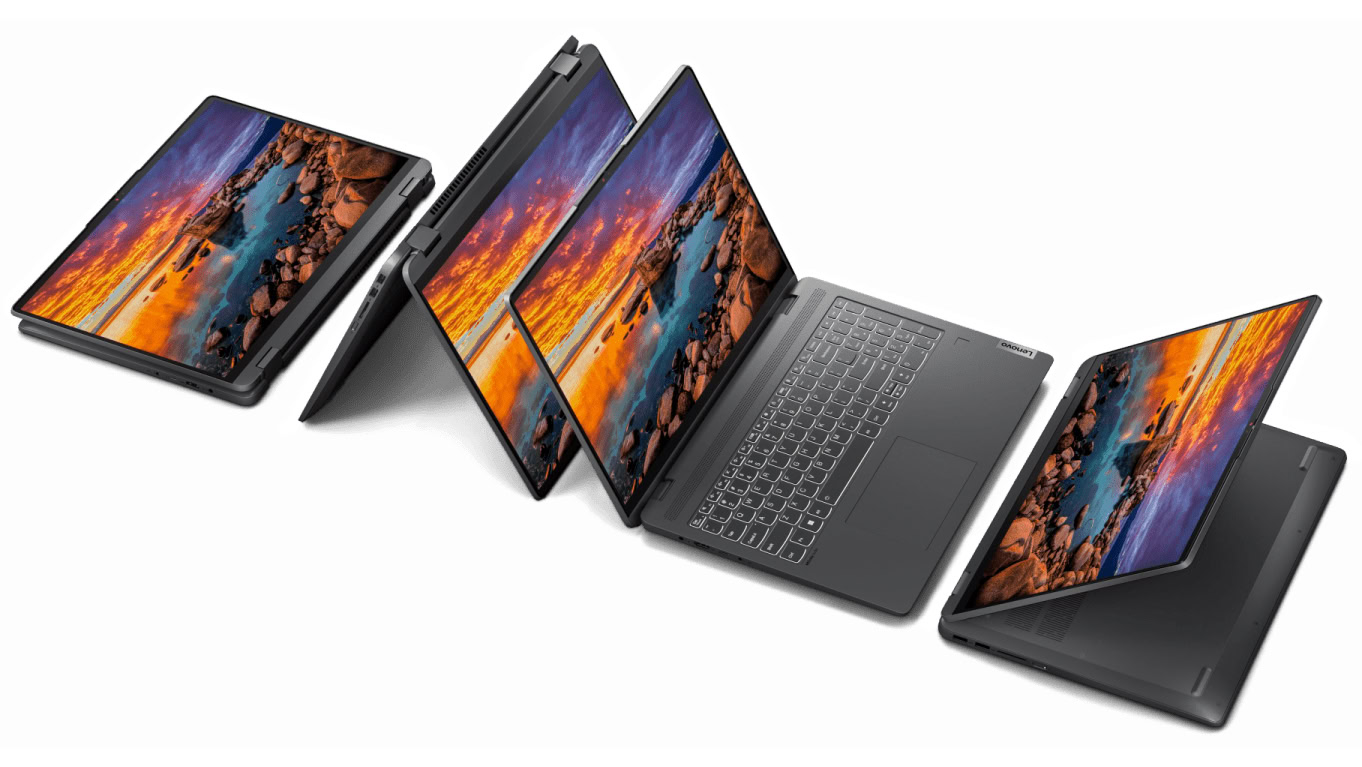
Convertible laptops add flexibility by allowing the display to fold backwards.
Many models use a 360-degree hinge. That lets you switch between ordinary laptop mode, tent mode, stand mode and tablet mode.
Touchscreen support makes these machines particularly useful for people who want more than a conventional keyboard-and-mouse experience.
Compatible Windows devices can take advantage of touch features built into the operating system, as explained in Microsoft’s touchscreen guidance.
Who benefits most?
- Students who like digital note-taking
- Artists using compatible styluses
- Presenters
- Travellers
- People who regularly use touchscreen applications
- Users who want laptop and tablet functionality in one device
There is one important trade-off: more moving parts mean more components that deserve inspection when buying used.
3. Detachable Laptops
Detachable devices take the 2-in-1 idea even further.
Instead of folding the keyboard behind the screen, you can physically separate the two parts. The display can then be used much like a tablet.
This arrangement works well for people who prioritise portability and touchscreen interaction.
However, a detachable may not provide the same typing comfort, upgradeability or performance as a conventional laptop. Port selection can also be more limited on some models.
4. Ultraportable Laptops
Ultraportable machines focus heavily on mobility.
The chassis is usually thin and lightweight, making the laptop easier to carry between home, school, the office and other locations.
For a person who commutes regularly, that difference can matter more than having a slightly faster processor.
There is a trade-off, though. Extremely thin laptops may offer fewer physical ports, limited upgrade options or less room for cooling hardware.
Thin Does Not Automatically Mean Better
A slim laptop can look impressive on a shop shelf, but appearance alone does not tell you how well the machine will survive daily use.
Chassis strength, hinge quality and keyboard construction all matter.
In fact, a slightly thicker business laptop may be a better choice for someone who carries a computer around frequently.
When evaluating a used machine, overall physical condition should therefore receive as much attention as the processor and RAM. Our refurbished vs UK-used laptop guide explains some of the differences buyers should consider.
5. Large Performance Laptops
Some users simply need more computing power.
Gaming laptops, mobile workstations and other performance-focused machines often use larger chassis to accommodate stronger processors, dedicated graphics and more substantial cooling systems.
The extra size can provide room for:
- Powerful CPUs
- Dedicated GPUs
- Larger cooling systems
- More storage
- Additional memory
- Higher-performance displays
That extra hardware comes at a cost. Carrying a large gaming or workstation laptop every day can become tiring, especially when its charger is included in the bag.
Which Form Factor Fits Which User?
| Form factor | Best suited for | Main advantage | Possible drawback |
|---|---|---|---|
| Clamshell | Students, offices, business and general use | Simple and practical | Limited flexibility |
| Convertible 2-in-1 | Touchscreen users, presenters and note-takers | Multiple operating modes | More hinge movement |
| Detachable | Tablet-focused users | Very portable | Keyboard and performance compromises on some models |
| Ultraportable | Travellers and mobile workers | Easy to carry | May sacrifice ports or upgradeability |
| Performance laptop | Gamers, creators and professionals | Higher computing power | Heavier and less portable |
A Lagos Commuter May Need Something Different
Imagine two laptop buyers.
The first person works mostly from home. Their laptop spends most of the day on a desk, so screen size and keyboard comfort may be more important than weight.
Now consider someone who travels around Lagos several times a week. For that buyer, a lighter chassis, strong construction and convenient charging could matter more.
Neither person is wrong. They simply have different requirements.
What Makes Sense for Students?
A 14-inch clamshell can be a very practical middle ground for many students.
The screen provides enough room for assignments and research, while the overall size remains manageable inside a backpack.
Students who genuinely enjoy handwritten notes or touchscreen interaction may prefer a convertible.
Paying extra for a 360-degree hinge makes less sense, however, if you intend to use the machine like an ordinary laptop every day.
For affordable options, take a look at our guide to UK-used laptops under ₦200,000 for students in Lagos.
What About Business Users?
Business users often benefit from practicality rather than unnecessary complexity.
A dependable clamshell with a comfortable keyboard can be more useful than a touchscreen convertible when most of your day involves email, spreadsheets, documents and browser-based applications.
Freelancers and small-business owners can also benefit from choosing a laptop around their actual workload instead of paying for features they rarely use. Our guide to laptops under ₦300,000 for business and freelancing provides more practical buying considerations.
Buying a Used 2-in-1? Test the Hinge
A convertible laptop deserves a more thorough physical inspection than a conventional clamshell.
Open and close the display gently several times. Pay attention to unusual sounds, excessive looseness or resistance.
Also check whether:
- The hinge feels unusually loose.
- The screen moves when you do not expect it to.
- The display changes when the lid moves.
- The touchscreen responds across the entire panel.
- The keyboard works normally.
- The laptop changes orientation correctly where applicable.
Never force the display beyond its normal range simply to test the hinge.
Don’t Ignore Keyboard Comfort
Touchscreen flexibility can be useful, but typing remains the main activity for many laptop owners.
If you regularly write reports, code, articles or school assignments, a comfortable keyboard may matter far more than tablet mode.
Before buying, spend several minutes typing on the machine. Check the key travel, layout, response and overall comfort.
Portability vs Performance
Trying to get every desirable feature in one laptop usually leads to compromises.
A very thin machine may be easy to carry but have less room for powerful hardware. A high-performance laptop can deliver much more processing power, yet its larger size makes it less convenient for travel.
Even battery capacity, cooling and upgradeability can be influenced by the physical design.
The goal is not to find a laptop without compromises. Instead, choose the machine whose compromises bother you the least.
Three Questions That Can Narrow Your Choice
Before looking at processor names and RAM numbers, answer these questions:
- How often will I carry the laptop outside the house?
- Will I actually use touchscreen or tablet-style features?
- Do I value portability more than raw performance?
Your answers can quickly eliminate several unsuitable designs.
What About Repair and Long-Term Ownership?
Form factor can also influence how a laptop is maintained.
Highly compact machines may use specialised components or have limited access to internal hardware. Some thin laptops also solder certain components directly to the motherboard.
Traditional business laptops can sometimes provide easier access to selected components, although this varies considerably by model.
For that reason, buyers should research the exact laptop rather than assuming that every machine in a particular category has the same repairability.
Should You Buy a Convertible Just Because It Looks Premium?
Not necessarily.
A premium appearance is nice, but it should not replace practical considerations.
If your work involves mostly typing and browsing, a good clamshell may offer better value. Someone who travels frequently might benefit more from a lightweight ultraportable.
Meanwhile, a graphic artist or student who makes heavy use of touch and pen input could have a completely different priority.
The Bottom Line
Laptop form factor affects much more than appearance.
It influences portability, typing comfort, screen flexibility, physical durability and, in some cases, repairability and upgrade options.
A traditional clamshell remains an excellent choice for everyday work and school. Convertible machines make sense when touchscreen and multiple operating modes will actually be used. Detachable devices suit people who want stronger tablet functionality, while ultraportables are ideal for users who spend much of their time on the move.
For demanding gaming and professional workloads, a larger performance laptop may be worth the extra weight.
The smartest laptop is not necessarily the thinnest, most powerful or most expensive one. It is the design that fits the way you actually work, study and move around.