The processor is one of the most important components in a laptop, but comparing processors is not as simple as looking at their advertised speeds or model names. Two laptops can both carry Intel Core i7 processors and deliver significantly different performance. Likewise, an AMD Ryzen 5 processor from a newer generation may outperform an older Ryzen 7 in several workloads.
The reason is that processor performance depends on architecture, manufacturing technology, core design, instruction execution, cache, memory support, power limits and thermal management. These factors determine how efficiently a CPU processes information and how much performance it can sustain during demanding tasks.
For laptop buyers, understanding CPU architecture makes it easier to distinguish marketing labels from genuine performance. It also helps businesses, students, developers, designers and professionals choose computers that can handle their workloads without spending money on unnecessary specifications.
This guide examines how modern laptop processors work, how Intel and AMD organise their CPU architectures, what cores and threads actually do, and how to compare processors using technical specifications and real-world benchmarks.
1. What Is CPU Architecture?
CPU architecture describes the design and organisation of a processor. It determines how the CPU executes instructions, manages data, communicates with memory and distributes workloads across its processing units.
A processor is not simply a component that runs at a particular clock speed. It contains several internal systems that work together to execute software instructions.
These systems include:
- Execution units: Hardware responsible for performing calculations and operations.
- Instruction decoder: Interprets instructions and prepares them for execution.
- Registers: Small, extremely fast storage locations used by the processor.
- Cache memory: Stores frequently accessed information close to the CPU.
- Branch prediction: Helps the processor anticipate which instructions it will need next.
- Memory controller: Coordinates communication between the processor and system memory.
- Scheduler: Distributes instructions across available execution resources.
Different processor architectures organise these systems differently. Even when two CPUs have identical core counts and advertised frequencies, their internal designs may allow one to execute more instructions per clock cycle.
This is one reason newer processor architectures can outperform older processors without requiring dramatically higher clock speeds.
2. Intel and AMD: Understanding the Two Major Laptop CPU Platforms
Most Windows laptops use processors from Intel or AMD. Both companies produce CPUs for everyday computing, business applications, gaming, content creation and professional workloads.
However, their product naming systems and processor designs have changed considerably over time. Understanding the different product families is important when evaluating used and new laptops.
Intel Processor Families
Intel has traditionally organised its mainstream laptop processors into Core i3, Core i5, Core i7 and Core i9 categories. These labels indicate broad product positioning rather than guaranteeing that a processor will outperform every chip in a lower category.
Intel introduced a revised naming approach with its Core Ultra and newer Core processor families. Buyers may therefore encounter several generations and naming conventions in the market.
Important Intel product families include:
- Intel Core i3: Generally positioned for entry-level and everyday computing.
- Intel Core i5: Covers mainstream laptops, business systems and more demanding productivity tasks.
- Intel Core i7: Often targets higher-performance productivity, multitasking and professional workloads.
- Intel Core i9: Appears in selected high-performance laptops designed for demanding workloads.
- Intel Core Ultra: A newer product family that includes processors with different combinations of CPU, graphics and AI acceleration capabilities.
Intel processor model numbers and suffixes also provide useful information. For example, older laptop processors may use suffixes such as U, H, P and Y to indicate different power and performance categories.
These suffixes are not universal performance rankings. They must be interpreted alongside the processor’s generation and complete specifications.
AMD Ryzen Processor Families
AMD uses Ryzen branding for many of its mainstream laptop processors. Its product categories include Ryzen 3, Ryzen 5, Ryzen 7 and Ryzen 9.
AMD also offers Ryzen AI processors and other specialised mobile processor families.
- Ryzen 3: Entry-level and everyday computing.
- Ryzen 5: Mainstream productivity and multitasking.
- Ryzen 7: Higher-performance computing and more demanding applications.
- Ryzen 9: Selected premium and performance-focused systems.
- Ryzen AI: Processors with dedicated neural processing capabilities in supported models.
AMD model numbers can identify the processor family, generation and product segment, but the naming system has changed across product releases. A Ryzen 7 label alone does not tell you the exact architecture or performance level.
Always identify the complete processor model before comparing laptops.
3. CPU Cores: Why They Matter
A CPU core is an individual processing unit capable of executing instructions. Modern processors often contain several cores, allowing them to perform multiple workloads simultaneously.
For example, a quad-core processor has four physical cores, while an eight-core processor has eight.
More cores can improve performance when software can distribute its workload across multiple processing units. This is particularly useful for video rendering, software compilation, virtual machines, scientific computing and heavy multitasking.
However, additional cores do not automatically make every application faster.
Single-Core Workloads
Some applications rely heavily on one main processing thread. Tasks such as certain spreadsheet operations, older software and parts of many desktop applications may depend significantly on single-core performance.
In these situations, a processor with fewer but faster and more efficient cores may outperform a CPU with more cores.
Multi-Core Workloads
Other applications can distribute work across several cores. Video encoding, 3D rendering and many development workloads can benefit from additional processing capacity.
Consider two processors:
- Processor A: 4 cores with strong single-core performance.
- Processor B: 8 cores with similar per-core performance.
Processor B may complete a well-parallelised rendering task faster because it can process more work simultaneously. However, the advantage depends on software optimisation, power limits and cooling.
4. Threads and Hyper-Threading: How One Core Handles Multiple Tasks
A thread is a sequence of instructions that a processor executes. Operating systems and applications use threads to organise work into smaller tasks.
Some processors support simultaneous multithreading, which allows a physical core to maintain more than one hardware execution thread.
Intel has traditionally used the term Hyper-Threading for its implementation. AMD commonly refers to its implementation as Simultaneous Multithreading (SMT).
For example, a processor with four physical cores and eight logical processors can expose eight processing threads to the operating system.
However, eight threads do not mean the processor has eight physical cores. The additional threads share the resources of their physical cores.
This distinction matters when comparing processors. An eight-core CPU with eight threads is not necessarily equivalent to an eight-core CPU with sixteen threads.
Also, not every modern processor supports multithreading across all its cores. Some newer designs use different core types with different execution capabilities.
5. Performance Cores and Efficiency Cores
Traditional processors often use cores based on a relatively uniform design. Newer hybrid architectures combine different types of cores within the same processor.
Intel introduced a hybrid design in several modern processor families. It combines Performance-cores (P-cores) with Efficient-cores (E-cores).
Performance-Cores
P-cores are designed to handle demanding workloads that benefit from strong individual-core performance.
They are useful for activities such as foreground applications, complex calculations, demanding software and performance-sensitive tasks.
Efficient-Cores
E-cores are designed to handle workloads with a different balance of performance and power consumption.
They can manage background tasks and additional processing work while helping the processor use its resources more efficiently.
How Hybrid Processing Works
The operating system and processor scheduling technology help determine where different workloads should run.
For example, a laptop may use its performance cores for an active application while assigning background processes to efficiency cores.
This arrangement can improve responsiveness and power efficiency, although the results depend on the processor generation, operating system and application behaviour.
When comparing hybrid processors, look beyond the total core count. Check how many performance cores and efficiency cores are available, how many threads the CPU supports and what workloads the laptop is designed to handle.
6. Clock Speed: Base Frequency and Turbo Frequency Explained
Clock speed describes how frequently a processor operates its internal clock. Manufacturers commonly express it in gigahertz (GHz).
One gigahertz represents one billion clock cycles per second.
However, a clock cycle does not automatically equal one completed instruction. A processor may execute several instructions during a cycle, while other instructions may require multiple cycles.
Base Clock
The base frequency is a reference operating frequency associated with the processor’s defined power and thermal conditions.
It should not be interpreted as the speed at which the CPU will run continuously in every situation.
Turbo or Boost Clock
Modern processors can increase their operating frequency above their base frequency when conditions allow.
Intel uses Turbo Boost technologies, while AMD uses Precision Boost technologies across supported processor families.
The actual boost frequency depends on several factors:
- Processor temperature.
- Available electrical power.
- Number of active cores.
- Workload intensity.
- Cooling-system capacity.
- Manufacturer firmware and power settings.
A processor advertised with a maximum boost frequency of 5.0GHz does not necessarily operate at that frequency across all cores continuously.
Thin laptops may also reduce sustained clock speeds to remain within their thermal and power limits.
7. CPU Cache: Why L1, L2 and L3 Memory Matter
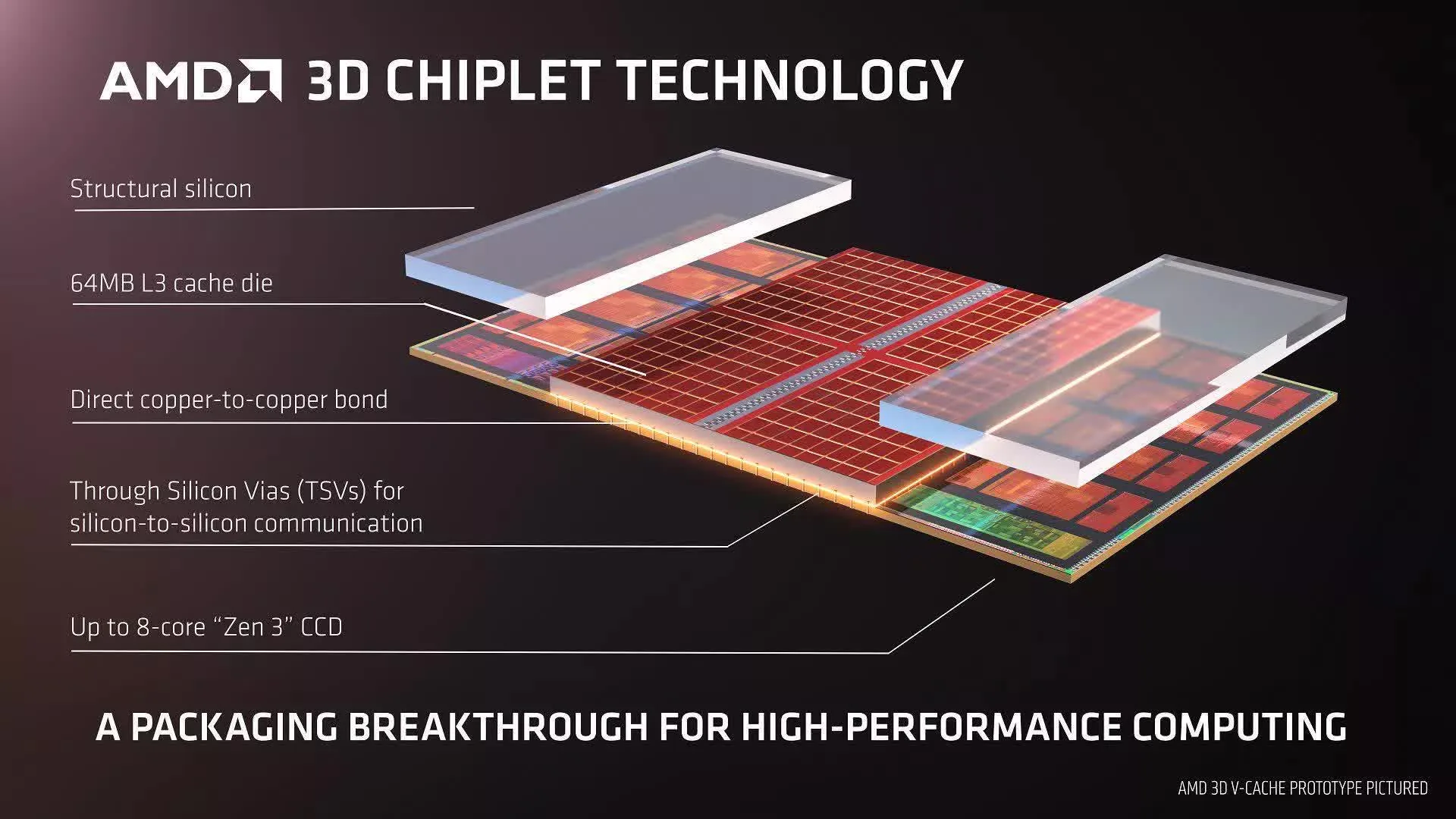
Cache is a small amount of high-speed memory located close to or inside the processor. It stores data and instructions that the CPU may need again.
Without cache, the processor would frequently wait for information to arrive from system RAM. Because RAM is slower than CPU cache, repeated memory access can reduce performance.
Modern processors commonly use several cache levels.
L1 Cache
L1 is generally the smallest and fastest cache level. It is usually located within each CPU core and stores instructions and data needed quickly.
L2 Cache
L2 cache provides additional high-speed storage. It is typically larger than L1 but has higher access latency.
L3 Cache
L3 cache is often larger and may be shared across multiple cores, depending on the architecture. It helps reduce the need to access slower system memory.
Cache size can influence performance in workloads that repeatedly access the same data. However, a larger cache does not automatically make one processor faster than another.
Cache design, latency, memory bandwidth and the application’s access patterns also matter.
8. Instruction Set Architecture: x86-64 and ARM64
Another important part of CPU architecture is the instruction set architecture (ISA). It defines the instructions that software can use to communicate with a processor.
Most traditional Intel and AMD Windows laptops use x86-64 processors. This architecture is widely supported by desktop applications, professional software and operating systems.
ARM-based processors use a different architecture. They are common in smartphones and tablets, but they have also become important in modern laptops.
x86-64 Processors
Intel and AMD laptop processors generally support the x86-64 instruction set. This provides compatibility with a large range of Windows applications and development tools.
Software compatibility is one reason x86 laptops remain common in business and professional environments.
ARM64 Processors
ARM-based laptop processors use an architecture designed around different instruction and implementation principles.
Modern ARM laptops can deliver strong performance and power efficiency. However, application compatibility must be considered because some traditional Windows software may require emulation or a native ARM version.
Microsoft’s Windows on Arm platform has improved support for applications, but compatibility is still worth checking before purchasing a device for specialised work.
Why Architecture Matters to Buyers
A laptop should not be selected using processor speed alone. Consider whether your required applications support the processor architecture and whether peripherals, drivers and professional tools work correctly.
Developers, engineers and users of specialised software should pay particular attention to compatibility before purchasing an ARM-based system.
9. Manufacturing Process: Understanding Nanometres
Processor manufacturers use advanced semiconductor manufacturing processes to create the transistors inside CPUs.
Manufacturing process names are often expressed in nanometres, such as 7nm, 5nm or 3nm. These names are commonly associated with manufacturing generations, but they should not be treated as direct measurements of every transistor dimension.
Smaller process technologies can enable improvements in transistor density, power efficiency and performance. However, the actual results depend on chip design, manufacturing methods and processor implementation.
Two processors manufactured using different process technologies cannot be ranked reliably using nanometre figures alone.
Architecture, core design, power consumption and benchmark results provide a more useful overall comparison.
10. TDP, Processor Power Limits and Laptop Cooling
Power consumption is one of the most important differences between desktop and laptop processors.
Laptop manufacturers must balance performance, battery life, temperature, noise and physical size. Consequently, the same processor family can behave differently in two laptops.
What Is TDP?
Thermal Design Power (TDP) is a processor-related thermal design specification. Its exact interpretation depends on the manufacturer and product family.
It is not necessarily the maximum electricity the processor can consume during demanding workloads.
Intel processors may use power specifications such as Processor Base Power and Maximum Turbo Power. AMD also publishes power-related specifications for its processor families.
Why Laptop Power Limits Matter
A processor may briefly consume more power to achieve high boost performance. If the laptop’s cooling system can manage the resulting heat, the CPU may sustain higher operating frequencies.
In a thin laptop with limited cooling capacity, the processor may reduce its power consumption and clock speed sooner.
This means two laptops with the same CPU model can deliver different sustained performance.
Cooling Affects Real-World Performance
Cooling systems determine how effectively a laptop removes heat from the processor and graphics hardware.
Large heatsinks, effective heat pipes, suitable fans and good ventilation can help maintain performance during demanding workloads.
For a deeper understanding of thermal problems, read our guide to why laptops overheat and how to fix them.
11. Integrated Graphics and Dedicated Graphics
The processor platform also influences how a laptop handles graphics.
Integrated graphics are built into the processor or closely integrated into the same processor package. They use system memory and are generally designed for everyday graphics tasks, video playback and selected creative workloads.
Dedicated graphics processors use separate graphics hardware, usually with their own memory. They are common in gaming laptops and professional systems designed for demanding graphics applications.
However, modern integrated GPUs have become considerably more capable. Some can handle photo editing, light video editing and selected games without a separate graphics card.
When evaluating graphics performance, examine the exact GPU model, memory configuration, power limits and cooling system.
12. NPU: The New AI Processing Component in Modern Laptops
Recent laptop processors increasingly include Neural Processing Units (NPUs). An NPU is a specialised processor designed to accelerate certain artificial intelligence workloads.
Unlike a CPU, which handles a broad range of general computing tasks, an NPU is optimised for particular types of machine-learning operations.
Depending on the platform, NPUs may help with:
- Background noise removal.
- Camera effects and image processing.
- Selected AI-powered productivity features.
- Local machine-learning workloads.
- Some on-device language and image processing tasks.
Not every AI application uses an NPU. Some rely on the CPU, GPU or cloud-based processing instead.
When buying an AI-capable laptop, check the NPU’s capabilities and software compatibility rather than relying entirely on an AI label.
For users who want to understand how these features affect everyday work, see our guide to using AI in business operations.
13. How to Compare Intel and AMD Laptop Processors Properly
Comparing Intel and AMD requires examining the complete processor model and the laptop in which it is installed.
Consider the following factors:
| Specification | What to Examine | Why It Matters |
|---|---|---|
| Architecture | Processor design and generation | Influences instructions per cycle and efficiency |
| Core count | Physical processing cores | Affects parallel workloads |
| Thread count | Supported hardware threads | Influences multitasking and parallel execution |
| Clock speed | Base and boost frequencies | Provides information about operating frequency |
| Cache | L1, L2 and L3 capacity | Influences data access efficiency |
| Power limits | Processor power specifications | Influences sustained performance and battery use |
| Graphics | Integrated or dedicated GPU | Important for visual and creative workloads |
| Memory support | DDR4, DDR5, LPDDR and supported capacity | Affects bandwidth and upgrade options |
| AI hardware | NPU availability and capability | Relevant to supported AI applications |
For reliable processor specifications, consult the official Intel processor product information and AMD laptop processor catalogue.
14. Why an Intel Core i7 Is Not Always Faster Than an Intel Core i5
Processor category labels can be misleading when used without generation and model information.
An older Core i7 may have fewer cores, a less efficient architecture and lower sustained performance than a newer Core i5.
For example, comparing a laptop processor from an older generation with a modern processor requires examining its architecture, core configuration, power limits and benchmark results.
The same principle applies to AMD Ryzen 5 and Ryzen 7 processors.
Do not assume that a higher product tier always wins. The complete processor model is more important than the i5,