
Upgrading RAM is one of the fastest and most affordable ways to improve a UK-used laptop’s performance. Many students in Nigeria buy reliable business laptops such as the HP EliteBook 840 G3 or Dell Latitude 7480; however, some of these systems come with only 4GB RAM. As a result, multitasking, online classes, and browsing can feel slow.
Fortunately, adding more RAM is usually simple and budget-friendly. This guide explains everything students need to know before upgrading.
You can also check upgrade-ready laptops at:
https://psero.com
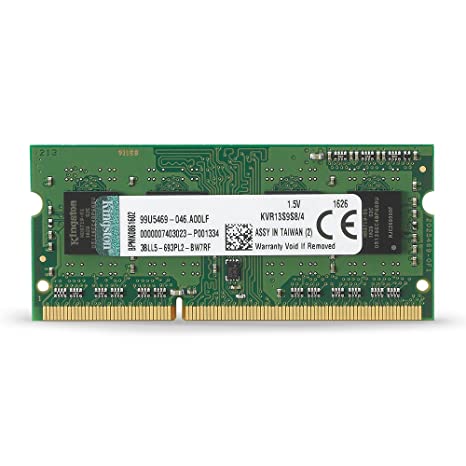
Why Upgrade RAM?
RAM (Random Access Memory) affects how smoothly your laptop runs multiple applications. When RAM is too small, the system starts lagging, freezing, or responding slowly.
After upgrading to 8GB or 16GB RAM, students typically notice:
-
Faster multitasking
-
Smoother Zoom and Google Meet sessions
-
Reduced freezing
-
Better performance in Microsoft Office
-
Improved speed when browsing multiple tabs
Therefore, upgrading RAM is often cheaper and more effective than buying a new laptop.
How Much RAM Do Students Need?
Choosing the right RAM size depends on usage.
4GB RAM – Too small for most students in 2026
8GB RAM – Recommended minimum for university work
16GB RAM – Ideal for programming, design, or heavy multitasking
For most Nigerian students, 8GB is sufficient. However, tech students benefit from 16GB.
Browse laptops with 8GB or 16GB RAM here:
https://psero.com
Step 1: Check If Your Laptop Supports RAM Upgrade
Before buying new RAM, confirm your laptop supports upgrades.
You need to check:
-
Maximum supported RAM
-
RAM type (DDR3 or DDR4)
-
Number of RAM slots available
Business laptops such as the HP EliteBook 840 G4 usually support upgrades up to 16GB or even 32GB. In contrast, some slim ultrabooks have soldered RAM, which cannot be upgraded.
You can confirm compatibility by:
-
Checking your laptop model online
-
Using system tools like Task Manager (Performance > Memory)
-
Consulting your laptop seller
Step 2: Buy the Correct RAM Type
Different laptops require different RAM types. Installing the wrong type will not work.
Common RAM types:
-
DDR3 (older models like EliteBook G2/G3)
-
DDR4 (newer models like G4/G5 and Latitude 7490)
Additionally, RAM speed (measured in MHz) should match your laptop’s supported speed.
If unsure, ask your seller before purchasing.
Step 3: Turn Off and Unplug the Laptop
Safety is important before opening your laptop.
First, shut down the laptop completely.
Next, unplug the charger.
Then, remove the battery if it is removable.
Avoid working on the laptop while it is powered on.
Step 4: Open the Back Panel
Most UK-used business laptops are easy to open.
Use a small screwdriver to remove the screws from the back panel.
After that, carefully lift the cover.
Inside, you will see the RAM slots near the center.
If your laptop has an internal battery, avoid touching other components unnecessarily.
Step 5: Install the New RAM
To insert RAM correctly:
-
Align the RAM notch with the slot
-
Insert at a slight angle (about 30 degrees)
-
Press down gently until it clicks into place
Once secured, close the back panel and tighten the screws.
Step 6: Confirm the Upgrade
After turning the laptop back on:
-
Right-click “This PC”
-
Click “Properties”
-
Check Installed RAM
If the new RAM size appears correctly, the upgrade was successful.
How Much Does RAM Upgrade Cost in Nigeria?
RAM prices vary depending on type and size.
Estimated prices:
-
8GB DDR3: ₦15,000 – ₦25,000
-
8GB DDR4: ₦20,000 – ₦30,000
-
16GB DDR4: ₦35,000 – ₦50,000
Compared to buying a new laptop, upgrading RAM is far more affordable.
You can also buy laptops already upgraded here:
https://psero.com
Signs You Need More RAM
Consider upgrading if:
-
Laptop freezes frequently
-
Browser crashes with many tabs
-
Zoom lags during classes
-
System shows 90–100% memory usage
In these cases, RAM upgrade will significantly improve performance.
RAM Upgrade vs SSD Upgrade – Which Is Better?
Both upgrades improve speed, but they serve different purposes.
-
RAM improves multitasking
-
SSD improves boot speed and overall responsiveness
For best results, students should combine 8GB RAM with at least 256GB SSD.
Explore SSD + 8GB laptops here:
https://psero.com
Should Students Upgrade Themselves or Use a Technician?
Although RAM installation is simple, some students prefer professional help. If you are unsure about opening your laptop, visiting a trusted technician prevents accidental damage.
However, experienced users can safely upgrade at home by following proper steps.
Final Advice for Students
Upgrading RAM is one of the smartest investments for a UK-used laptop. It extends lifespan, improves speed, and supports smoother online learning. Instead of replacing your laptop, upgrading memory often solves most performance issues.
Students who want ready-to-use upgraded laptops can browse verified options here:
https://psero.com