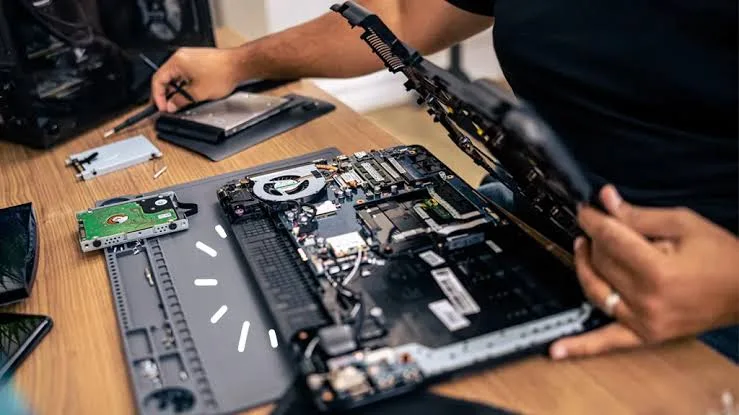
Two laptops can look almost identical from the outside, yet one can be repaired relatively easily while the other can become a headache the moment something goes wrong.
A damaged keyboard, faulty charging circuit, broken hinge or failed storage drive does not necessarily mean the entire laptop is finished. The real question is whether the affected component can be accessed and replaced without turning a simple repair into a major project.
This is where repairability becomes important.
For someone buying a laptop in Nigeria, especially a UK-used machine, repairability can have a direct effect on long-term ownership costs.
What Does Laptop Repairability Mean?
Repairability refers to how easily a laptop can be diagnosed, opened, serviced and repaired when something fails.
A repairable laptop usually has replaceable components, accessible screws, serviceable connectors and a design that does not require unnecessary replacement of an entire assembly.
That does not mean every repair will be cheap. Parts availability, technician skill and the actual fault still matter.
Why Should You Care About Repairability?
Imagine buying a laptop for ₦250,000 and using it for several years.
Eventually, the SSD develops a problem.
If the storage is replaceable, a technician may be able to install another compatible drive. If the storage is soldered to the motherboard, the situation can be considerably more complicated.
The same principle applies to memory, keyboards, fans, batteries and other components.
A laptop that can be repaired component by component can sometimes remain useful for much longer.
The Motherboard Is at the Centre of Everything
The motherboard connects many of the laptop’s major components.
It contains or connects the processor, memory, storage interfaces, power circuitry, display connections, USB ports and other hardware depending on the design.
When a major motherboard component fails, repair can become expensive.
Some faults can be repaired at board level by a skilled technician. Others may require replacing the entire motherboard.
That is one reason motherboard failure is generally more serious than replacing something like an SSD.
Soldered Components Can Change the Repair Equation
Modern laptops increasingly use soldered components.
RAM is one common example.
With soldered memory, you cannot simply remove the old RAM module and install a larger one in the same way you would with a laptop that has accessible memory slots.
Our laptop RAM guide explains the difference between soldered and upgradeable memory and why it matters when choosing a machine.
Storage Can Be Replaceable or Soldered
Storage design also varies.
Many laptops use removable M.2 SSDs, while others may use different storage arrangements.
A replaceable SSD gives you more flexibility if you need additional capacity or the original drive fails.
When buying a used laptop, it is therefore worth knowing whether the storage can actually be replaced.
If you are unfamiliar with M.2 and NVMe storage, our SSD types explained guide provides more detail.
The Keyboard Is Another Important Example
A faulty keyboard is not unusual on a laptop that has seen years of use.
Liquid spills, worn keys and damaged connectors can all cause keyboard problems.
On some laptops, the keyboard can be replaced as a separate component. On others, the keyboard may be integrated into a larger palm-rest or top-case assembly.
That difference can affect both parts cost and labour.
What Happens When a Hinge Breaks?
Hinge repairs demonstrate why physical construction matters.
A simple worn hinge may be manageable. Unfortunately, broken hinge mounts can sometimes damage the surrounding chassis or display assembly.
If the laptop has already suffered physical damage around the hinge, the repair may involve more than replacing the hinge itself.
When buying a used laptop, inspect the hinges carefully rather than assuming a stiff or loose hinge is a minor cosmetic issue.
Fans Are Usually Easier to Understand
Cooling fans are mechanical components, so they can eventually become noisy or fail.
Fortunately, many laptops have replaceable fan assemblies.
Access varies from one model to another, though. A fan that is easy to reach on one machine may require significant disassembly on another.
Dust accumulation is also worth considering, particularly in environments where laptops are frequently used in dusty surroundings.
What About the Battery?
Battery replacement is a normal part of long-term laptop ownership.
Some laptops use batteries that can be removed relatively easily. Others place the battery inside the chassis and require the bottom cover to be removed.
An internal battery is not necessarily a bad design. The important issue is whether a technician can safely access and replace it when necessary.
Glue Can Make Repairs More Difficult
Adhesive has its place in modern electronics, but excessive use can make component replacement more complicated.
A technician may need to carefully separate glued components without damaging surrounding parts.
That can increase labour time and raise the risk of accidental damage during a repair.
When evaluating a laptop for long-term ownership, a design that relies heavily on easily removable screws and connectors can be more service-friendly.
Why Screws and Connectors Matter
A serviceable laptop usually has a logical internal structure.
Screws hold panels together, while connectors allow components to be disconnected without cutting or destroying them.
Good internal design makes diagnosis and component replacement easier.
It also reduces the likelihood that a technician will damage something simply while trying to reach the faulty part.
How to Judge Repairability Without Opening the Laptop
You do not need to dismantle a laptop in a shop to start evaluating its repairability.
First, find the exact model number.
Then research its service documentation, replacement parts and upgrade options.
Manufacturer support pages can be particularly useful because some provide service manuals, maintenance guides or component information.
For example, HP Support provides product and support information for many HP laptop models.
The same approach can be used with other manufacturers: identify the exact model first rather than searching for information about the entire brand.
Repairability and UK-Used Laptops
Repairability deserves particular attention when buying a used laptop because the machine has already accumulated some operating history.
A used laptop can still provide excellent value, but components such as the keyboard, fan, storage drive, hinges and battery may eventually require attention.
That does not mean every used laptop is problematic.
It simply means you should evaluate the machine as a piece of equipment rather than looking only at its processor and RAM.
Our UK-used laptop inspection checklist is useful for checking the condition of a machine before purchase.
Repairability vs Price
A cheaper laptop is not automatically cheaper to own.
Consider two machines with similar specifications.
| Factor | Laptop A | Laptop B |
|---|---|---|
| Purchase price | Lower | Higher |
| RAM | Soldered | Upgradeable |
| SSD | Replaceable | Replaceable |
| Keyboard | Integrated into top assembly | More easily serviceable |
| Long-term flexibility | Lower | Higher |
Laptop A might initially look like the better bargain. Over several years, however, Laptop B could prove easier and cheaper to maintain.
Repairability Does Not Mean You Should Repair Everything
There comes a point where repair no longer makes financial sense.
For example, spending a large amount to repair an old laptop with several unrelated faults may not be sensible when another working machine is available at a reasonable price.
The decision should consider:
- Cost of the repair
- Current value of the laptop
- Age of the machine
- Availability of replacement parts
- Expected remaining lifespan
- Importance of the laptop to your work
When Is a Repair Usually Worth Considering?
Small or isolated problems are often easier to justify.
A replacement SSD, keyboard, fan or charger may make sense when the rest of the laptop is in good condition.
Major motherboard damage is a different situation. Before spending heavily, compare the repair cost with the price of another suitable laptop.
Don’t Ignore Parts Availability in Nigeria
A laptop can be technically repairable while still being difficult to repair locally if replacement parts are hard to find.
This is an important distinction.
A manufacturer may have replacement components available internationally, yet obtaining a specific part in Nigeria could take time or cost significantly more than expected.
Popular business-class laptop models can sometimes have an advantage because compatible replacement parts are easier for technicians and parts sellers to identify.
What Should You Ask a Laptop Seller?
When considering a used laptop, ask questions that go beyond the processor.
- Has the laptop been opened before?
- Has the motherboard ever been repaired?
- Has the screen been replaced?
- Does the keyboard work properly?
- Are the hinges firm?
- Is the SSD replaceable?
- Is the RAM upgradeable?
- Does the charger work correctly?
- Are all major functions working?
You should still test the answers yourself where possible.
Repairability and Buying a Laptop for Business
For someone whose laptop is an important work tool, repairability can be more valuable than it first appears.
A freelancer who depends on a laptop every day cannot afford long periods of downtime.
Having a machine that can be serviced relatively quickly can therefore be an advantage.
If you are choosing a machine for business or freelance work, our guide to laptops for business and freelancing in Nigeria covers other factors worth considering.
Repairability Is Part of the Total Cost
When buying a laptop, most people calculate the purchase price and stop there.
A better approach is to think about the total cost of ownership.
Over the next three or four years, you may need a replacement charger, storage upgrade, battery, keyboard or other component.
A repair-friendly design can make some of those future expenses easier to manage.
The Bottom Line
Repairability is one of the least discussed laptop specifications, yet it can have a major effect on long-term value.
Upgradeable RAM, replaceable storage, accessible components and sensible internal construction can make maintenance easier. Soldered parts, glued assemblies and difficult-to-source components can make certain repairs more complicated.
None of this means you should reject every thin or modern laptop. Design priorities differ, and some compact machines offer excellent reliability despite limited upgradeability.
The smarter approach is to understand what you are buying.
Don’t ask only, “How powerful is this laptop?” Ask, “What happens when something eventually goes wrong?”
That question can help you choose a machine that remains useful long after the excitement of the initial purchase has disappeared.