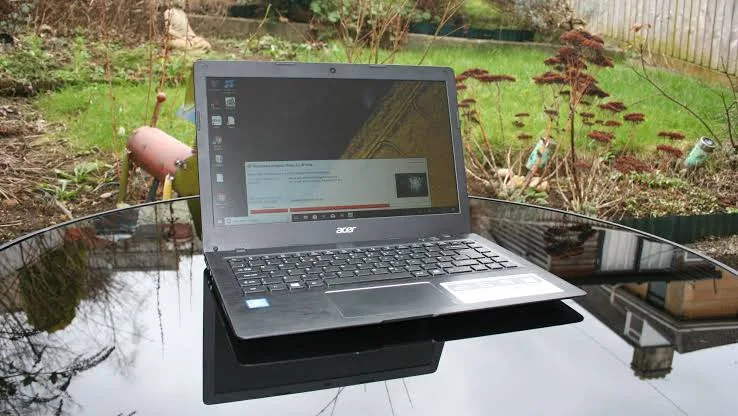
The Acer Swift 1 is an entry-level ultrabook designed for everyday use rather than heavy workloads. It aims to deliver portability, decent battery life, and smooth performance for basic tasks — all at an affordable price. But is it worth buying, especially in Nigeria where users juggle online classes, browsing, and productivity tools?
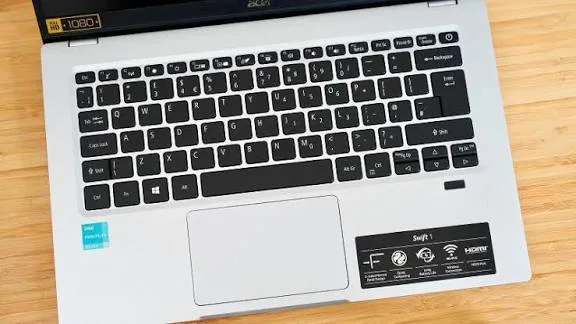
In this review, we break down how the Swift 1 performs in real use, what it does well, and where it struggles — so you know exactly what to expect.
Quick Overview: What the Acer Swift 1 Is
The Acer Swift 1 sits at the affordable end of the ultrabook market. It typically comes with:
-
Energy-efficient Intel or AMD processors
-
4–8GB of RAM
-
128GB–256GB SSD storage
-
14-inch Full HD display
-
Lightweight aluminum or metal-coated chassis
The idea is a lightweight, everyday laptop that’s great for basic workflows like browsing, typing, and media.
Design and Build Quality: Slim and Light
Right away, the Swift 1 impresses with its portability:
-
Slim and feather-light design
-
Solid build quality for its price range
-
Minimalist and professional look
This makes it easy to carry between classes, offices, or work sessions — a clear advantage for students and remote workers who move a lot during the day.
Display: Adequate for Everyday Use
The typical Acer Swift 1 model features a 14-inch Full HD (1920×1080) display. In real use, it delivers:
-
Clear text for documents and emails
-
Comfortable viewing for streaming videos
-
Decent color accuracy for basic tasks
However, it’s not ideal for professional photo editing or detailed color work. For everyday web use, presentations, and online classes, the screen is perfectly adequate.
Performance: Mostly Smooth for Light Tasks
The Swift 1 is designed for light workflows, and that’s exactly where it performs best. Typical configurations include:
-
Intel Pentium or Intel Core i3 / AMD equivalents
-
4–8GB RAM
-
SSD storage
In real-world usage, this translates to smooth handling of:
-
Web browsing with multiple tabs
-
Word processing (essays, reports)
-
Spreadsheets and presentations
-
Email and research tasks
-
Video calls (Zoom, Google Meet, Teams)
For these tasks, the Swift 1 rarely lags. However, when pushed into heavier workloads like video editing, advanced programming IDEs, or large multitasking sessions, the performance becomes noticeably limited.
Battery Life: Long Enough for Most Days
Battery life is one of the Swift 1’s strengths. In practical use:
-
Basic productivity and browsing: 6–8 hours
-
Mixed use with video calls: 4–6 hours
-
Streaming and media playback: 5–7 hours
This makes the Swift 1 a good choice if you attend back-to-back classes, work remotely, or study in locations without frequent access to power.
Keyboard and Touchpad: Comfortable for Productivity
Typing and navigation matter, especially for students or office users.
On the Swift 1:
-
Keyboard is comfortable and responsive
-
Key travel is adequate for long typing sessions
-
Touchpad is accurate and fluid
While not as premium as higher-end models, the typing experience is reliable for everyday work.
Storage and Everyday Responsiveness
Most Acer Swift 1 units come with SSD storage, which significantly improves overall responsiveness:
-
Faster boot times
-
Quick app opening
-
Snappy navigation
Even with modest hardware, SSD makes a noticeable difference compared with traditional HDD laptops.
Ports and Connectivity
For an everyday laptop, the Swift 1 has a practical selection of ports:
-
USB-A ports
-
USB-C port
-
HDMI (in many models)
-
Audio jack
-
Optional microSD card reader
This flexibility makes it easier to connect external drives, displays, and headphones — especially useful during presentations and group work.
Pros and Cons for Light Tasks
Pros
-
Slim and lightweight — great for mobility
-
Decent battery life for daily use
-
Comfortable keyboard for typing
-
SSD storage improves responsiveness
-
Affordable price point
Cons
-
Limited performance for heavy tasks
-
4GB RAM variants struggle with extensive multitasking
-
Not ideal for video editing or advanced creative software
Who the Acer Swift 1 Is Best For
The Acer Swift 1 is ideal for:
-
Students attending online classes
-
Writers and researchers
-
Office workers handling documents and emails
-
Remote workers with web-based workflows
It is not recommended for:
-
High-end gaming
-
Video editing or 3D rendering work
-
Large software development IDEs with heavy workloads
Practical Verdict
The Acer Swift 1 is a practical laptop for light tasks such as browsing, typing, online meetings, and everyday productivity. It is especially suited for Nigerian users who need an affordable, lightweight device with reliable battery life.
However, it is not designed for heavy workloads or demanding software. If your use case involves advanced video editing, large development projects, or high-performance tasks, a laptop with stronger CPU and more RAM would be a better choice.
For tested and delivery-ready Swift 1 laptops in Nigeria, start here:
https://psero.com
If you want, I can also create:
-
A budget comparison table for light-task laptops
-
A student-focused buying checklist
-
A side-by-side performance comparison with Acer Aspire or Swift 3
Just tell me what you want next.
Here is a clean, SEO-ready review you can publish titled “ASUS ExpertBook Review for Business Users” — with clear subheadings and practical insights for students, professionals, and corporate buyers in Nigeria.
ASUS ExpertBook Review for Business Users (2026 Guide)
The ASUS ExpertBook series is designed specifically for business users who need reliability, performance, security features, and all-day productivity. Whether you are a manager, consultant, remote professional, or student focused on business coursework, this review explains whether the ExpertBook delivers where it matters most.
Quick Overview: What the ExpertBook Is
The ASUS ExpertBook is a business-focused laptop lineup that prioritizes:
-
Lightweight and portable design
-
Strong battery life
-
Business-grade security
-
Stable performance for daily workflows
These laptops compete with business models like Lenovo ThinkPad, Dell Latitude, and HP EliteBook.
Design and Build Quality
The ExpertBook feels professional and durable:
-
Sleek, minimalist design that matches business settings
-
Solid aluminum chassis that resists wear
-
Lightweight construction for daily mobility
Business users who travel or attend meetings benefit from the ExpertBook’s portability without sacrificing structural integrity.
Display: Clear and Comfortable
Most ExpertBook models come with a 14-inch Full HD (1920×1080) display.
In real use:
-
Text and spreadsheets are easy to read
-
Video calls and presentations look clear
-
Screen brightness is usually adequate for indoor and office environments
The display is sized for productivity rather than entertainment, and it performs well in business contexts.
Keyboard and Typing Experience
ASUS places emphasis on typing comfort for business users. On the ExpertBook:
-
Keys have solid travel and responsiveness
-
Layout is comfortable for typing emails, reports, and proposals
-
Backlit keyboard options improve usability in low-light environments
This makes the ExpertBook ideal for professionals who spend hours typing documents or coding.
Performance: Day-to-Day Business Workloads
ExpertBook configurations vary, but common specs include:
-
Intel Core i5 / i7 processors
-
8GB to 16GB RAM
-
SSD storage (256GB or larger)
In practical use, this means reliable performance for:
-
Email and calendar apps
-
Word processing and spreadsheets
-
Project management tools
-
Web browsing with many tabs
-
Video conferencing (Zoom, Teams, Meet)
Even with many apps open simultaneously, the ExpertBook rarely feels sluggish thanks to SSD storage and efficient CPU performance.
Battery Life: All-Day Productivity
Business users often work away from power outlets — in meetings, coworking spaces, or during travel.
Typical battery performance includes:
-
Light productivity: 8–10 hours
-
Mixed use (documents + meetings): 6–8 hours
-
Heavy multitasking: 5–7 hours
This level of battery life comfortably supports:
-
Full workdays
-
Back-to-back meetings
-
Presentations on the go
For many business users in Nigeria, this reduces dependence on constant charging.
Connectivity and Ports
A key business need is flexible connectivity.
The ExpertBook usually includes:
-
USB-C with power and display support
-
USB-A ports
-
HDMI for external presentations
-
Audio jack
-
Optional Ethernet via adapter
These ports make it easy to connect:
-
Projectors and displays during presentations
-
USB drives and external storage
-
Headsets for virtual meetings
Overall, connectivity is solid for daily business tasks.
Security Features
Business users care about security, and ExpertBook models include features like:
-
Fingerprint sensor
-
TPM security chip
-
BIOS-level protections
These help protect sensitive work files, company data, and user credentials — a real advantage compared with consumer laptops that lack such security.
Pros and Cons for Business Users
Pros
-
Lightweight and professional design
-
Comfortable typing experience
-
Good battery life for all-day use
-
Solid performance for office apps
-
Business-grade security features
-
Reliable connectivity options
Cons
-
Not designed for heavy creative workloads
-
Not ideal for intensive gaming or 3D design
-
Premium configurations can be pricey
Who the ASUS ExpertBook Is Best For
The ExpertBook is ideal for:
-
Corporate professionals
-
Business students and MBA candidates
-
Remote workers
-
Consultants and project managers
-
Entrepreneurs and SME owners
It shines in everyday business tasks such as:
-
Presentations and reports
-
Email and scheduling
-
Video conferencing
-
Data entry and analysis
-
Document collaboration
How It Compares With Business Competitors
| Feature | ASUS ExpertBook | ThinkPad / Latitude / EliteBook |
|---|---|---|
| Build Quality | Strong | Strong |
| Keyboard Comfort | Good | Excellent |
| Battery Life | Very Good | Very Good |
| Security Features | Good | Excellent |
| Price | Competitive | Often higher |
| Service & Support | Good | Often stronger |
The ExpertBook often delivers solid value, while competitors may have stronger keyboards or support ecosystems.
Final Thoughts
The ASUS ExpertBook is a solid choice for business users who want a reliable, portable, and secure laptop for all-day productivity. It hits the key points that matter for professionals:
-
Long battery life
-
Comfortable typing and build quality
-
Balanced performance for everyday business apps
-
Practical connectivity and security features
If you want help finding a tested Expert book with verified battery health and delivery options in Nigeria, you can explore listings here:
https://psero.com