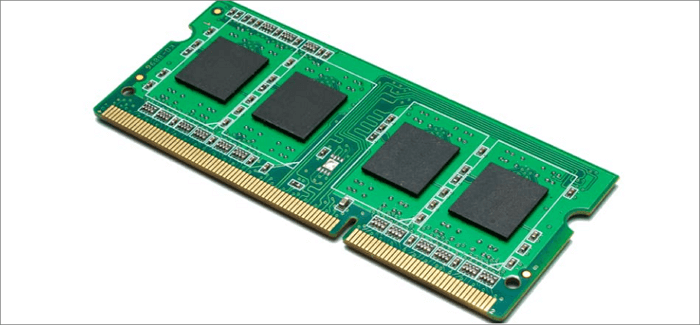
If your laptop has become frustratingly slow when opening applications, switching between browser tabs, attending Zoom meetings, or running office software, the problem may not be your processor. In many cases, insufficient RAM is the real bottleneck.
Fortunately, upgrading laptop RAM is one of the easiest and most affordable ways to improve performance. Better still, many Nigerians can perform this upgrade themselves without paying a technician.
In this detailed guide, you’ll learn how RAM works, how to know if your laptop can be upgraded, where to buy genuine RAM in Nigeria, and the exact steps to install it safely.
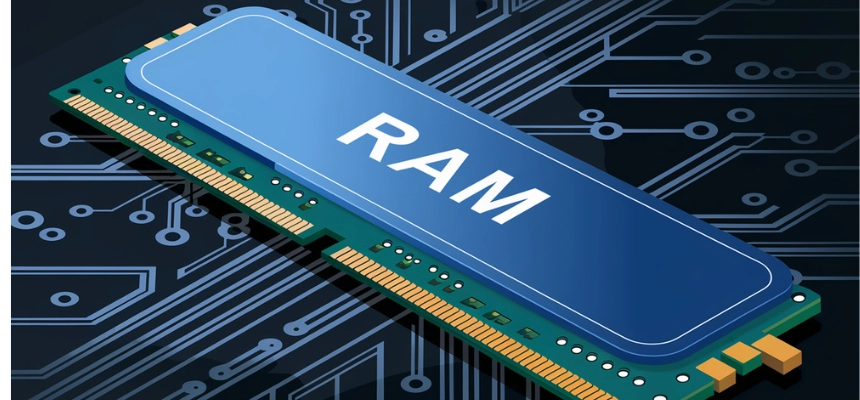
What Is RAM and Why Is It Important?
RAM (Random Access Memory) is the temporary workspace your laptop uses while applications are running.
Every time you open Chrome, Microsoft Word, Zoom, Excel, Photoshop, or multiple tabs simultaneously, your laptop stores active information in RAM.
The more RAM available, the more tasks your laptop can handle without slowing down.
For example:
- 4GB RAM = Basic browsing and office work
- 8GB RAM = Students and general professionals
- 16GB RAM = Programming, content creation, multitasking
- 32GB RAM+ = Professional editing, engineering software, virtual machines
If your laptop constantly freezes, hangs, or becomes slow when several programs are open, upgrading RAM may dramatically improve performance.
Signs Your Laptop Needs More RAM
Before spending money on an upgrade, watch for these common warning signs:
- Applications take too long to open
- Browser tabs reload automatically
- System freezes frequently
- Slow performance during Zoom meetings
- Laptop becomes sluggish while multitasking
- Microsoft Excel struggles with large files
- Video editing software crashes often
If you experience several of these problems, upgrading RAM may be a smart investment.
How Much RAM Do Nigerians Need in 2026?
The answer depends on your work.
| User Type | Recommended RAM |
|---|---|
| Secondary School Student | 8GB |
| University Student | 8GB – 16GB |
| Office Worker | 16GB |
| Programmer | 16GB – 32GB |
| Video Editor | 16GB – 32GB |
| Virtual Assistant | 16GB |
| Graphic Designer | 16GB+ |
In 2026, 16GB RAM has become the sweet spot for most professionals in Nigeria.
Step 1: Check Your Current RAM
Before buying anything, determine how much RAM is currently installed.
On Windows:
- Press Ctrl + Shift + Esc
- Open Task Manager
- Click Performance
- Select Memory
You will see:
- Total RAM installed
- RAM speed
- Available RAM slots
- Current usage
Write this information down before proceeding.
Step 2: Confirm Whether Your Laptop Supports RAM Upgrades

Not every laptop allows RAM upgrades.
Some modern ultrabooks and certain MacBooks have RAM permanently soldered to the motherboard.
Search your laptop model online and check the manufacturer’s specifications.
Useful resources:
These tools can tell you:
- Maximum supported RAM
- Compatible memory type
- Number of available slots
Step 3: Identify the Correct RAM Type
Buying the wrong RAM is one of the most common mistakes Nigerians make.
Common laptop RAM types include:
- DDR3
- DDR3L
- DDR4
- DDR5
You must match your laptop’s specifications exactly.
For instance, a DDR4 slot cannot use DDR3 RAM.
Similarly, speed compatibility matters.
Always verify before making payment.
Step 4: Buy Genuine RAM in Nigeria
Counterfeit computer components remain a problem in some markets.
Therefore, buy from trusted sellers only.
Reliable brands include:
- Kingston
- Crucial
- Samsung
- Corsair
- SK Hynix
When shopping, avoid unusually cheap offers because fake RAM modules often fail quickly.
For more laptop buying guides, check related articles on Psero:
- Core i3 vs Core i5 vs Core i7
- 8GB vs 16GB RAM Comparison
- UK Used Laptop Inspection Guide
- Why SSD Matters More Than HDD
Tools You Need Before Opening the Laptop
The good news is that you only need a few simple tools:
- Small screwdriver set
- Clean workspace
- Microfiber cloth
- Anti-static precautions
Always shut down the laptop completely before opening it.
Step 5: Remove the Back Cover Carefully
Next, disconnect the charger and power off the device.
Then:
- Turn the laptop upside down
- Remove all visible screws
- Use a plastic pry tool if necessary
- Lift the cover gently
Avoid forcing the cover open because hidden clips can break.
Step 6: Locate the RAM Slot
After opening the laptop, identify the RAM compartment.
Most laptops have one or two memory slots.
You will see a rectangular memory stick secured by side clips.
If a slot is empty, installation becomes much easier.
Step 7: Install the New RAM Module
Now comes the actual upgrade.
- Align the notch correctly
- Insert the RAM at an angle
- Push gently until fully seated
- Press downward until the clips lock
Do not force the module.
If it doesn’t fit naturally, double-check compatibility.
Step 8: Reassemble the Laptop
Once the RAM is secured:
- Replace the back cover
- Tighten screws carefully
- Reconnect the charger
- Power on the laptop
The first boot may take slightly longer than usual.
Step 9: Verify the Upgrade
After Windows loads:
- Open Task Manager
- Select Performance
- Click Memory
You should now see the new RAM capacity displayed.
For example:
- 8GB upgraded to 16GB
- 16GB upgraded to 32GB
Common Mistakes to Avoid
- Buying incompatible RAM
- Ignoring RAM speed requirements
- Touching memory contacts directly
- Forcing RAM into the slot
- Buying counterfeit memory modules
- Opening the laptop while plugged into power
Avoiding these mistakes can save you money and prevent hardware damage.
How Much Does RAM Upgrade Cost in Nigeria in 2026?
Prices vary based on capacity and memory type.
- 8GB DDR4: ₦15,000 – ₦30,000
- 16GB DDR4: ₦30,000 – ₦60,000
- 32GB DDR4: ₦60,000 – ₦120,000+
- DDR5 modules generally cost more
Although prices fluctuate, upgrading RAM remains one of the most cost-effective performance improvements available.
Final Thoughts
Learning how to upgrade your laptop RAM without visiting a technician can save money and extend the life of your computer significantly. Furthermore, the process is easier than many Nigerians think.
Whether you’re a student, freelancer, programmer, content creator, business owner, or remote worker, additional RAM can transform an aging laptop into a much faster and more productive machine.
Most importantly, always verify compatibility, buy genuine components, and follow the installation steps carefully. As a result, you’ll enjoy smoother multitasking, faster application performance, and a better overall computing experience in 2026 and beyond.