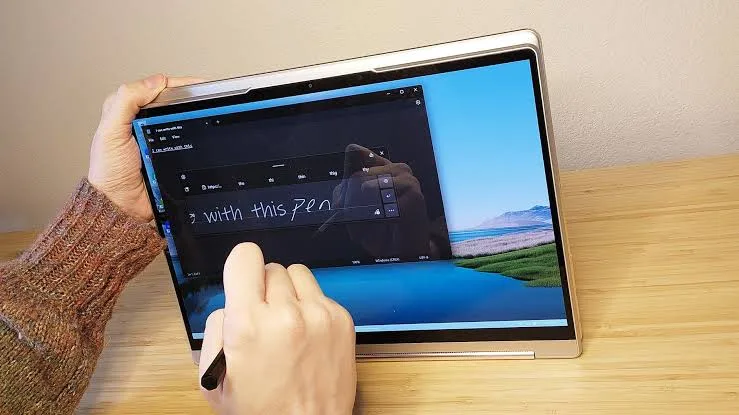
Touchscreens are no longer limited to smartphones and tablets. Many laptops now allow you to interact with Windows by tapping, swiping and scrolling directly on the display.
For some users, a touchscreen can make a laptop more convenient and flexible. For others, it may add cost without providing much practical benefit.
Before spending extra money on a touchscreen laptop in Nigeria, it is worth understanding what you are actually getting.

What Is a Touchscreen Laptop?
A touchscreen laptop has a display that can detect physical touch. Instead of relying entirely on a mouse or touchpad, you can interact directly with compatible applications and Windows features.
Depending on the model, the screen may support simple taps and scrolling or more advanced multi-touch gestures and pen input.
How Does a Laptop Touchscreen Work?
Most modern laptop touchscreens use a touch-sensitive layer integrated with the display. When you touch the screen, the system detects the location of the contact and sends that information to Windows.
This allows you to select items, scroll through pages, zoom into photographs and perform other supported actions.
Advantages of a Touchscreen Laptop
1. Direct Interaction
A touchscreen lets you interact directly with items on the display. This can feel natural when browsing photographs, maps, presentations and certain applications.
2. Useful for Presentations
Touch input can be convenient when presenting information to another person. Instead of constantly reaching for the touchpad, you can interact directly with the screen.
3. Helpful for Creative Work
Some touchscreen laptops support active pens. Artists, designers and students can use compatible styluses for handwriting, drawing and annotation.
4. Convenient in Tablet Mode
On a 2-in-1 convertible laptop, the touchscreen becomes particularly useful when the keyboard is folded behind the display or the device is used in another supported mode.
Disadvantages of Touchscreen Laptops
Touchscreen technology also comes with trade-offs.
- Touchscreen models can cost more.
- Touch input can consume additional power.
- Fingerprints can accumulate on the display.
- The screen may be more reflective on some models.
- A touchscreen is unnecessary for many traditional laptop tasks.
Does a Touchscreen Reduce Battery Life?
It can contribute to power consumption, although battery life depends on many other factors as well. Processor efficiency, display brightness, battery capacity, refresh rate and software can all affect how long a laptop lasts away from a charger.
Therefore, do not assume that every touchscreen laptop has poor battery life.
Touchscreen vs Non-Touchscreen Laptop
| Feature | Touchscreen | Non-Touchscreen |
|---|---|---|
| Touch Input | Yes | No |
| Direct Screen Interaction | Yes | Requires touchpad or mouse |
| Fingerprints | More likely | Less likely |
| Potential Cost | Often higher | Usually lower |
| 2-in-1 Compatibility | Common | Less suitable |
Who Should Buy a Touchscreen Laptop?
A touchscreen may be worthwhile if you regularly use applications that benefit from direct interaction.
- Students who annotate documents
- Artists and digital creators
- People who take handwritten notes
- Presenters
- Users who prefer touch navigation
- People buying 2-in-1 convertible laptops
Who Probably Does Not Need One?
If you mainly type documents, browse websites, use spreadsheets or work with business software, a traditional non-touchscreen laptop may provide better value.
You can put the money saved towards more RAM, a larger SSD, a better processor or a higher-quality display.
What About Students in Nigeria?
A touchscreen can be convenient for students, but it should not automatically be the priority.
For most students, specifications such as adequate RAM, SSD storage, battery condition and a comfortable keyboard will have a larger impact on everyday schoolwork.
What About 2-in-1 Laptops?
Touchscreens make the most sense on convertible laptops designed to change between laptop and tablet-style modes.
If you are specifically interested in a 2-in-1, make sure the hinge feels strong and the touchscreen responds accurately across the display.
How to Test a Used Touchscreen Laptop
If you are buying a UK used touchscreen laptop, test the entire display before paying.
Tap different areas of the screen and confirm that Windows responds correctly. Try scrolling, zooming and other basic gestures. If the laptop supports a stylus, test that as well.
Also inspect the display for cracks, scratches, dead pixels, unusual brightness changes and visible touch-layer damage.
Does a Touchscreen Mean the Laptop Supports a Pen?
No. A touchscreen and active pen support are not necessarily the same thing.
Some touchscreens support only finger input, while compatible models can recognise an active stylus with additional pressure and precision features.
Always check the exact laptop model before purchasing a pen.
Things to Check Before Buying
- Touchscreen responsiveness
- Display resolution
- Brightness
- Viewing angles
- Refresh rate
- Pen compatibility if required
- Battery condition
- Hinge condition on convertible models
Related PSERO Guides
- Should You Buy a 2-in-1 Convertible Touchscreen Laptop?
- How to Tell If a Laptop Has a Good Display
- What Is a Laptop Refresh Rate?
- HD vs Full HD vs 2K vs 4K Explained
- How to Test a Used Laptop Before Buying
Shop Laptops at PSERO
Useful Official Resources
For detailed information about touchscreen capabilities, check the official specifications from manufacturers such as HP, Dell, Lenovo and Microsoft Surface.
Final Verdict
A touchscreen can be a useful laptop feature, but it is not essential for everyone. If you frequently use touch input, draw, annotate documents or want a 2-in-1 convertible, it can be worth paying extra.
For ordinary office work, browsing and typing, however, a non-touchscreen laptop may offer better value. Before buying, consider how you actually use your laptop rather than paying more simply because a touchscreen sounds attractive.