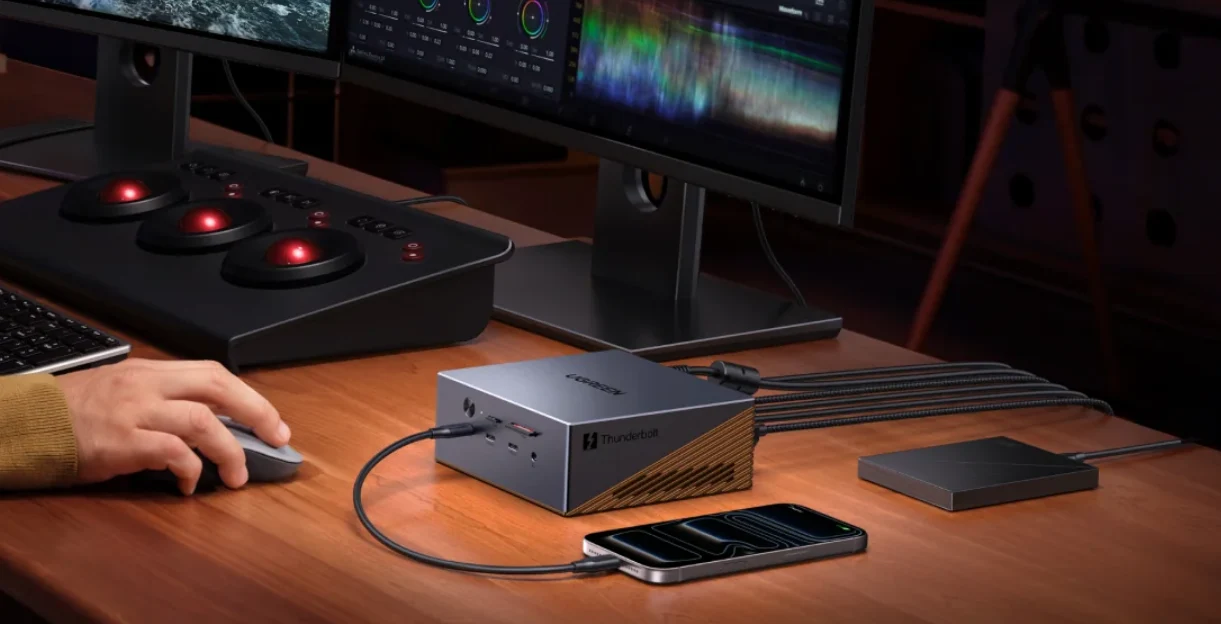
Modern laptops are becoming thinner and more dependent on USB-C connectivity. However, not every USB-C port provides the same capabilities. Some support charging and basic data transfer, while others can connect high-speed storage, multiple displays, docks and other demanding accessories.
This is where Thunderbolt becomes important. Thunderbolt is a high-speed connectivity technology that can carry data, video and power through a compatible USB-C connector.
For anyone buying a laptop in 2026, understanding Thunderbolt can help prevent an expensive mistake: assuming that every USB-C port can do everything.

What Is Thunderbolt?
Thunderbolt is a high-speed connection technology developed by Intel in collaboration with other industry partners. Modern Thunderbolt connections use the USB-C connector, but Thunderbolt provides capabilities beyond what a basic USB-C port necessarily offers.
Intel describes Thunderbolt as a connection technology capable of carrying data, video and power through a single port. Its current Thunderbolt technology also supports features such as high-speed storage and external displays. (Intel Thunderbolt)
Is Thunderbolt the Same as USB-C?
No.
USB-C describes the physical connector. Thunderbolt describes a connectivity technology that can use that connector.
This distinction is extremely important when buying a laptop. Two computers may both have USB-C ports, yet one may support Thunderbolt while the other supports only ordinary USB functions.
Therefore, never assume that a USB-C port automatically provides Thunderbolt-level performance.
What Can You Connect to Thunderbolt?
A compatible Thunderbolt port can support a wide range of devices, depending on the laptop and the particular Thunderbolt generation.
- External SSDs
- Thunderbolt docks
- External monitors
- Professional displays
- External storage arrays
- Audio interfaces
- Capture devices
- Networking accessories
- Other high-speed peripherals
This makes Thunderbolt particularly useful for professionals who want to turn a laptop into a desktop-style workstation when they are at home or in the office.
What Is Thunderbolt 4?
Thunderbolt 4 is one of the most widely recognised recent Thunderbolt standards.
It uses the USB-C connector and provides up to 40 Gbps of bandwidth. Thunderbolt 4 also has requirements around features such as display support, PCIe performance and connectivity that help distinguish it from ordinary USB-C implementations.
Intel lists Thunderbolt 4 with up to 40 Gbps bandwidth and support for connecting displays, storage and other peripherals through compatible systems. (Intel Thunderbolt 4)
What Is Thunderbolt 5?
Thunderbolt 5 is the newer generation of the technology.
It increases the headline bandwidth substantially compared with Thunderbolt 4 and is designed for demanding workloads involving high-resolution displays, storage and professional peripherals.
Intel states that Thunderbolt 5 can provide up to 80 Gbps of bidirectional bandwidth, with Bandwidth Boost enabling up to 120 Gbps in certain display-intensive scenarios. (Intel Thunderbolt 5)
This makes Thunderbolt 5 particularly interesting for high-end workstations, content creators and users working with several demanding peripherals.
Is Thunderbolt 5 Better Than Thunderbolt 4?
Yes, in terms of maximum bandwidth and supported capabilities.
However, more bandwidth does not automatically make every laptop faster. If you only connect a mouse, keyboard, printer and ordinary external hard drive, you may never benefit from the additional bandwidth.
Thunderbolt 5 becomes more attractive when your workload involves high-speed external SSDs, multiple high-resolution displays or other bandwidth-intensive peripherals.
Can Thunderbolt Connect an External GPU?
Thunderbolt can be used with compatible external GPU enclosures, although compatibility and performance depend on the specific laptop, enclosure, graphics card and software.
An external GPU can allow a compatible laptop to use desktop-class graphics hardware without permanently installing that graphics card inside the computer.
However, external GPU performance can differ from installing the same graphics card directly into a desktop because the connection between the laptop and enclosure introduces bandwidth limitations.
Can Thunderbolt Connect Multiple Monitors?
Yes, compatible Thunderbolt systems can support multiple displays depending on the laptop’s graphics capabilities, Thunderbolt version, monitor configuration and dock.
This is one reason Thunderbolt is popular among professionals.
Someone working with spreadsheets, programming environments, video editing software or financial applications can connect a laptop to a dock and use multiple external displays while keeping the laptop itself as the main computer.
Can Thunderbolt Charge a Laptop?
The USB-C connector used by Thunderbolt can support USB Power Delivery, but the exact charging capability depends on the laptop and charger.
Therefore, the presence of a Thunderbolt port does not automatically tell you the maximum charging wattage of the laptop.
Always check the manufacturer’s specifications if charging speed is important.
Can Thunderbolt Replace a Docking Station?
Thunderbolt does not replace the docking station itself, but it can make a single-cable docking setup extremely powerful.
A compatible Thunderbolt dock can provide connections for displays, Ethernet, USB accessories, storage and other peripherals through one cable connected to the laptop.
This is particularly convenient for people who carry their laptop between home and work.
Why Is Thunderbolt Useful for Business Laptops?
Business users often need to connect their laptops to several devices at once.
For example, a workstation might require two monitors, Ethernet, a keyboard, mouse, external storage and other USB accessories.
Instead of plugging everything directly into the laptop, a Thunderbolt dock can provide a central connection point.
That makes it easier to disconnect the laptop when leaving the desk and reconnect it later with a single cable.
Why Is Thunderbolt Useful for Video Editors?
Video editing can involve large files that are inconvenient to keep entirely on the laptop’s internal drive.
A fast external SSD connected through Thunderbolt can provide high-speed access to large project files, footage and editing assets.
For professionals working with high-resolution video, the additional bandwidth available from newer Thunderbolt generations can be particularly useful.
Why Is Thunderbolt Useful for Photographers?
Photographers frequently work with large RAW image libraries and high-resolution photographs.
Fast external storage can make it easier to move and edit large collections without relying entirely on the laptop’s internal storage.
A Thunderbolt-compatible external SSD can therefore be a useful addition to a professional photography setup.
Is Thunderbolt Useful for Students?
For many students, Thunderbolt is not essential.
If you mainly use your laptop for web browsing, Microsoft Office, research and online classes, ordinary USB-C and USB-A ports may already provide everything you need.
However, students studying engineering, architecture, film production, computer science or other technical subjects may benefit from having faster external connectivity.
Is Thunderbolt Useful for Gamers?
Thunderbolt can be useful to gamers, especially if they use external storage, docking stations or an external GPU.
Nevertheless, gaming performance still depends primarily on the laptop’s CPU, GPU, cooling system and display.
If you are comparing gaming laptops, do not choose a weaker graphics card simply because another model has Thunderbolt.
How Do You Know If a Laptop Has Thunderbolt?
Look at the manufacturer’s specifications for the exact model.
The physical USB-C port may include a Thunderbolt symbol, although markings can vary between devices.
On many Intel-powered laptops, the Thunderbolt logo can help identify compatible ports, but checking the official specifications is still the safest method.
This is especially important when buying used laptops because sellers sometimes describe every USB-C port as “Thunderbolt” without verifying the actual specification.
If you are checking a used laptop before buying, our used laptop inspection guide can help you check ports and other important hardware.
What Is the Difference Between USB4 and Thunderbolt?
USB4 and Thunderbolt 4 are closely related technologies, but they are not simply different names for exactly the same thing.
USB4 provides a flexible specification with different levels of capability, while Thunderbolt has specific certification and feature requirements.
As a result, two USB-C ports can have different capabilities even when they look identical.
This is why checking the actual specification matters more than judging a laptop by the shape of its connector.
Can You Connect a USB Device to Thunderbolt?
Yes. Thunderbolt ports are designed to support a range of compatible USB devices and other peripherals.
However, the speed of the connected device will depend on the device itself and the connection standard it supports.
Connecting an ordinary USB storage device to a Thunderbolt port does not magically make that storage device operate at Thunderbolt speeds.
Does Thunderbolt Make an External SSD Faster?
It can, provided the SSD and enclosure are capable of taking advantage of the available bandwidth.
A slow external drive will remain slow regardless of whether it is connected through Thunderbolt.
For this reason, the complete storage chain matters: the SSD, enclosure, cable, laptop port and operating system must all support the desired performance.
Why Does the Thunderbolt Cable Matter?
Not every USB-C cable supports every USB or Thunderbolt feature.
Some USB-C cables are designed primarily for charging, while others support high-speed data transfer and video.
Thunderbolt systems may therefore require appropriate certified cables to achieve their intended capabilities.
If a high-speed external SSD or display is performing below expectations, the cable can be one of the things worth checking.
Does Every USB-C Laptop Have Thunderbolt?
No.
This is one of the most important things to remember.
A laptop may have USB-C charging, USB-C data transfer or USB-C display output without supporting Thunderbolt.
Therefore, when comparing laptops, do not simply count how many USB-C ports they have. Check what each port actually supports.
What About Thunderbolt on Used Laptops?
Thunderbolt can be particularly valuable when buying a used business or professional laptop because older premium machines may still offer excellent docking and external-display capabilities.
However, inspect the physical port carefully and verify the exact laptop model before purchasing.
Some machines may have multiple USB-C ports with different capabilities. Checking the exact specification can prevent you from buying a laptop expecting Thunderbolt when the port only supports standard USB functionality.
If you are comparing older business laptops, you can also use this laptop comparison guide to evaluate the processor, RAM, storage, display and connectivity together.
Should You Buy a Laptop With Thunderbolt in 2026?
If you regularly use external displays, fast external storage, docking stations or professional peripherals, Thunderbolt can be extremely useful.
For ordinary laptop users, however, it may not be worth paying a large premium for.
For example, if two laptops have similar processors and displays but one includes Thunderbolt at only a small additional cost, choosing the Thunderbolt model could make sense for future flexibility.
On the other hand, if the Thunderbolt model costs substantially more while offering less RAM or a weaker processor, the cheaper machine may provide better overall value.
Thunderbolt 4 vs Thunderbolt 5: Which Should You Choose?
| Feature | Thunderbolt 4 | Thunderbolt 5 |
|---|---|---|
| Maximum headline bandwidth | Up to 40 Gbps | Up to 80 Gbps |
| Display-focused bandwidth boost | More limited | Up to 120 Gbps in supported scenarios |
| Best suited for | Docks, storage and multiple displays | High-end displays, storage and demanding professional setups |
Intel’s Thunderbolt 5 documentation explains that the newer standard doubles the baseline bidirectional bandwidth to 80 Gbps and can dynamically provide up to 120 Gbps for certain display-heavy workloads. (Intel Thunderbolt 5)
Final Verdict
Thunderbolt is one of the most useful technologies available on modern laptops, particularly for people who need fast external storage, multiple displays, docking stations or professional peripherals.
However, the most important lesson is that USB-C does not automatically mean Thunderbolt. The connector may look identical while the capabilities are completely different.
For a new laptop in 2026, Thunderbolt 4 is already a powerful connectivity option, while Thunderbolt 5 is particularly attractive for users with demanding professional setups. If you are a typical student or office user, standard USB-C may be enough.
Ultimately, choose the laptop according to how you actually work. A well-balanced machine with the right processor, RAM, SSD, display and connectivity will usually be a better purchase than one chosen because it has a single impressive specification.