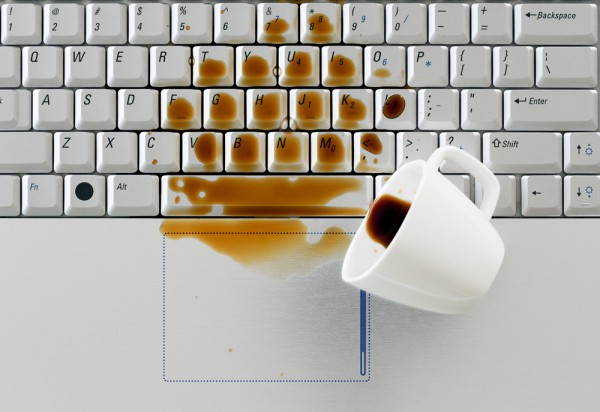
In Nigeria, the problem becomes even more common because of:
- Dusty environments
- Harmattan weather
- High humidity
- Frequent snacking while working
As a result, many Nigerians struggle with keyboards that no longer respond smoothly.
Fortunately, sticky laptop keys can often be cleaned safely without replacing the entire keyboard.
Therefore, this guide explains the safest ways to clean sticky laptop keys, the tools you should use, and the mistakes you must avoid.

Why Laptop Keys Become Sticky
Several things can cause laptop keyboards to become sticky over time.
Common causes include:
- Dust buildup
- Food crumbs
- Soft drink spills
- Sweat and oil from fingers
- Humidity and moisture
As a result, the keyboard may begin to feel uncomfortable or unresponsive.
Signs Your Laptop Keyboard Needs Cleaning
You may notice symptoms such as:
- Keys pressing slowly
- Keys getting stuck halfway
- Repeated letters while typing
- Unusual keyboard noises
- Delayed response during typing
Therefore, cleaning the keyboard early can prevent more serious problems later.
Things You Should NEVER Do
Before cleaning your keyboard, it is important to avoid dangerous mistakes.
Never:
- Pour water directly on the keyboard
- Use excessive liquid cleaners
- Scrape keys with metal objects
- Forcefully remove keys unnecessarily
As a result, you reduce the risk of damaging internal components.
Tools Needed for Cleaning Sticky Laptop Keys
You do not need expensive equipment to clean most keyboards safely.
Helpful tools include:
- Microfiber cloth
- Soft brush
- Compressed air
- Cotton swabs
- Isopropyl alcohol
These tools help remove dirt without damaging the keyboard.
You can also learn more about laptop cleaning safety from HP:
https://www.hp.com/us-en/shop/tech-takes/how-to-clean-laptop-keyboard
Step 1: Turn Off the Laptop
Before cleaning anything, completely shut down the laptop.
If possible:
- Disconnect the charger
- Remove external devices
- Remove the battery if removable
As a result, you reduce the risk of electrical damage.
Step 2: Shake Out Loose Dirt
Carefully tilt the laptop upside down.
Then gently tap the bottom.
This helps remove:
- Dust
- Food crumbs
- Loose particles
As a result, deeper cleaning becomes easier.
Step 3: Use Compressed Air
Compressed air helps remove dirt trapped beneath keys.
Spray short bursts around the keyboard while holding the laptop at an angle.
This method is very effective for:
- Dust removal
- Crumbs
- Small debris
Step 4: Clean the Surface Properly
Use a microfiber cloth lightly dampened with isopropyl alcohol.
Then gently wipe:
- Key surfaces
- Keyboard edges
- Touchpad areas
Do not soak the cloth excessively.
As a result, moisture will not enter the laptop.
Step 5: Clean Around Sticky Keys
Some keys may remain sticky after surface cleaning.
In that case:
- Use cotton swabs
- Apply a small amount of isopropyl alcohol
- Clean around the key edges gently
Therefore, trapped oils and dirt can dissolve safely.
Should You Remove the Keys?
Removing laptop keys is risky for beginners.
Some keyboards use fragile plastic clips that break easily.
Therefore, avoid removing keys unless:
- You understand the keyboard design
- You are following manufacturer instructions
- The laptop model supports easy key removal
How Nigerian Weather Affects Laptop Keyboards
Nigeria’s environment contributes heavily to keyboard problems.
Harmattan Dust
During Harmattan, fine dust particles enter keyboards easily.
As a result:
- Keys may become rough
- Typing becomes uncomfortable
- Dust accumulates under keys
Humidity and Moisture
Humid environments can make keyboards sticky over time.
Therefore, storing laptops in dry environments is important.
How to Prevent Sticky Keys
Preventing keyboard problems is easier than repairing them.
Helpful habits include:
- Avoid eating over your laptop
- Wash hands before typing
- Use keyboard covers
- Clean the keyboard regularly
As a result, your keyboard stays cleaner for longer.
Best Laptop Types for Long-Term Keyboard Durability
Business laptops are usually built with stronger keyboards.
Popular durable business laptop series include:
- Lenovo ThinkPad
- Dell Latitude
- HP ProBook
These keyboards are designed for heavy professional typing.
Recommended Durable Business Laptops in Nigeria
Dell Latitude 3320
The Dell Latitude 3320 offers a reliable keyboard and strong business durability.
Lenovo ThinkPad L13 Gen 3
The Lenovo ThinkPad L13 Gen 3 is famous for its excellent keyboard quality and comfortable typing experience.
HP ProBook 440 G8
The HP ProBook 440 G8 combines durability, SSD performance, and reliable keyboard quality.
When Should You Replace the Keyboard?
Sometimes cleaning may not fully solve the problem.
You may need professional keyboard replacement if:
- Keys stop responding completely
- Liquid damage reaches internal circuits
- Multiple keys malfunction together
- Typing errors continue after cleaning
Therefore, professional repair may become necessary.
Why SSD Laptops Improve Overall Experience
Although keyboards matter, overall laptop speed is also important.
SSD laptops provide:
- Faster boot speed
- Better multitasking
- Smoother workflow
As a result, work becomes more efficient.
You can also browse SSD-powered business laptops on
Psero Nigeria.
Final Thoughts
Sticky laptop keys are common in Nigeria because of dust, humidity, spills, and daily usage. Fortunately, regular cleaning and proper maintenance can prevent serious keyboard problems.
Therefore, using safe cleaning methods and avoiding harmful mistakes will help extend the lifespan of your laptop keyboard.
In addition, durable business laptops usually offer stronger keyboards and better long-term reliability for Nigerian users.
Looking for Durable Business Laptops in Nigeria?
Explore trusted SSD-powered business laptops here:
Pay on delivery available in Lagos.
Call or WhatsApp: 08032592918