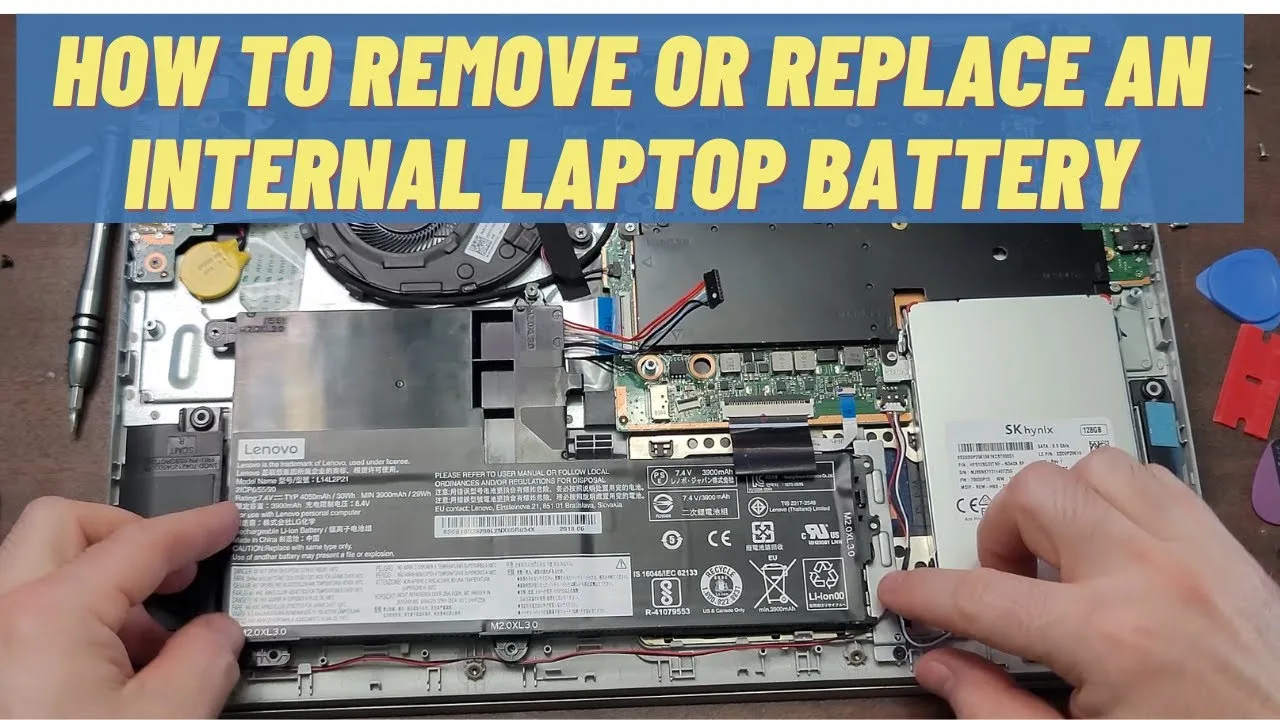
If your laptop suddenly shuts down at 40%, charges very slowly, or only works when plugged in, your battery is likely failing. In Nigeria, this is a very common issue due to power fluctuations, heat, and long-term usage patterns.
Fortunately, replacing a laptop battery is not as complicated as many people think. With the right guidance, you can either do it yourself or confidently buy the correct replacement without wasting money.
In this detailed guide, you will learn how laptop batteries work, how to know when to replace them, how much it costs in Nigeria, and the safest way to install a new one.

How a Laptop Battery Works
A laptop battery stores electrical energy so your device can run without being plugged into a power source. Most modern laptops use lithium-ion or lithium-polymer batteries.
Over time, these batteries degrade due to:
- Charge cycles (charging and discharging)
- Heat exposure
- Power fluctuations (common in Nigeria)
- Long hours of continuous use
As a result, battery capacity reduces gradually until it can no longer hold charge effectively.

Signs You Need a Battery Replacement
Before spending money, confirm these warning signs:
- Laptop shuts down suddenly even with battery percentage showing
- Battery drains extremely fast
- Battery percentage jumps (e.g., 60% to 20%)
- Laptop only works when plugged in
- Battery takes very long to charge
- Battery warning: “Consider replacing your battery”
If you notice multiple symptoms, replacement is the best solution.
Step 1: Check Your Battery Health
Before replacing your battery, you should confirm its health status.
On Windows:
- Press Windows + X
- Open Command Prompt (Admin)
- Type: powercfg /batteryreport
- Press Enter
Then open the generated report file to view battery capacity and cycle count.
If full charge capacity is much lower than design capacity, your battery is weak.
Step 2: Identify the Correct Battery Type
This is very important because using the wrong battery can damage your laptop.
You can find your battery model by:
- Checking the label on the old battery
- Searching your laptop model online
- Using manufacturer websites
Most laptops use either:
- Internal (built-in) battery
- External removable battery
Step 3: Where to Buy Laptop Batteries in Nigeria
In Nigeria, laptop batteries are widely available, especially in major tech markets.
However, always buy from trusted sources to avoid fake products.
Recommended places include:
- Computer Village, Ikeja (Lagos)
- Trusted online laptop stores
- Authorized repair centers
Recommended brands:
- HP Original Batteries
- Dell OEM Batteries
- Lenovo Genuine Batteries
- Samsung cells (for replacements)
Be careful of extremely cheap batteries—they are often refurbished or fake.
Step 4: Tools You Need for Replacement
You do not need advanced tools for most battery replacements:
- Small screwdriver set
- Plastic pry tool (for internal batteries)
- Clean workspace
- Anti-static precautions
Step 5: Replacing External Laptop Battery
If your battery is removable:
- Turn off your laptop
- Disconnect charger
- Slide battery latch
- Remove old battery
- Insert new battery until it clicks
This is the easiest type of replacement.
Step 6: Replacing Internal Laptop Battery
For built-in batteries:
- Turn off laptop completely
- Disconnect charger
- Remove back cover carefully
- Locate battery connector
- Disconnect battery cable
- Unscrew and remove battery
- Install new battery and reconnect cable
Always be gentle to avoid damaging internal components.
Step 7: First-Time Battery Calibration
After installing a new battery, calibration improves accuracy.
- Charge battery to 100%
- Use laptop until it drops to 5–10%
- Charge again to 100% without interruption
This helps your system read battery levels correctly.
How Much Does Laptop Battery Replacement Cost in Nigeria (2026)?
- HP/Dell/Lenovo batteries: ₦20,000 – ₦80,000
- High-end business laptops: ₦60,000 – ₦120,000+
- Repair service fee (if technician): ₦5,000 – ₦15,000
Prices depend on model, availability, and brand authenticity.
Common Mistakes to Avoid
- Buying fake or refurbished batteries
- Using incompatible models
- Installing battery while laptop is powered
- Ignoring overheating issues
- Not calibrating new battery
How to Extend Your New Battery Life
To make your new battery last longer:
- Avoid overcharging overnight constantly
- Reduce screen brightness
- Close unused apps
- Use power-saving mode
- Keep laptop away from heat
Internal Psero Resources
- How to Add SSD to Your Laptop
- How to Upgrade Laptop RAM
- Best Laptop Buying Guide 2026
- UK Used Laptop Inspection Guide
Conclusion
Replacing your laptop battery in Nigeria is a simple but powerful way to extend the life of your device. Instead of struggling with sudden shutdowns and poor battery performance, a replacement restores mobility and productivity.
Most importantly, always buy genuine batteries, confirm compatibility, and follow proper installation steps to avoid damage.
With the right care, your laptop can serve you efficiently for several more years in 2026 and beyond.