USB-C has become one of the most common connectors on modern laptops. However, the fact that a laptop has a USB-C port does not necessarily mean that the port can connect to an external monitor.
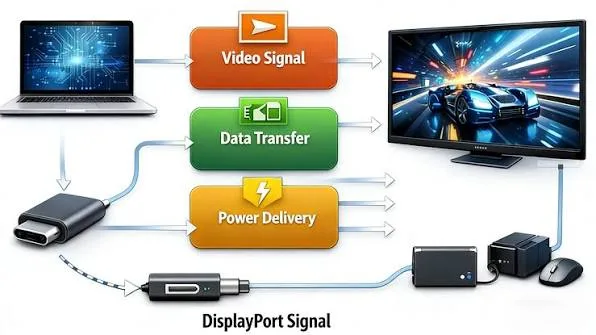
One important technology that determines whether USB-C can carry video is called DisplayPort Alt Mode. It allows compatible USB-C connections to transmit DisplayPort video signals without requiring a separate full-size DisplayPort connector.
This can be particularly useful when connecting a modern laptop to an external monitor, television, projector or docking station.
What Is DisplayPort Alt Mode?
DisplayPort Alt Mode is a feature that allows the USB-C connection to carry DisplayPort video signals.
VESA, the organisation responsible for the DisplayPort standard, explains that DisplayPort Alternate Mode allows DisplayPort to operate over the USB Type-C connection. The same USB-C connection can also carry other functions depending on the configuration, including USB data and power. (VESA DisplayPort Alt Mode documentation)
This is one reason USB-C ports can be so versatile on modern laptops.
Does Every USB-C Port Support DisplayPort?
No.
This is one of the most important things to understand when buying a laptop.
A USB-C port may support data transfer and charging without supporting video output. Another USB-C port may support DisplayPort Alt Mode and allow you to connect an external monitor.
Therefore, you should always check the exact specifications of the laptop rather than assuming that every USB-C port can output video.
How Can USB-C Carry Video?
USB-C is a physical connector with multiple electrical pathways. Compatible devices can configure some of those high-speed lanes for different purposes.
With DisplayPort Alt Mode, some of the high-speed lanes can carry DisplayPort signals. Depending on the implementation, USB data and power can also operate through the same connection.
VESA’s documentation shows how DisplayPort and USB data can share a USB Type-C connection while USB Power Delivery remains available. (VESA)
Why Is DisplayPort Alt Mode Useful on Laptops?

Modern laptops are becoming thinner, and manufacturers increasingly want to reduce the number of different connectors on the chassis.
Instead of providing separate ports for USB, video and charging, a manufacturer can use USB-C to provide several functions through one connector.
This can make the laptop more convenient to use with external displays and docking stations.
Can USB-C Connect a Laptop to an HDMI Monitor?
Yes, provided the laptop’s USB-C port supports video output and you use a suitable adapter or cable.
A USB-C-to-HDMI adapter can convert the DisplayPort signal available through the USB-C connection into an HDMI output for a compatible monitor or television.
However, the maximum resolution and refresh rate depend on the capabilities of the laptop, adapter, cable and display.
Can USB-C Connect Directly to DisplayPort?
Yes.
If the monitor has a DisplayPort input, you can use a suitable USB-C-to-DisplayPort cable when the laptop supports DisplayPort Alt Mode.
This can be particularly useful with modern monitors that provide DisplayPort inputs.
USB-C DisplayPort vs HDMI: Which Is Better?
Neither connection is automatically better for every situation.
Both HDMI and DisplayPort can support high-resolution digital video, while the actual capabilities depend on the specific version of the standard and the hardware involved.
DisplayPort is particularly common on computer monitors, while HDMI is extremely common on televisions, projectors and home entertainment equipment.
Therefore, the best connection is often simply the one that matches your laptop and display while providing the resolution and refresh rate you need.
Can DisplayPort Alt Mode Support 4K?
Yes, compatible implementations can support 4K displays.
However, the exact maximum resolution and refresh rate depend on the DisplayPort version supported by the laptop and the number of DisplayPort lanes made available through the USB-C connection.
This is why the phrase “USB-C video output” alone is not enough when comparing laptops.
Can USB-C DisplayPort Support High Refresh Rates?
It can, provided the laptop, connection and monitor support the required DisplayPort specification and bandwidth.
For example, a gaming monitor running at a high refresh rate may require considerably more bandwidth than an ordinary 60Hz office display.
Before purchasing a cable or adapter, check the monitor’s resolution and refresh-rate requirements as well as the laptop’s video-output specifications.
Can One USB-C Port Run a Monitor and Transfer Data?
In compatible configurations, yes.
USB-C can combine DisplayPort video with USB data functionality. This is one of the features that makes USB-C useful for docking stations.
VESA documents the ability to combine DisplayPort and USB data over USB Type-C, allowing a single connection to support multiple functions. (VESA USB-C DisplayPort documentation)
Can USB-C DisplayPort Charge the Laptop at the Same Time?
Potentially, yes.
USB Power Delivery can operate through the USB-C connection while compatible configurations carry video.
This is one reason a USB-C docking station can be so useful. A single cable can potentially provide video, data and power between the dock and the laptop.
However, the laptop and dock must both support the required charging and data features.
What Is the Difference Between DisplayPort Alt Mode and Thunderbolt?
DisplayPort Alt Mode and Thunderbolt are related but they are not the same technology.
DisplayPort Alt Mode allows DisplayPort video to travel through USB-C. Thunderbolt provides a broader high-speed connectivity technology that can carry multiple types of data and video while also supporting compatible USB devices.
For example, a laptop may have USB-C DisplayPort output without having Thunderbolt.
This distinction is important when choosing a laptop for professional docking setups.
If you are considering Thunderbolt specifically, our previous guide on what Thunderbolt means on a laptop explains the technology in greater detail.
Can a USB-C Port Without DisplayPort Alt Mode Connect to a Monitor?
Not through DisplayPort Alt Mode.
If the USB-C port does not support video output, a basic USB-C-to-DisplayPort cable will not magically create a video signal.
Some specialised USB display adapters use other technologies to provide video output, but these are different from native DisplayPort Alt Mode.
Therefore, check the port specification before buying an adapter.
How Do You Know If a Laptop Supports DisplayPort Alt Mode?
The most reliable method is to check the laptop manufacturer’s specifications for the exact model.
You may also see a DisplayPort symbol next to a compatible USB-C port. Some manufacturers use icons to indicate video output, while others provide the information in the technical specifications.
Do not rely exclusively on the appearance of the connector because USB-C ports can look identical while supporting very different features.
Can You Use a USB-C Hub With DisplayPort Alt Mode?
Yes.
A compatible USB-C hub can use the laptop’s DisplayPort Alt Mode connection to provide an external HDMI or DisplayPort output along with other ports.
For example, a hub may provide:
- HDMI output
- USB-A ports
- USB-C data
- SD or microSD card slots
- Ethernet
- USB-C power input
The capabilities of the hub depend on the particular model.
Can You Connect Two Monitors Through USB-C?
Sometimes.
Whether two monitors can operate simultaneously depends on the laptop’s graphics hardware, USB-C implementation, DisplayPort capabilities and the dock or hub being used.
Some laptops can drive multiple external displays through a compatible docking solution, while others have limitations.
This is especially important for office users who want a laptop workstation with two or more monitors.
What Is DisplayPort MST?
MST stands for Multi-Stream Transport. It allows multiple display streams to be carried through a compatible DisplayPort connection.
In suitable laptop and docking configurations, MST can help drive more than one monitor from a single video connection.
However, support depends on the laptop’s graphics system, operating system, dock and monitors.
Is DisplayPort Alt Mode Useful for Gaming Laptops?
Yes.
A gaming laptop with DisplayPort Alt Mode can potentially connect to a high-refresh-rate external gaming monitor without requiring a full-size DisplayPort connector on the laptop.
Nevertheless, gamers should verify exactly which GPU is connected to the USB-C port. On some laptops, different ports may be connected to different graphics paths, which can affect display capabilities.
When comparing gaming machines, do not look only at the GPU name. Check the display outputs as well.
Is DisplayPort Alt Mode Useful for Business Laptops?
It can be extremely useful.
Business users often connect laptops to docking stations at their desks. A USB-C port supporting DisplayPort Alt Mode can allow the laptop to connect to an external display while also using USB peripherals and power through a compatible dock.
This reduces the number of cables that need to be connected directly to the laptop.
Is DisplayPort Alt Mode Useful for Students?
Most students will not need to think about DisplayPort Alt Mode every day.
However, it becomes useful when connecting a laptop to a classroom projector, external monitor or television.
If you are buying a laptop for several years of school or university use, having versatile USB-C connectivity can provide useful flexibility.
What Happens If the USB-C Cable Is the Wrong Type?
The cable can become a limiting factor.
USB-C cables can support different levels of data transfer, charging and video functionality. A cable that works for charging may not provide the capabilities needed for a high-resolution external display.
Consequently, when troubleshooting an external monitor, check the laptop port, cable, adapter and monitor rather than assuming the laptop itself is faulty.
Can a Used Laptop Have USB-C but No Video Output?
Absolutely.
This is particularly common when comparing laptops from different generations and product ranges.
A used laptop may have a USB-C connector that supports data and charging but does not support DisplayPort Alt Mode.
If you are buying a used machine and need external-monitor support, verify the exact specification before purchasing. You can also use this used-laptop inspection checklist to examine the rest of the machine before paying.
Should DisplayPort Alt Mode Affect Your Laptop Buying Decision?
If you regularly connect your laptop to an external monitor, projector or docking station, it should definitely be part of your buying checklist.
If you never use external displays, it may not be a major priority.
Still, USB-C video output is a useful feature to have because your needs can change. A laptop that can connect easily to an external display can remain useful in more situations.
When comparing several machines, consider DisplayPort Alt Mode alongside the processor, RAM, SSD and other specifications. Our laptop comparison guide can help you evaluate the complete specification rather than focusing on one feature.
What Should You Check Before Buying?
- Does the USB-C port support DisplayPort Alt Mode?
- Which DisplayPort version is supported?
- What maximum resolution can it output?
- What refresh rates are supported?
- Can the port provide USB data at the same time?
- Does it support USB Power Delivery?
- Can it work with a docking station?
- Can the laptop drive multiple external monitors?
- Does the included or recommended cable support the required bandwidth?
Final Verdict
DisplayPort Alt Mode is one of the reasons USB-C has become such a useful laptop connector. It allows compatible laptops to send DisplayPort video through the same compact USB-C connection that can also handle other functions.
However, the most important point is simple: not every USB-C port supports video. The connector may look exactly the same, but the capabilities can be completely different.
If you frequently use external monitors, projectors or docking stations, DisplayPort Alt Mode is a feature worth checking before buying a laptop. For everyone else, it is still a useful capability that can provide additional flexibility without requiring a separate full-size DisplayPort connector.