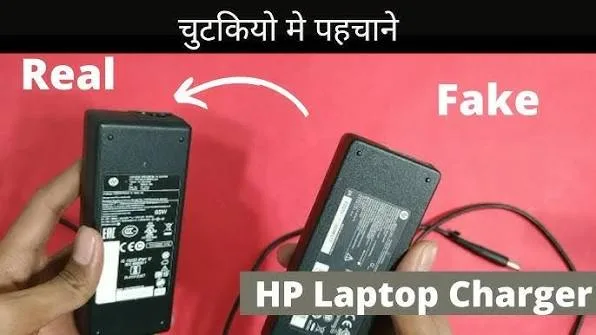
A laptop charger may look simple, but it is one of the most important accessories that comes with a computer. The wrong charger can cause charging problems, overheating, unstable performance and, in some cases, damage to the laptop.
This is especially important when buying a UK used laptop in Nigeria because the laptop may come with a replacement charger rather than the original adapter supplied with the machine. Before paying for the computer, you should therefore inspect the charger just as carefully as you inspect the laptop itself.
Why Does the Laptop Charger Matter?
The charger converts electricity from the wall outlet into the electrical power required by the laptop. It must provide the correct voltage, current and power for the computer.
Using an unsuitable adapter can lead to slow charging, battery problems, warning messages or unreliable operation. Therefore, never judge a charger simply by whether its plug fits the laptop.
Check the Charger Label
The first thing to inspect is the information printed on the charger.
Look for details such as:
- Input voltage
- Output voltage
- Output current
- Wattage
- Manufacturer name
- Model or part number
- Safety and certification markings
The output specifications are particularly important because they must be compatible with the laptop.
How to Calculate the Charger Wattage
You can calculate the approximate wattage of a charger by multiplying its output voltage by its output current.
For example, a charger rated at 19.5V and 3.33A provides approximately 65W.
However, do not use a higher-wattage adapter simply because the connector fits. Always follow the laptop manufacturer’s specifications.
Check the Manufacturer’s Logo
Counterfeit chargers may attempt to copy the branding of major laptop manufacturers.
Look carefully at the printed logo, text quality, spacing and overall finish. Blurry printing, spelling mistakes, inconsistent fonts or unusually poor construction can be warning signs.
Nevertheless, appearance alone cannot prove that a charger is genuine. Counterfeit products can sometimes look surprisingly convincing.
Check the Charger Model Number
Many original laptop chargers have a specific model number or part number printed on the label.
Search for that number in the manufacturer’s documentation or support resources where available. For example, Dell’s official support resources can help users identify information associated with Dell products.
Similarly, buyers of HP and Lenovo laptops can check the relevant manufacturer’s support information before purchasing replacement accessories.
Check the Plug and Connector
The connector that enters the laptop should fit properly without excessive looseness.
Do not force a connector into the charging port. If it does not fit naturally, the charger may be designed for another laptop or the connector may be damaged.
While inspecting the connector, look for bent parts, exposed wiring, cracks or signs of burning.
Inspect the Cable
Run your fingers carefully along the cable and inspect its entire length.
Look for:
- Exposed wires
- Cracked insulation
- Burn marks
- Severe bends
- Loose sections
- Damaged connectors
A charger can have the correct specifications and still be unsafe if the cable has been physically damaged.
Does a Heavy Charger Mean It Is Original?
Not necessarily.
Older chargers can sometimes feel heavier because of their internal construction, but weight alone cannot determine whether an adapter is genuine.
Instead, combine the physical inspection with the electrical specifications, model number and laptop compatibility.
Can a Fake Charger Still Charge the Laptop?
Yes. A counterfeit charger may appear to work normally at first.
That does not automatically make it safe or reliable. Poor-quality components can cause excessive heat, unstable voltage or premature failure.
Consequently, the fact that a charger powers the laptop should not be your only test.
How to Check If the Charger Is Overheating
Some warmth during normal operation can be expected from a power adapter. However, excessive heat, burning smells, unusual noises or visible damage should not be ignored.
If the adapter becomes extremely hot during ordinary charging, disconnect it safely and have it inspected or replaced.
Check Whether the Laptop Recognises the Charger
Some laptops can detect whether the connected adapter is compatible.
If the laptop displays a warning about an unknown, unsupported or incorrectly rated charger, investigate the problem rather than ignoring the message.
On some systems, an incompatible adapter can cause the laptop to charge slowly or limit performance.
What Does “Plugged In, Not Charging” Mean?
If the charger is connected but the battery is not charging, several things could be responsible.
- Faulty charger
- Damaged charging cable
- Battery problem
- Charging-port problem
- Incorrect adapter
- Software or power-management issue
Therefore, do not immediately conclude that the battery is faulty. If possible, test the laptop with a known-compatible charger.
Why You Should Test the Charger Before Buying a Used Laptop
A used laptop inspection should include the charger because replacing it can add unexpected costs after purchase.
For example, you might find a laptop that appears to be a good bargain, only to discover that the supplied charger is damaged and the correct replacement is difficult to find.
This is one reason a complete inspection should include the charging port and other laptop ports as well.
Can You Use a Universal Laptop Charger?
Universal chargers can work with certain laptops when they provide the correct electrical specifications and compatible connector.
However, compatibility should be confirmed before use. A universal adapter should not be treated as automatically safe simply because it includes a connector that physically fits.
What About USB-C Laptop Chargers?
Some modern laptops charge through USB-C. However, USB-C does not automatically mean that every USB-C charger will provide enough power for every laptop.
Check the laptop’s required charging specifications and make sure the charger and cable support the necessary power delivery standard.
Should You Buy a Replacement Charger From a Random Seller?
Be careful when purchasing replacement laptop chargers from unknown sellers.
A very cheap adapter may appear attractive, but the cost of dealing with a failed charger or damaged laptop can be much higher.
Where possible, purchase from a reputable computer retailer or a reliable source of compatible replacement parts.
What Should You Do If Your Charger Sparks?
Do not continue using a charger that produces sparks, smoke, a burning smell or other abnormal behaviour.
Disconnect it safely from the power source and replace it with an appropriate charger. If the wall socket itself appears damaged, have the electrical installation inspected as well.
How Nigerian Power Conditions Can Affect Chargers
Power fluctuations can place additional stress on electronic equipment. This is particularly relevant for laptop users who regularly switch between public electricity, generators, inverters and other power sources.
Using an appropriate surge-protection or power-conditioning solution can provide additional protection. However, it should not be treated as a substitute for a correctly rated laptop charger.
If you frequently experience unstable electricity, you may also want to understand how generator power can affect laptops and their accessories.
Quick Laptop Charger Inspection Checklist
- Check the manufacturer name.
- Check the charger model or part number.
- Confirm the output voltage.
- Confirm the output current.
- Check the wattage.
- Inspect the cable.
- Inspect the connector.
- Look for burning or melting.
- Check for unusual smells.
- Test whether the laptop recognises the charger.
- Confirm that the battery charges normally.
- Watch for excessive heat.
Final Verdict
Identifying an original laptop charger is about more than looking for a familiar logo. The specifications, model number, connector, cable condition and charging behaviour all matter.
When buying a used laptop in Nigeria, test the charger before completing the purchase. A few extra minutes of inspection can help you avoid spending additional money on a replacement or dealing with an unsafe adapter later.