A fast processor and plenty of RAM are important, but your laptop’s Wi-Fi technology also affects your experience. Whether you attend online meetings, stream videos, play games, or work remotely, a reliable wireless connection makes everyday tasks much easier.
Modern laptops support different Wi-Fi standards, including Wi-Fi 5, Wi-Fi 6, and the newer Wi-Fi 7. Understanding these technologies will help you choose a laptop that remains useful for years.
What Is Wi-Fi?
Wi-Fi is a wireless networking technology that allows your laptop to connect to the internet without using an Ethernet cable.
Over the years, new Wi-Fi generations have improved speed, reliability, security, and the ability to handle multiple connected devices.
What Is Wi-Fi 5?
Wi-Fi 5, also known as 802.11ac, became popular in many laptops released over the past several years. It offers fast wireless performance for browsing, streaming, video calls, and downloading files.
Even today, Wi-Fi 5 remains suitable for many home and office users.
Advantages of Wi-Fi 5
- Reliable everyday performance
- Good wireless speeds
- Works with most modern routers
- Available on many affordable laptops
What Is Wi-Fi 6?
Wi-Fi 6, also known as 802.11ax, improves on Wi-Fi 5 by increasing efficiency, reducing network congestion, and supporting more connected devices.
As a result, laptops with Wi-Fi 6 often provide more stable connections in busy homes, schools, and offices.
Advantages of Wi-Fi 6
- Higher wireless efficiency
- Better performance with many connected devices
- Improved battery efficiency
- Lower network latency
- Better security support
What Is Wi-Fi 7?
Wi-Fi 7 is the newest wireless standard available on some premium laptops and routers. It delivers faster speeds, lower latency, and better performance for demanding applications.
Although Wi-Fi 7 offers impressive capabilities, many users may not fully benefit from it until compatible routers become more common.
Advantages of Wi-Fi 7
- Extremely fast wireless speeds
- Very low latency
- Excellent for cloud gaming
- Improved support for high-resolution streaming
- Designed for future networking needs
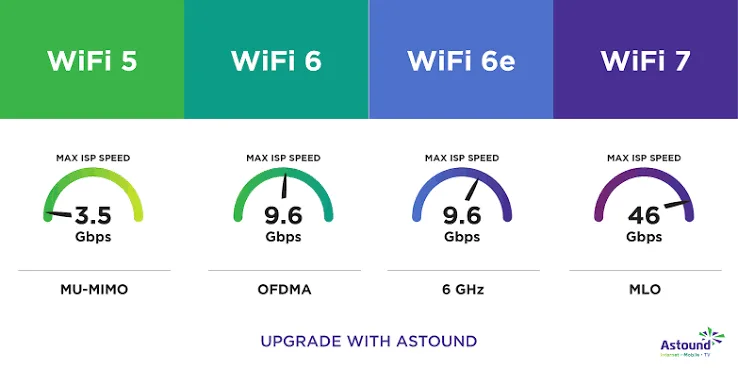
Wi-Fi 5 vs Wi-Fi 6 vs Wi-Fi 7 Comparison
| Feature | Wi-Fi 5 | Wi-Fi 6 | Wi-Fi 7 |
|---|---|---|---|
| Speed | Fast | Faster | Fastest |
| Network Efficiency | Good | Excellent | Outstanding |
| Battery Efficiency | Good | Better | Excellent |
| Best For | Everyday use | Homes and offices | Power users |
| Future Readiness | Good | Very Good | Excellent |
Do You Need Wi-Fi 6?
For most buyers in 2026, Wi-Fi 6 is an excellent choice. It improves wireless stability, especially when several devices share the same internet connection.
Furthermore, many new routers already support Wi-Fi 6, making it a practical long-term investment.
Should You Buy a Wi-Fi 7 Laptop?
If you plan to keep your laptop for many years, Wi-Fi 7 can provide better future compatibility. However, buying a Wi-Fi 7 laptop only makes sense if you also intend to use a compatible router.
Otherwise, you may not notice much difference during everyday use.
Which Wi-Fi Standard Is Best for Nigerian Users?
| User Type | Recommended Standard |
|---|---|
| Students | Wi-Fi 5 or Wi-Fi 6 |
| Office Workers | Wi-Fi 6 |
| Remote Workers | Wi-Fi 6 |
| Gamers | Wi-Fi 6 or Wi-Fi 7 |
| Content Creators | Wi-Fi 6 or Wi-Fi 7 |
Things to Check Before Buying
- Confirm the laptop’s Wi-Fi standard
- Check whether your router supports the same technology
- Look for Bluetooth 5.2 or newer
- Consider future upgrade needs
- Compare overall laptop specifications before buying
You should also compare the processor, RAM, SSD, battery life, and display quality to ensure the laptop meets your needs.
Useful Official Resources
Learn more about wireless networking standards through the official Wi-Fi Alliance, the organisation responsible for Wi-Fi certification worldwide.
Final Verdict
Wi-Fi 5 still performs well for everyday tasks, but Wi-Fi 6 offers better speed, efficiency, and long-term value for most laptop buyers. Meanwhile, Wi-Fi 7 is the best choice for users who want the latest wireless technology and plan to invest in compatible networking equipment.
For most Nigerians buying a laptop in 2026, choosing a model with Wi-Fi 6 provides the best balance between performance, affordability, and future readiness.