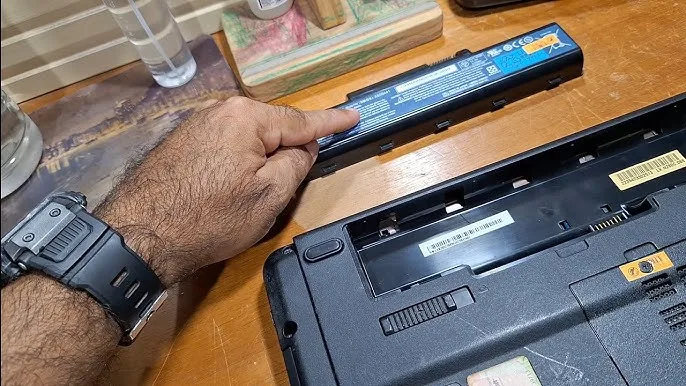
Many laptop owners eventually face a battery problem. The battery may stop holding charge, become swollen, or simply become too weak to provide useful backup time. At that point, one common question comes up: can you continue using the laptop without a battery?
In many cases, the answer is yes. However, the exact behaviour depends on the laptop design, power adapter and condition of the machine. Before removing a battery or relying entirely on wall power, there are a few important things you should understand.
Can a Laptop Work Without a Battery?
Many laptops can operate directly from their AC power adapter even when the battery is removed or no longer holding charge.
The charger supplies the electricity required to operate the laptop. When the battery is present, the laptop’s power-management system can also charge and use the battery as appropriate.
However, some modern laptops have different battery designs and power-management systems. Therefore, you should check the manufacturer’s documentation for your specific model before removing a battery.
What Happens When You Remove the Battery?
If the laptop supports operation without a battery, it can continue working while connected to its compatible charger.
However, there is an important disadvantage: there is no battery backup.
If electricity suddenly goes off, the laptop can shut down immediately unless it is connected to another suitable backup power source.
Is It Safe to Use a Laptop Without a Battery?
Generally, a laptop designed to operate from its AC adapter can be used without its battery. Nevertheless, the charger must be compatible with the computer and provide the required power.
Do not assume that any adapter with the same-looking connector is safe. Check the charger’s voltage, current and wattage before using it.
If you are unsure about a replacement adapter, learning how to identify a suitable laptop charger can help you avoid using the wrong power supply.
What Is the Biggest Problem With Using a Laptop Without a Battery?
The biggest disadvantage is the lack of protection against sudden power loss.
For example, imagine you are typing an important document and electricity suddenly goes off. A laptop without a functioning battery can turn off immediately.
This can result in unsaved work and, in some situations, file corruption.
That is why a working battery can be useful even when you normally use your laptop while connected to a charger.
Can You Use a Laptop With a Dead Battery?
Sometimes, yes. A battery that no longer holds much charge does not necessarily prevent the laptop from operating while connected to its charger.
However, a battery that is physically damaged or swollen should not simply be left inside the laptop because the computer still works.
What If the Laptop Battery Is Swollen?
A swollen lithium-ion battery requires particular attention.
Do not press, puncture, bend or attempt to dismantle a swollen battery. It should be handled appropriately and replaced by a qualified professional or through a suitable battery-replacement service.
Continuing to use a laptop with a visibly damaged battery can create unnecessary safety risks.
Can You Remove a Removable Laptop Battery?
Some older laptops have an external battery that can be removed without opening the computer.
If the laptop is designed for this, you can usually disconnect the battery according to the manufacturer’s instructions and connect the AC adapter.
However, do not force the battery out or use tools unnecessarily.
What About Laptops With Internal Batteries?
Many newer laptops have batteries installed inside the chassis.
Removing an internal battery normally requires opening the bottom cover and disconnecting the battery from the motherboard. This is more complicated than removing an external battery.
If you are not comfortable opening the laptop, it is better to have a technician perform the procedure.
Can a Laptop Run Faster Without Its Battery?
Removing a battery does not automatically make a laptop faster.
Performance is primarily affected by components such as the processor, RAM, storage and cooling system, along with the laptop’s power-management settings.
If your laptop feels slow, replacing the battery is therefore not normally the solution.
For older machines, upgrading from a traditional hard drive to an SSD can make a much more noticeable difference. You can learn more about this in our guide on why SSD storage matters in a laptop.
Can You Use a Laptop Without a Battery During Power Outages?
You can, but the laptop itself will not provide any backup when electricity disappears.
This matters in areas where power interruptions are frequent. If the charger loses power, the laptop loses its power source as well.
A UPS, inverter or other suitable backup system can provide an alternative source of electricity, although the equipment must be appropriately sized for the laptop and other connected devices.
Can an Inverter Power a Laptop Without a Battery?
The laptop itself still requires an appropriate power source. An inverter can provide that power if the inverter system is properly configured and has sufficient capacity.
However, an inverter does not replace the laptop’s internal battery in terms of portability. If the inverter also shuts down, the laptop can lose power immediately.
Should You Remove a Laptop Battery That Is No Longer Good?
If the battery is simply old and has very poor capacity, replacement may be a better long-term solution than permanently removing it.
If the battery is swollen, leaking or physically damaged, stop treating it as an ordinary worn-out battery and have it handled safely.
How Long Can a Laptop Last Without Its Battery?
There is no special time limit simply because a laptop is operating from its charger without a battery. If the laptop and power adapter are functioning correctly, it can continue operating from AC power.
The limiting factor is normally the reliability of the external power source rather than a countdown inside the laptop.
Does Removing the Battery Damage the Laptop?
Simply operating a compatible laptop from its charger without a battery does not normally mean that the laptop will automatically be damaged.
The greater concern is using an incorrect charger, an unstable power source or physically damaging the computer while removing an internal battery.
What Should You Check Before Removing the Battery?
- Confirm that the laptop supports AC-only operation.
- Check the manufacturer’s instructions.
- Use the correct charger.
- Inspect the charging port.
- Check for signs of battery swelling.
- Save important work regularly.
- Consider a backup power source.
Is a Laptop Without a Battery Good for a Student?
It can work if the laptop is normally used in a location with reliable electricity. However, students who move between classrooms, libraries, homes and other locations will benefit more from having a healthy battery.
A working battery also provides valuable protection when electricity suddenly goes off during an assignment, examination or presentation.
What About Remote Workers?
For remote workers, battery backup can be particularly useful. A short power interruption does not necessarily have to end an online meeting or interrupt work if the laptop has enough battery charge.
If you regularly experience electricity interruptions, you should also consider choosing a laptop with good battery life.
Should You Buy a Laptop With a Bad Battery?
It depends on the price and the cost of replacing the battery.
A laptop with an inexpensive replacement battery may still be a reasonable purchase if all the other components are in good condition. However, you should factor the replacement cost into your budget before deciding.
This is particularly important when comparing UK used laptops because a low purchase price does not necessarily mean the machine will be cheaper after repairs.
Final Verdict
Many laptops can operate without a battery when connected to the correct AC adapter. However, doing so removes the battery backup that protects you from sudden power interruptions.
For Nigerian users who regularly experience electricity outages, keeping a healthy laptop battery can be especially useful. If the battery is simply old, consider replacing it. If it is swollen or physically damaged, stop using it and have it handled safely.
Most importantly, never remove or replace a laptop battery without considering the design of the specific computer. When in doubt, consult the manufacturer’s instructions or a qualified technician.