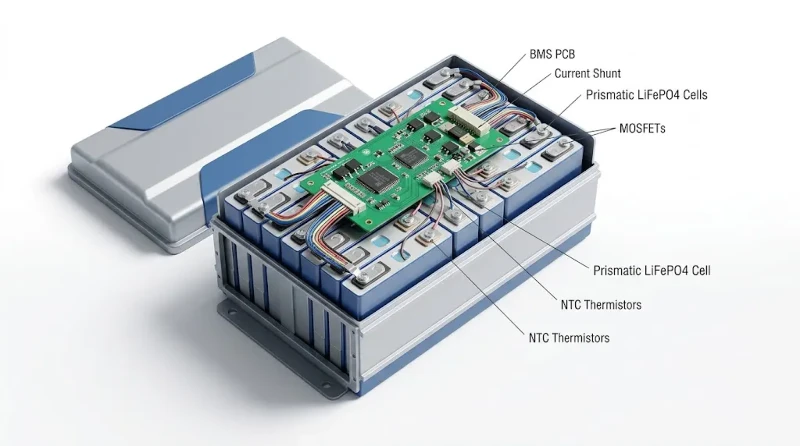
A laptop battery may appear to be a simple component that stores electricity, but its internal operation is much more complicated. Modern laptop batteries contain multiple rechargeable cells, electronic monitoring circuits, protection systems and firmware that work together to deliver stable power.
Two laptops with batteries advertised at the same capacity can have different runtimes, charging behaviour and long-term reliability. These differences may come from battery chemistry, cell configuration, power-management design, temperature, manufacturing quality and the way the laptop uses energy.
Understanding laptop battery architecture is useful when comparing new and UK-used computers. It also helps explain why some batteries lose capacity faster than others, why a laptop may shut down before reaching zero per cent and why replacing individual cells is not always a straightforward repair.
1. How a Laptop Battery Stores Electricity
Most modern laptops use rechargeable lithium-based batteries. These batteries store energy through electrochemical reactions that move lithium ions between two electrodes.
A typical lithium-ion cell contains several major components:
- Anode: The electrode that stores lithium during charging, commonly made from graphite.
- Cathode: The electrode that receives lithium ions during discharge and contains a lithium-based compound.
- Electrolyte: A medium that allows lithium ions to move between the electrodes.
- Separator: A thin insulating material that prevents direct electrical contact between the electrodes while allowing ion movement.
- Current collectors: Conductive materials that carry electrical current to and from the cell.
During charging, an external power source drives lithium ions towards the anode. During discharge, the ions move back towards the cathode while electrons travel through the external electrical circuit to power the laptop.
This movement of ions and electrons makes rechargeable operation possible. However, repeated charging and discharging gradually affect the materials inside the cell.
2. Lithium-Ion and Lithium-Polymer Batteries
Laptop manufacturers commonly describe their batteries as lithium-ion or lithium-polymer. These terms are often used to distinguish battery packaging and electrolyte arrangements, although lithium-polymer batteries are also part of the wider lithium-ion battery family.
Lithium-ion batteries
Traditional lithium-ion batteries often use cylindrical or prismatic cells. Their construction can offer predictable manufacturing characteristics and established protection designs.
Some older laptops use removable battery packs containing multiple cylindrical or prismatic cells. These packs can be easier to replace as complete units.
Lithium-polymer batteries
Lithium-polymer batteries commonly use pouch-style cells. Their flexible packaging allows manufacturers to create thin battery assemblies that fit into compact laptop designs.
This makes them useful in ultrabooks, slim notebooks and devices where internal space is limited.
However, the word polymer does not automatically mean a battery has better lifespan or performance. Cell chemistry, manufacturing quality, operating temperature and battery management remain important.
3. Understanding Battery Capacity: mAh and Wh
Battery capacity is commonly presented in milliampere-hours (mAh) or watt-hours (Wh). Both describe battery characteristics, but watt-hours provide a more useful indication of stored energy when comparing batteries with different voltage ratings.
Milliampere-hours describe electrical charge capacity. Watt-hours account for both voltage and charge capacity.
The relationship is:
Wh = (mAh × Voltage) ÷ 1,000
For example, consider a battery rated at 5,000mAh with a nominal voltage of 11.4V.
Its approximate energy capacity is:
(5,000 × 11.4) ÷ 1,000 = 57Wh
This means the battery stores approximately 57 watt-hours of energy under its rated conditions.
When comparing laptop batteries, use the watt-hour rating where possible. A battery with a higher mAh number is not necessarily larger in energy capacity if its voltage is lower.
4. How Laptop Battery Cells Are Connected
A laptop battery pack usually contains several cells connected in series, parallel or a combination of both. The arrangement determines the pack’s voltage and capacity.
Series connections
In a series configuration, cell voltages add together while the ampere-hour capacity remains approximately the same as that of an individual cell in the group.
For example, three cells with a nominal voltage of 3.7V connected in series create a battery group with a nominal voltage of approximately 11.1V.
Parallel connections
In a parallel configuration, the voltage remains approximately the same while the capacity increases.
For example, two compatible 3,000mAh cells connected in parallel can provide approximately 6,000mAh at the same nominal voltage.
Series-parallel configurations
Many laptop batteries combine series and parallel connections to achieve the required voltage and capacity. Manufacturers may describe these arrangements using terms such as 2S2P, 3S1P or 4S2P.
The first number identifies the number of series groups, while the second identifies the number of parallel cells in each group.
For example, a 3S2P arrangement contains three series-connected groups, with two cells in parallel within each group.
The precise cell count, chemistry and configuration must match the battery manufacturer’s design. Replacing cells with an arbitrary arrangement can create serious electrical and safety risks.
5. What Is a Battery Management System?
The Battery Management System, commonly called BMS, is the electronic system responsible for monitoring and protecting a rechargeable battery pack.
It monitors important operating conditions and helps ensure that the battery remains within its permitted electrical and thermal limits.
A laptop battery management system may perform several functions:
- Monitors individual cell-group voltages.
- Measures battery current.
- Tracks battery temperature.
- Estimates remaining capacity.
- Records charge and discharge information.
- Controls charging and discharging protection.
- Detects abnormal operating conditions.
- Communicates battery information to the laptop.
The BMS is important because lithium-based batteries require controlled operating conditions. Excessive charging voltage, excessive discharge, high current or extreme temperatures can damage cells.
Protection circuits help reduce these risks, although no battery management system can eliminate every possible failure.

6. How the Battery Communicates With the Laptop
A laptop battery does more than supply electricity. It also communicates information to the computer through a data connection.
Many laptop battery packs use the System Management Bus (SMBus) protocol or related communication arrangements to exchange information with the embedded controller and power-management hardware.
Depending on the design, the battery may report:
- Current charge level.
- Remaining capacity.
- Design capacity.
- Battery voltage.
- Charging or discharging status.
- Temperature information.
- Battery health and error information.
This communication allows Windows to display battery information and helps the laptop coordinate charging, power consumption and shutdown behaviour.
If communication fails, the battery may not be recognised correctly even when the cells still contain usable energy. A faulty connector, damaged communication circuit, incompatible replacement battery or firmware problem can contribute to this situation.
7. Cell Balancing: Why Battery Cells Must Work Together
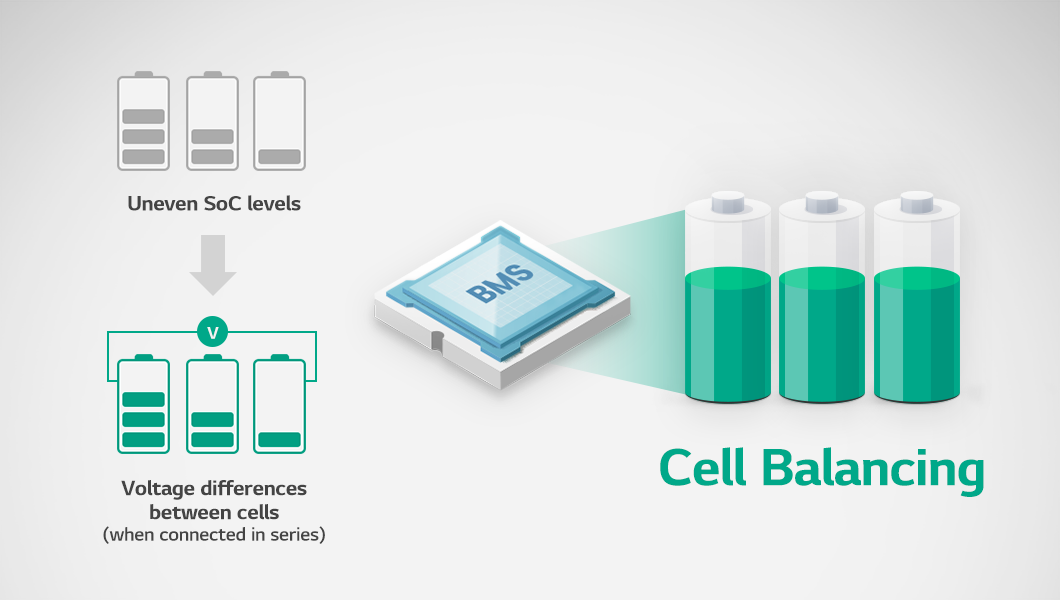
Battery packs containing multiple series-connected cell groups require careful voltage management. Individual cells do not always maintain exactly the same voltage or capacity throughout their lifetime.
Small differences can develop because of manufacturing variation, temperature differences, ageing and uneven operating conditions.
Cell balancing helps reduce these differences so that one group does not reach its charging or discharge limit significantly earlier than the others.
Passive cell balancing
Passive balancing uses electronic components, commonly resistors, to dissipate excess energy from cells or groups with higher voltage.
This approach is relatively straightforward, but the energy used during balancing becomes heat rather than being transferred to another cell.
Active cell balancing
Active balancing transfers energy between cells or groups through additional electronic circuitry.
It can reduce balancing losses in suitable designs, although it requires more complex hardware.
Not every laptop battery uses the same balancing method. The implementation depends on the battery design and its management electronics.
8. How Laptop Batteries Estimate Remaining Charge
The battery percentage displayed in Windows is an estimate, not a direct measurement of the exact amount of electricity remaining.
The battery management system uses several measurements and calculations to estimate the remaining charge.
Two important techniques are coulomb counting and voltage-based estimation.
Coulomb counting
Coulomb counting measures the current flowing into or out of the battery over time. The system uses this information to estimate how much charge remains.
Although useful, measurement errors can accumulate. The battery management system may need reference points and correction methods to maintain accurate estimates.
Voltage-based estimation
Battery voltage can provide clues about the state of charge. However, voltage alone is not always enough because it changes with load, temperature and cell characteristics.
The system may combine voltage measurements with current measurements, temperature information and stored battery models to improve its estimate.
This explains why a laptop can sometimes show a percentage that changes unexpectedly or shut down before reaching zero per cent.
9. Battery Degradation: Why Capacity Reduces Over Time
Every rechargeable lithium-based battery experiences gradual degradation. As the battery ages, its ability to store and deliver energy decreases.
Battery degradation occurs through several chemical and physical processes inside the cells.
Loss of cyclable lithium
Some lithium becomes unavailable for normal charge transfer as the battery ages. This reduces the amount of energy the cell can store.
Growth of the solid electrolyte interphase
The solid electrolyte interphase, or SEI, is a layer that forms on the anode during normal battery operation. It is important for stable cell operation, but continued growth can consume active lithium and increase internal resistance.
Electrode degradation
Repeated cycling and environmental stress can change electrode materials. These changes may reduce the battery’s ability to store energy or deliver current efficiently.
Increased internal resistance
As a battery ages, its internal resistance may increase. This can cause greater voltage drops under load and more heat during operation.
Consequently, an old battery may show a reasonable charge percentage but struggle when the laptop performs demanding tasks.
10. Calendar Ageing Versus Cycle Ageing
Battery degradation does not depend only on how frequently a laptop is charged. Time itself can contribute to capacity loss.
Calendar ageing
Calendar ageing describes battery degradation that occurs over time, even when the battery is not being actively charged or discharged.
Storage temperature and the battery’s state of charge can influence the rate of ageing.
Cycle ageing
Cycle ageing results from repeated charging and discharging. Each cycle contributes to the gradual wear of the battery’s internal materials.
A cycle does not necessarily mean plugging the charger in once. It generally represents the equivalent of using a cumulative amount of energy equal to the battery’s full rated capacity.
For example, using 50 per cent of the battery’s capacity on one occasion and another 50 per cent later represents approximately one equivalent full cycle.
This distinction is important when evaluating a used laptop. A battery with relatively few recorded cycles may still have aged significantly because of its calendar age or storage conditions.
11. Why Heat Is One of the Biggest Battery Enemies
Temperature strongly influences lithium-based battery behaviour. High temperatures can accelerate unwanted chemical reactions and contribute to faster capacity degradation.
Heat can come from several sources:
- High CPU and GPU workloads.
- Poor laptop cooling.
- Charging under demanding workloads.
- Exposure to direct sunlight.
- Blocked ventilation openings.
- Faulty charging or battery components.
Low temperatures can also affect battery performance. A cold battery may temporarily deliver less available power, even when it has not permanently lost the same amount of capacity.
For everyday use, avoid leaving a laptop in extremely hot environments. Keep ventilation openings clear and use a stable working surface.
Our article on laptop thermal management and cooling architecture explains how heat moves through the computer and why cooling design matters.
12. Why Keeping a Laptop at 100% Charge All the Time Can Affect Battery Ageing
Lithium-based batteries experience different levels of chemical stress depending on their state of charge and operating temperature.
Remaining at a very high state of charge for extended periods can contribute to faster ageing, particularly when the battery is also exposed to heat.
This is why some laptop manufacturers provide battery charge limits or conservation modes.
Depending on the model, these settings may limit charging to a lower percentage when the laptop is frequently connected to a charger.
Such features are useful for office systems that remain plugged in for long periods. However, the correct setting depends on how the laptop is used.
If the computer regularly needs to operate away from a power source, charging to a higher level may be more practical.
13. What Is Battery Calibration?
Battery calibration is the process of improving the accuracy of the battery’s charge-level estimate. It does not restore the battery’s original chemical capacity.
Over time, the battery management system’s estimate may become less accurate. A laptop might shut down unexpectedly even though Windows displays some charge remaining.
A calibration procedure, where recommended by the manufacturer, may help the system update its estimate.
However, repeated deep discharges should not be used as a routine maintenance method. Deeply discharging lithium-based batteries unnecessarily can add stress.
Follow the laptop manufacturer’s guidance rather than using generic calibration instructions designed for a different battery system.
14. Understanding Battery Design Capacity and Full Charge Capacity
Windows can report two useful battery measurements: design capacity and full charge capacity.
Design capacity is the amount of energy the battery was designed to store when new.
Full charge capacity is the system’s current estimate of how much energy the battery can store when fully charged.
Consider a laptop battery with a design capacity of 60,000mWh and a current full charge capacity of 45,000mWh.
Its estimated remaining capacity relative to the original design is:
(45,000 ÷ 60,000) × 100 = 75%
This indicates approximately 75 per cent of the original rated capacity remains according to the reported measurements.
Battery health estimates are useful, but they should not be treated as perfect measurements. Reporting accuracy varies between battery controllers and manufacturers.
15. How to Generate a Windows Battery Report
Windows includes a built-in battery reporting feature that can reveal useful information about the installed battery.
To generate a report:
- Open Command Prompt or Windows Terminal.
- Run the terminal as an administrator.
- Enter the following command.
powercfg /batteryreportWindows creates an HTML report and displays the file location.
Open the report in a web browser and inspect the following sections:
- Installed batteries: Shows battery identification and capacity information.
- Design capacity: Displays the original rated capacity.
- Full charge capacity: Shows the current reported maximum capacity.
- Cycle count: Shows the recorded number of cycles where the battery provides this information.
- Battery usage: Shows historical usage information.
- Battery capacity history: Helps reveal changes in reported capacity over time.
Some laptops do not report every field. A missing cycle count, for example, does not automatically mean that the battery is defective.
16. What Is the Difference Between a Battery Charger and a Battery Management System?
The charger and BMS work together, but they perform different functions.
The charging circuit controls the electrical power delivered to the battery. It regulates charging conditions according to the battery’s requirements and the laptop’s power-management design.
The BMS monitors the battery pack and provides protection and battery information.
Depending on the laptop, charging management may involve a charger IC, embedded controller, battery protection circuitry and other motherboard components.
For example, when a laptop connects to a charger, the system determines how to distribute available power between the computer’s operating components and the battery.
Our article on laptop power delivery, USB-C charging and battery management explores the electrical architecture behind this process.
17. Why a Laptop Battery Can Show 100% but Last Only a Short Time
A laptop showing 100 per cent charge does not necessarily have a healthy battery. The percentage represents the system’s estimate of the remaining charge relative to its current capacity, not necessarily its original factory capacity.
For example, a worn battery may have lost a significant amount of its original storage capacity. Windows can still display 100 per cent when that reduced capacity is fully charged.
Several factors can explain short runtime:
- Reduced battery capacity from ageing.
- High CPU or GPU power consumption.
- High screen brightness.
- Background applications and services.
- Wireless connections and connected accessories.
- Battery temperature.
- Incorrect battery reporting.
When evaluating battery performance, compare its current full charge capacity with the original design capacity. Then consider the laptop’s workload and power settings.
18. Why Replacing Individual Laptop Battery Cells Is Not Always Practical
Some older laptop battery packs contain replaceable cylindrical cells, which may appear easier to service. However, modern battery packs often include sophisticated monitoring and protection electronics.
Replacing individual cells can introduce compatibility problems if the new cells have different characteristics from the original ones.
The battery controller may also retain historical information about the original cell group. Depending on the design, replacing cells without the correct procedures can cause reporting errors or protection lockouts.
Other concerns include cell matching, internal connections, insulation, temperature sensing and physical protection.
Battery packs should not be opened or rebuilt casually. Damaged lithium-based cells can create fire and injury hazards. For most users, replacing the complete battery with a verified compatible pack from a reliable supplier is the safer option.
19. What Laptop Buyers in Nigeria Should Check Before Buying a Used Battery-Powered Laptop
Battery condition is particularly important when buying a UK-used laptop. A computer may have an excellent processor and sufficient RAM but still require an expensive battery replacement.
Before paying, check the following:
- Generate a Windows battery report.
- Compare design capacity with full charge capacity.
- Check the recorded cycle count where available.
- Inspect the battery for swelling or physical deformation.
- Confirm that the laptop recognises the battery.
- Test whether the battery charges normally.
- Disconnect the charger and observe whether the laptop continues running.
- Check for sudden shutdowns or unusual percentage changes.
- Confirm that a compatible replacement battery is available if needed.
Do not rely entirely on a seller’s statement that a battery is good. A short practical test combined with the battery report provides more useful information.
For a wider inspection process, read our complete checklist for buying a UK-used laptop in Nigeria.
Students who need dependable battery performance for lectures and research can also explore our guide to UK-used laptops for students in Lagos.
20. Practical Habits That Help Maintain Laptop Battery Health
Although battery ageing cannot be stopped completely, sensible usage habits can help reduce unnecessary stress.
- Avoid leaving the laptop in extremely hot environments.
- Use the manufacturer’s battery conservation feature when appropriate.
- Do not intentionally drain the battery to zero every day.
- Use a compatible charger with the correct power requirements.
- Keep the laptop’s cooling system clean and functional.
- Follow manufacturer recommendations for long-term storage.
- Replace swollen or physically damaged batteries through a qualified service provider.
For long-term storage, manufacturers often recommend leaving a lithium-based battery at a partial state of charge rather than storing it completely full or empty. The precise recommendation varies by manufacturer and battery design.
21. Official Resources for Laptop Battery Research
Battery specifications and maintenance recommendations vary across manufacturers. These resources provide additional technical information:
- Battery University explains lithium-ion chemistry, charging behaviour, ageing and battery maintenance.
- Microsoft Support provides Windows battery reporting and power-management guidance.
- Intel Support provides platform-related power and system information.
- Dell Support provides model-specific battery diagnostics and replacement information for supported Dell systems.
- HP Support provides battery testing, maintenance and service guidance for supported HP laptops.
Conclusion
A laptop battery is an advanced electrochemical power system. Its performance depends on cell chemistry, series and parallel configurations, the battery management system, cell balancing, temperature and long-term ageing.
Understanding these components makes it easier to interpret battery reports and identify why two laptops with similar advertised capacities may deliver different runtimes.
When purchasing a used laptop, check the actual battery condition rather than relying on the percentage displayed in Windows. A healthy battery, compatible charger and well.